
Postgres JSONB in Practice: Operators, GIN Indexes and When to Use Columns Instead
It usually starts with one metadata jsonb column "for the odd extra field." A year later half the app's filters read from it, nobody knows which keys are guaranteed, and the slow query log is full of payload->>'type' = .... JSONB is a good tool. It just needs the same deliberate design as the rest of your schema.
This guide covers the operators you'll actually use, how GIN indexing works for JSONB (and which operator class to pick), and the cases where a plain column is the better answer. Everything is checked against the PostgreSQL 18 manual, which is the current major version as of November 2026. Where a result is quoted from the docs I say so; for the small table below I worked the results out by hand, since they're short enough to check by eye.
json or jsonb
Use jsonb. The manual's own advice is that most applications should prefer jsonb unless they depend on things like key order. The differences that matter:
json | jsonb | |
|---|---|---|
| Storage | exact input text, reparsed on every use | decomposed binary, no reparsing |
| Whitespace and key order | preserved | not preserved |
| Duplicate keys | all kept | last value wins |
| Containment, existence, GIN indexing | no | yes |
The one reason to keep json is when you must hand back the document byte-for-byte as received, say for a webhook payload whose signature you'll verify later.
A table to experiment with
CREATE TABLE events (
  id bigint GENERATED ALWAYS AS IDENTITY PRIMARY KEY,
  payload jsonb NOT NULL
);

INSERT INTO events (payload) VALUES
  ('{"type": "signup", "user": {"id": 42, "plan": "pro"},  "tags": ["web", "promo"]}'),
  ('{"type": "login",  "user": {"id": 42},                  "tags": ["mobile"]}'),
  ('{"type": "signup", "user": {"id": 7,  "plan": "free"}, "tags": []}');
If you're pasting payloads from logs, run them through the JSON formatter first so a missing quote doesn't surface as a Postgres syntax error.
Reading values: -> versus ->>
-> returns jsonb, ->> returns text. That's the whole distinction, and it causes most JSONB bugs.
SELECT id,
       payload->>'type'          AS type,
       payload->'user'->>'plan'  AS plan,
       payload#>>'{tags,0}'      AS first_tag
FROM events;
id | type | plan | first_tag
----+--------+------+-----------
1 | signup | pro | web
2 | login | | mobile
3 | signup | free |Missing keys don't raise errors. The extraction operators return NULL rather than failing when the structure doesn't match, which is convenient and also how typos in key names go unnoticed for months.
The text trap: payload->'user'->>'id' > '9' compares strings, so '42' > '9' is false. Cast first: (payload->'user'->>'id')::int > 9. If you find yourself casting the same path in every query, that's a column trying to get out.
Querying: containment, existence and jsonpath
Containment (@>) asks "does this document include this fragment?" It's the operator GIN indexes are best at:
SELECT id FROM events
WHERE payload @> '{"type": "signup", "user": {"plan": "pro"}}';
-- returns id 1
The rules are structural. From the manual: '[1, 2, 3]'::jsonb @> '[3, 1]'::jsonb is true because order and duplicates don't matter, but '{"foo": {"bar": "baz"}}'::jsonb @> '{"bar": "baz"}'::jsonb is false, because the nesting has to match. There's one exception: an array contains a bare scalar, so '["foo", "bar"]'::jsonb @> '"bar"'::jsonb is true.
Existence (?, ?|, ?&) checks for a key or array string at the top level only. '{"foo": "bar"}'::jsonb ? 'bar' is false because object values aren't considered. So on our table you point it at the array first:
SELECT id FROM events WHERE payload->'tags' ? 'promo';
-- returns id 1
For anything conditional, use SQL/JSON path. @? asks whether a path returns any item, @@ evaluates a predicate:
SELECT id FROM events WHERE payload @? '$.tags[*] ? (@ == "mobile")';
-- returns id 2

SELECT jsonb_path_query('{"a":[1,2,3,4,5]}',
  '$.a[*] ? (@ >= $min && @ <= $max)', '{"min":2, "max":4}');
-- 2, 3, 4  (example and result from the manual)
Paths default to lax mode, where missing keys simply produce no match. Prefix the path with strict and structural errors are raised instead, which is what you want in a data-quality check.
Changing documents
Three tools cover nearly everything. The examples and results are from the functions reference:
-- merge (top level only, not recursive)
SELECT '{"a": "b"}'::jsonb || '{"c": "d"}'::jsonb;   -- {"a": "b", "c": "d"}

-- delete a key, or a path
SELECT '{"a": "b", "c": "d"}'::jsonb - 'a';          -- {"c": "d"}
SELECT '["a", {"b":1}]'::jsonb #- '{1,b}';           -- ["a", {}]

-- set a nested value
SELECT jsonb_set('[{"f1":1,"f2":null},2]', '{0,f3}', '[2,3,4]');
-- [{"f1": 1, "f2": null, "f3": [2, 3, 4]}, 2]
Subscripting also works in UPDATE, which reads more naturally:
UPDATE events SET payload['user']['plan'] = '"team"' WHERE id = 3;The right-hand side must be JSON, hence '"team"' with inner quotes. And if an intermediate value is a string, number or JSON null, Postgres raises an error and aborts the transaction rather than guessing.
Note || is shallow: merging {"user": {"plan": "pro"}} replaces the whole user object, and the user id goes with it.
Indexing JSONB
A plain GIN index on the column supports ?, ?|, ?&, @>, @? and @@. That's the default operator class, jsonb_ops:
CREATE INDEX events_payload_gin ON events USING GIN (payload);The alternative, jsonb_path_ops, drops the key-existence operators but keeps @>, @? and @@:
CREATE INDEX events_payload_path ON events USING GIN (payload jsonb_path_ops);The difference is what goes into the index. jsonb_ops stores each key and each value as separate items; jsonb_path_ops stores a hash of each value together with the keys leading to it. The manual says the result is usually much smaller and more selective, especially when queries mention keys that appear in most rows.
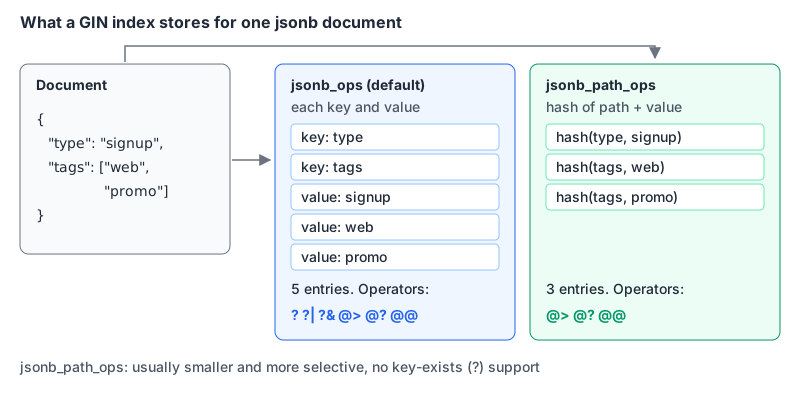
The catch with jsonb_path_ops: it produces no entries for empty structures like {"a": {}}, so searching for one needs a full index scan, which the manual describes as "quite slow." My default: jsonb_path_ops if every query uses @> or jsonpath, jsonb_ops if any query uses ?.
Two more options are often better than indexing the whole document:
-- GIN on just the sub-document you query
CREATE INDEX events_tags_gin ON events USING GIN ((payload->'tags'));

-- B-tree on one extracted scalar, for equality, ranges and sorting
CREATE INDEX events_type_idx ON events ((payload->>'type'));
The second needs the double parentheses that expression indexes require, and your query has to use the same expression (payload->>'type' = 'signup') for the planner to match it. Expression indexes cost something on every insert and non-HOT update, since the expression is computed per row. On a busy table, build any of these with CREATE INDEX CONCURRENTLY; our zero-downtime migrations guide covers the lock behaviour. Then confirm the index is used with EXPLAIN ANALYZE, the same loop as in Postgres performance tuning.
Turning JSON into rows
When you need JSON arrays as relational rows (for a report or a join), JSON_TABLE arrived in PostgreSQL 17 alongside JSON_EXISTS, JSON_QUERY and JSON_VALUE:
SELECT e.id, t.tag
FROM events e,
     JSON_TABLE(e.payload, '$.tags[*]' COLUMNS (tag text PATH '$')) AS t;
Worked out by hand for our data, that gives (1, web), (1, promo) and (2, mobile); event 3 has an empty array, so it contributes no rows. On Postgres 16 or older, jsonb_array_elements_text(payload->'tags') in a lateral join does the same job.
A practical aside: if you run these through our SQL formatter, choose the PostgreSQL dialect. In my test of the formatting library it uses (sql-formatter 15.8.0), the default Standard SQL mode stopped with a parse error at @>, while PostgreSQL mode formatted the same query cleanly.
When not to use JSONB
JSONB is great for data whose shape you don't control (third-party webhooks, per-tenant custom fields, feature payloads) and for attributes you read but rarely filter on. It's a poor fit when:
- You filter, join or sort on the key in most queries. A real column gets proper statistics, constraints and simpler indexes. Promote it, even if you keep the document too.
- Something else needs to reference it. A foreign key constraint is declared on columns, not on a path inside a document.
- Several writers update different keys at once. The manual is blunt: any update acquires a row-level lock on the whole row. Two workers bumping different counters in one document will queue behind each other.
- You need types enforced. Postgres will happily store
"price": "12,50". You can addCHECK (jsonb_typeof(payload->'price') = 'number'), but by the time you've written five of those you've reinvented columns.
The manual's design advice is the best test I know: each document should be an atomic datum that business rules dictate cannot reasonably be further subdivided. If parts of it change independently, they probably want their own columns or rows. And if the whole data model is documents, it's worth reading our MongoDB vs PostgreSQL comparison before committing to either.
Quick reference
| Task | Use |
|---|---|
| Get a value as text | ->>, #>> |
| Get a sub-document | ->, #> |
| "Contains this fragment" | @> with a GIN index |
| "Has this top-level key" | ? with jsonb_ops GIN |
| Conditional match | @? / @@ with jsonpath |
| One hot scalar key | B-tree expression index on (payload->>'key') |
| Update a nested value | subscripting or jsonb_set |
| JSON array to rows | JSON_TABLE (17+) or jsonb_array_elements |
Written by AIDToolStack Editorial
Researched from official documentation, specifications and vendor pages, listed under Sources below. Last checked November 2026.
Sources
Related Posts
Explore on AIDToolStack
Discover tools and servers featured in our directory.
AI Tools
MCP Servers
Sponsor Our Newsletter
Reach thousands of developers who are actively evaluating AI tools, MCP servers, and dev infrastructure. Our weekly newsletter goes to engaged technical decision-makers.
All sponsored content is clearly labeled per our editorial policy.