
Open-Source AI Coding Agents in Late 2026: What's Maintained, Licences and Local Models
Two well-known open-source coding agents are now effectively finished. Roo Code was shut down in May and its GitHub repository is archived. Continue's README says the repo "is no longer actively maintained and is read-only for all users." Meanwhile Aider, the long-running terminal pair programmer, hasn't tagged a release since August 2025. If you picked an open-source agent a year ago because you wanted something you could keep, that's an awkward lesson: open source protects the code, not the maintainers.
So this isn't a ranking. It's a status check of the open-source agents as of 7 November 2026, from their repositories and docs, plus the things that actually differ between them: licence, how you pay for the model, and how well they run against a model on your own hardware.
Status board
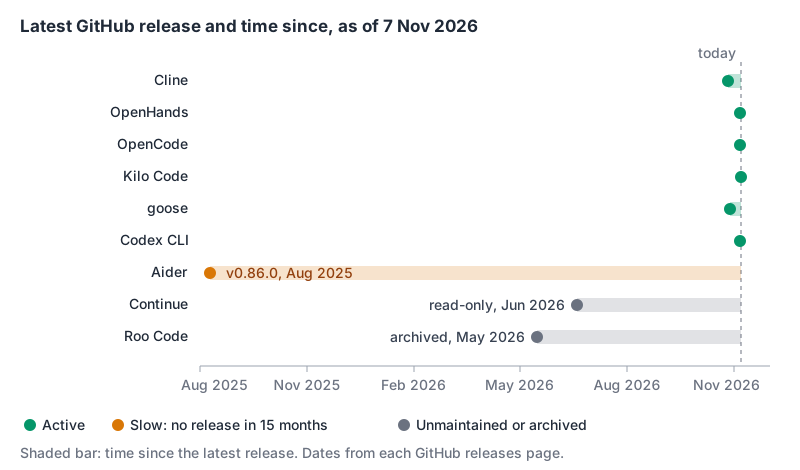
| Agent | Licence | Latest release (GitHub) | State |
|---|---|---|---|
| Cline | Apache-2.0 | v4.1.26, 26 Oct 2026 | Active |
| OpenHands | MIT | v1.37.0, 6 Nov 2026 | Active |
| OpenCode | MIT | v2.2.6, 6 Nov 2026 | Active |
| Kilo Code | MIT | v7.8.28, 7 Nov 2026 | Active |
| goose | Apache-2.0 | v1.57.0, 28 Oct 2026 | Active |
| OpenAI Codex CLI | Apache-2.0 | rust-v0.167.0, 6 Nov 2026 | Active |
| Aider | Apache-2.0 | v0.86.0, 9 Aug 2025 | Slow: last commit 22 May 2026 |
| Continue | Apache-2.0 | v2.1.0-vscode, 19 Jun 2026 | Unmaintained, read-only |
| Roo Code | Apache-2.0 | v3.54.0, 15 May 2026 | Archived |
Several of these have moved house, which breaks old links and install scripts. OpenHands now lives at OpenHands/OpenHands (the old All-Hands-AI path redirects). OpenCode moved from sst/opencode to anomalyco/opencode, and its README now installs it from npm as @opencode/cli. goose moved from Block's GitHub org to aaif-goose and describes itself as part of the Agentic AI Foundation at the Linux Foundation.
The active ones, briefly
Cline is now a family of clients: the extension, a CLI (npm i -g cline) with a headless mode for CI, a desktop app, a JetBrains plugin and an SDK. One catch hiding in its README: "Currently we are not open-sourcing JetBrains plugins." The VS Code extension, CLI and SDK are Apache-2.0; the JetBrains client isn't in the repo. Cline's Plan/Act split and per-action approvals are the main draw. Project rules go in .clinerules.
OpenHands has changed shape. The README now centres on Agent Canvas, which runs locally by default and can drive the OpenHands agent or third-party agents over the Agent Client Protocol, naming Claude Code, Codex, Gemini CLI, Pi and OpenCode. Agents can run in Docker, on VMs or on OpenHands' commercial cloud. It's the one to look at if you want to run many agents on a server rather than one in your editor.
OpenCode is a terminal agent that isn't tied to a model vendor. Its provider docs say it pulls its model catalogue from models.dev, auto-detects a local Ollama server on 127.0.0.1:11434 with no config, and supports LM Studio. It also lets you sign in with a ChatGPT Plus or Pro plan or a GitHub Copilot account instead of an API key, which matters if you already pay for one of those.
Kilo Code runs in VS Code, JetBrains and a CLI. Its pitch is an account with access to 500+ models billed at provider rates, so "no API keys required to start". Its MIT licence file carries a copyright line for opencode alongside Kilo Code, which is worth knowing if you're tracking where code comes from.
goose is broader than coding: desktop app, CLI and API, written in Rust, with 15+ providers including Ollama and the option to use existing Claude, ChatGPT or Gemini subscriptions through ACP.
Codex CLI belongs on this list too. The CLI itself is Apache-2.0 even though it's built to talk to OpenAI's models. Gemini CLI is also Apache-2.0, but Google moved individual users to Antigravity CLI in June 2026, and that announcement doesn't say whether Antigravity CLI is open source.
What happened to the others
Aider is still installable and still works. But the last tagged release is v0.86.0 from August 2025, the last commit on main is from May 2026, and the README's model advice still names Claude 3.7 Sonnet, o3-mini and GPT-4o. If you like that it commits every edit with a descriptive message, it's fine for now; just don't expect support for new model features. Our Aider vs Cline and Aider vs OpenHands comparisons cover how the workflows differ.
Continue shipped what its README calls a final 2.0.0 release that removed anonymous telemetry and pulled out authentication, then marked the repo read-only. The code is all still there under Apache-2.0, which is exactly the point of open source, but nobody is fixing it.
Roo Code is archived on GitHub with v3.54.0 as its last release, and its README now says plainly: "The Roo Code Extension was shut down on May 15th." It points users to two alternatives: ZooCode, a fork started by the Roo Code community, and Cline, which the README says is where Roo Code originated.
Bring your own key, or your own model
Every agent here lets you choose where inference happens. That's the real reason most people want an open-source agent: the agent is free, and you control the model bill and where your code goes.
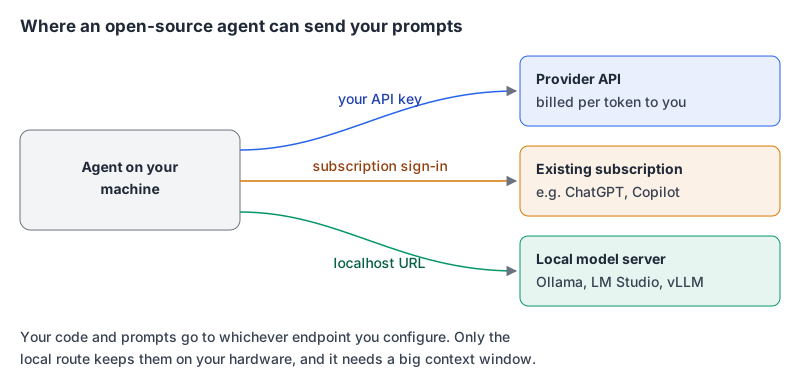
Running locally is where the docs get specific, and the recurring trap is the context window:
- Ollama's default is small. Aider's Ollama docs say Ollama "uses a 2k context window by default" and "silently discards context that exceeds the window." Aider works around it by sizing the window per request; other agents may not.
- OpenHands wants at least 22,000 tokens. Its local LLM docs say Ollama's default of 4,096 is too small for the system prompt and to set
OLLAMA_CONTEXT_LENGTHto 22000 or more (32768 recommended in LM Studio). They suggest Qwen3.6-35B-A3B as a first model, needing roughly 24 GB of VRAM or a 64 GB Apple Silicon Mac for quantised variants. - Tool calling is the weak point. The same OpenHands page warns that "some local models may struggle with reliable tool use," and that if the agent starts acting like a chatbot, try a different model. Cline's Ollama page recommends turning on its "Use Compact Prompt" setting for local models.
The two-line version of a local setup with Aider:
OLLAMA_CONTEXT_LENGTH=8192 ollama serve
aider --model ollama_chat/<model>
Our guide to running local LLMs for development covers Ollama, LM Studio, llama.cpp and vLLM in more depth. My honest take: a local model is great for privacy-sensitive repos and offline work, but agentic loops are where smaller models fail first. Expect to drop back to a hosted model for the hard tasks.
How I'd choose
| If you want... | Look at |
|---|---|
| An editor agent with approvals and checkpoints | Cline, Kilo Code |
| A terminal agent that works with any provider or subscription | OpenCode, goose |
| To run many agents on a server or in containers | OpenHands |
| Git-commit-per-change pairing, and you accept slow maintenance | Aider |
| OpenAI models with an open-source client | Codex CLI |
And a few checks before you standardise on any of them, given this year's churn:
- Look at the repo, not the marketing site: last release date, whether it's archived, whether the README carries a maintenance notice.
- Check that the parts you use are actually in the repo (Cline's JetBrains plugin isn't).
- Prefer agents that read
AGENTS.mdor let you point at it, so your instructions survive a switch. - Keep your provider keys in the provider's console, not baked into one agent's account system, so moving is a config change.
If the choice is really between open source and a commercial agent, Claude Code vs Cline and Aider vs Claude Code are the comparisons to read next.
Written by AIDToolStack Editorial
Researched from official documentation, specifications and vendor pages, listed under Sources below. Last checked November 2026.
Sources
- github.com/cline/cline
- github.com/OpenHands/OpenHands
- github.com/anomalyco/opencode
- github.com/Kilo-Org/kilocode
- github.com/aaif-goose/goose
- github.com/openai/codex
- github.com/Aider-AI/aider
- github.com/continuedev/continue
- github.com/RooCodeInc/Roo-Code
- opencode.ai/docs/providers/
- aider.chat/docs/llms/ollama.html
- aider.chat/docs/git.html
- docs.openhands.dev/openhands/usage/llms/local-llms
- docs.cline.bot/provider-config/ollama
- developers.googleblog.com/an-important-update-transitioning-gemini-cli-to-antigravity-cli/
Related Posts
Explore on AIDToolStack
Discover tools and servers featured in our directory.
AI Tools
MCP Servers
Sponsor Our Newsletter
Reach thousands of developers who are actively evaluating AI tools, MCP servers, and dev infrastructure. Our weekly newsletter goes to engaged technical decision-makers.
All sponsored content is clearly labeled per our editorial policy.