
Open Graph and Twitter Card Tags: What Each Platform Reads, Image Sizes and Cache Busting
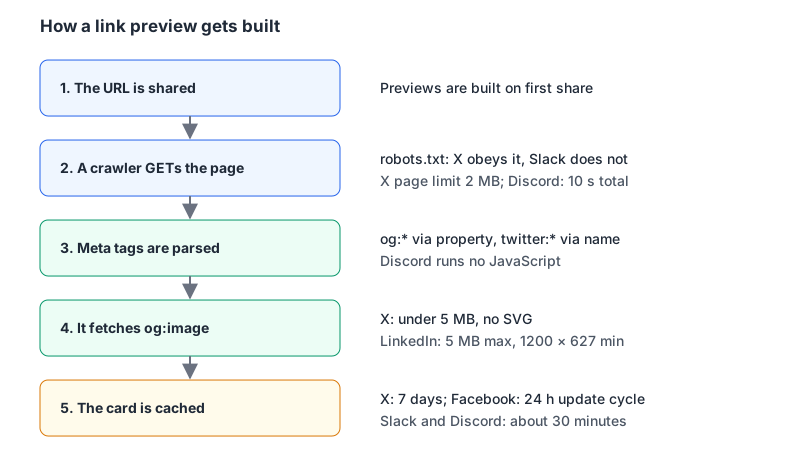
You ship a blog post, someone drops the link into Slack, and the preview shows your homepage title with a stretched logo. Or no image at all. Or the image from last week's draft, which you've since replaced. None of that is decided by the chat app's mood. Each platform sends a crawler to your URL, reads a handful of meta tags from the HTML it gets back, fetches one image and caches the result. Get those tags right in the server-rendered HTML and most previews take care of themselves.
This post covers which tags each platform documents, the image sizes they actually state (not the numbers that float around design blogs), and how to force a refresh when a card is stale. Everything here comes from the platforms' own documentation as of November 2026.
The tag set I'd put on every page
The Open Graph protocol defines four required properties: og:title, og:type, og:image and og:url. It recommends og:description and og:site_name, and for images it adds structured properties (og:image:width, og:image:height, og:image:type, og:image:alt). On top of that you want exactly one X-specific tag:
<head>
  <title>Rotating API Keys Without Downtime | Example Blog</title>
  <meta name="description" content="A two-key overlap pattern for rotating API keys safely." />
  <link rel="canonical" href="https://example.com/blog/rotating-api-keys" />

  <meta property="og:type" content="article" />
  <meta property="og:url" content="https://example.com/blog/rotating-api-keys" />
  <meta property="og:title" content="Rotating API Keys Without Downtime" />
  <meta property="og:description" content="A two-key overlap pattern for rotating API keys safely." />
  <meta property="og:site_name" content="Example Blog" />
  <meta property="og:image" content="https://example.com/og/rotating-api-keys.png" />
  <meta property="og:image:width" content="1200" />
  <meta property="og:image:height" content="630" />
  <meta property="og:image:alt" content="Diagram of two API keys overlapping during rotation" />
  <meta property="article:published_time" content="2026-11-07T09:00:00Z" />

  <meta name="twitter:card" content="summary_large_image" />
  <meta name="twitter:site" content="@example" />
</head>
Why so few twitter: tags? X's card markup reference documents an Open Graph fallback for most of them: twitter:title falls back to og:title, twitter:description to og:description, twitter:image to og:image and twitter:image:alt to og:image:alt (archived X cards markup reference). twitter:card has no real equivalent, and X says that without it, a page with og:type, og:title and og:description "may" get a plain summary card. If you want the big image, say so.
Note the attribute split. Open Graph uses property and content; X's tags use name. X's getting-started guide calls this out and also says the prefix="og: ..." attribute that ogp.me shows on <html> isn't needed for X cards (archived X getting started guide). Discord reads the key from name if present, otherwise from property (Discord link preview docs), so it doesn't care.
Facebook's webmaster guide adds two details worth following: og:url should be the "undecorated URL, without session variables, user identifying parameters, or counters", and og:title shouldn't carry branding like your site name. That's what og:site_name is for.
Image sizes, per each platform's own docs
This is where most advice goes wrong, because the numbers get copied between blogs without anyone checking the source. Here is what the platforms publish themselves.
| Platform | What its docs state |
|---|---|
X, summary_large_image | 2:1 ratio, minimum 300 × 157, maximum 4096 × 4096, under 5 MB. JPG, PNG, WEBP, GIF (first frame only). SVG not supported. |
X, summary | 1:1 ratio, minimum 144 × 144, maximum 4096 × 4096, cropped to a square on all platforms. |
| Minimum 1200 × 627, ratio 1.91:1, maximum 5 MB. Images under 401 px wide show as a thumbnail. | |
| "At least 1080 pixels in width" for high-resolution devices. Declare width and height so the image renders on first share. | |
| Discord | PNG, GIF, JPG, JPEG, WEBP, AVIF. Its example uses 1200 × 630. Without declared dimensions it downloads the image to measure it. |
| Slack | No image requirements in its crawler docs. |
Sources: X summary large image card (archived), X summary card (archived), LinkedIn help, Facebook sharing best practices, Discord, Slack robots page.
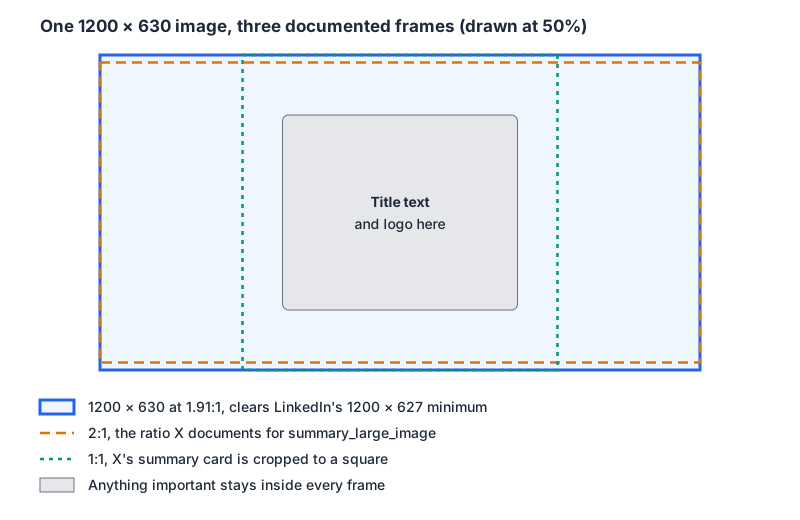
A 1200 × 630 PNG or JPEG clears every published minimum above. It isn't exactly 2:1, so on X expect the top and bottom edges to be at risk, and if you ever fall back to a summary card the image is cropped to a square. The practical rule: put the title and logo in the centre and treat the edges as decoration.
X and LinkedIn both cap images at 5 MB. Our Image Compressor re-encodes to JPEG or WebP in the browser, which is usually enough to get a screenshot-heavy card down to a few hundred kilobytes. Keep PNG or JPEG for the tag itself if you care about older consumers, since WebP and AVIF support isn't listed by every platform.
Gotchas that produce blank or wrong cards
- Tags added by client-side JavaScript. Discord's docs are blunt: "No code is executed, so tags added by a client-side script after load are never seen." Treat every crawler that way. If your SPA sets meta tags in
useEffect, previews will show whatever the initial HTML had. In Next.js the Metadata API renders them on the server; our Next.js SEO write-up covers the merge rules. - Relative image URLs. Discord accepts relative URLs only if they start with
/. Other platforms don't document relative handling at all, so use absolutehttps://URLs and stop thinking about it. - Several
og:imagetags. The Open Graph spec says the first one wins in conflicts and that structured properties likeog:image:widthattach to the image tag above them. Discord, on the other hand, turns two or moreog:imagetags into a gallery of up to four. Unless you want that, emit one. - Text over the limits. X caps
twitter:titleat 70 characters andtwitter:descriptionat 200. Discord trims titles at 70 bytes and descriptions at 350 bytes, and drops the whole preview ifog:site_nameexceeds 256 characters or alt text exceeds 4,096. Note bytes: a title full of non-ASCII characters hits Discord's limit sooner. - Huge HTML. X's troubleshooting page says its crawler has a 2 MB limit for page responses (archived troubleshooting guide). Discord allows up to 50 MB but wants the whole fetch, images included, done in 10 seconds and no more than 5 redirects.
- robots.txt. X's crawler follows robots.txt: a blocked page gets no card and a blocked image gets no thumbnail. Its user agent is
Twitterbot. Slack's page says plainly that it does not currently honour robots.txt. So "it works in Slack but not on X" often means aDisallowrule. - Staging behind auth. None of these crawlers can log in. X's troubleshooting page suggests exposing a test environment on a reachable port if you need to check cards before launch.
- Unescaped quotes. A title like
The "right" wayinsidecontent="..."ends the attribute early. Escape it as"; the HTML Entity Encoder does that if you're templating by hand.
Discord also reads <meta name="theme-color"> for the accent bar on the left of the embed, but only as #RRGGBB or #RRGGBBAA. Named colours and rgb() are ignored.
Debugging: see what the crawler sees, then bust the cache
Start with curl. Facebook's guide says its crawler identifies as facebookexternalhit/1.1, so you can request the page the way it does:
curl -s -A "facebookexternalhit/1.1" https://example.com/blog/rotating-api-keys \
  | grep -Eo '<meta[^>]+(og:|twitter:)[^>]+>'
If the output is empty, the tags aren't in your server HTML, or a bot filter on your CDN is serving that user agent something else. Try -A "Twitterbot/1.0" too. Then check the image URL itself returns a 200 with an image content type, not a redirect to a login page.
Once the HTML is right, the remaining problem is usually caching:
- Facebook caches images by URL and says they "won't be updated unless the URL changes". Its Sharing Debugger triggers a fresh scrape; the best-practices page describes a standard 24-hour update period otherwise.
- X caches card content for 7 days after a link is posted. As of November 2026 the old Card Validator address (
cards-dev.x.com/validator) redirects to an X login page, so plan on new image URLs rather than manual refreshes. - LinkedIn has a Post Inspector for checking a URL.
- Discord caches for about 30 minutes and suggests resharing with a new query string such as
?v=2. Its Embed Debugger shows which tags it picked up and which layout it chose. - Slack caches unfurls "globally across the service for around 30 minutes".
The pattern that avoids most of this: put a content hash or version in the image filename (/og/rotating-api-keys.3f9a.png). A changed image then has a new URL, and every cache treats it as new.
For a quick offline check before deploying, paste your <head> into our SEO Meta Analyzer. It flags a missing og:title, og:description or og:image alongside title and description length. The Twitter Card Validator checks the card type, the 70 and 200 character limits and that the image URL is absolute. Neither fetches your live page, so they won't catch a robots.txt block or a CDN serving bots different HTML; curl will.
A note on X's documentation
While researching this, X's cards documentation turned out to be gone from its current developer site. The old developer.x.com cards URLs now redirect to the general docs overview at docs.x.com, and the docs index has no cards section. The tag reference above is from archived copies of X's own pages taken in early 2026. Cards still render on X, and the tags haven't changed, but if X publishes new card docs, trust those over this post.
Pre-publish checklist
og:title,og:type,og:url,og:imageandog:descriptionare in the server-rendered HTML, withproperty=.og:urlmatches your canonical URL, without tracking parameters.og:imageis an absolute HTTPS URL to a PNG or JPEG of 1200 × 630, under 5 MB, withog:image:width,og:image:heightandog:image:alt.- The important part of the image sits in the centre third.
twitter:cardis set tosummary_large_image.- Titles are under 70 characters, descriptions under 200.
- robots.txt doesn't block
Twitterbotfrom the page or the image path. curl -A "facebookexternalhit/1.1"shows the tags.- Image filenames change when the image changes.
Written by AIDToolStack Editorial
Researched from official documentation, specifications and vendor pages, listed under Sources below. Last checked November 2026.
Sources
- ogp.me/
- web.archive.org/web/20260201012312/https://developer.x.com/en/docs/x-for-websites/cards/overview/markup
- web.archive.org/web/20260204074639/https://developer.x.com/en/docs/x-for-websites/cards/overview/summary-card-with-large-image
- web.archive.org/web/20260128060618/https://developer.x.com/en/docs/x-for-websites/cards/overview/summary
- web.archive.org/web/20260206065645/https://developer.x.com/en/docs/x-for-websites/cards/guides/getting-started
- web.archive.org/web/20260124210156/https://developer.x.com/en/docs/x-for-websites/cards/guides/troubleshooting-cards
- docs.x.com/llms.txt
- developers.facebook.com/docs/sharing/webmasters
- developers.facebook.com/docs/sharing/best-practices
- developers.facebook.com/tools/debug/
- www.linkedin.com/help/linkedin/answer/a521928
- www.linkedin.com/post-inspector/
- docs.discord.com/developers/link-previews/overview
- discord.com/developers/embeds
- api.slack.com/robots
Related Posts
Explore on AIDToolStack
Discover tools and servers featured in our directory.
AI Tools
MCP Servers
Sponsor Our Newsletter
Reach thousands of developers who are actively evaluating AI tools, MCP servers, and dev infrastructure. Our weekly newsletter goes to engaged technical decision-makers.
All sponsored content is clearly labeled per our editorial policy.