
npm Supply-Chain Attacks: What Happened in 2025-2026 and the Defenses That Work
On 2 April 2026, two days after the compromise, the axios maintainers published a postmortem with a one-liner every JavaScript team should have run that week:
grep -E "axios@(1\.14\.1|0\.30\.4)|plain-crypto-js" package-lock.json yarn.lock 2>/dev/nullAccording to Jason Saayman's postmortem, two malicious axios versions went out through his compromised account and stayed live for about three hours. Neither touched axios's own code. Each added a new dependency, [email protected], whose postinstall hook ran node setup.js and dropped a remote access trojan, as Datadog Security Labs documented. If your CI ran a fresh npm install in that window, the trojan ran with whatever secrets the job had.
That's the shape of most npm incidents now. Nobody needs a bug in your code. They need one publish.
Four incidents, four different doors
The useful thing about these incidents is that each one got in a different way, so each one tests a different defense. All four have primary write-ups.
| Incident | When | How the attacker got publish rights | What ran on victims | Source |
|---|---|---|---|---|
| Nx "s1ngularity" | Aug 2025 | A pull_request_target workflow ran untrusted PR input | Install-time credential hunting | Nx postmortem |
| Shai-Hulud | Sep 2025 | Compromised maintainer accounts, then self-propagation with stolen credentials | Credential scanner that republished the victim's own packages | CISA alert |
| axios | Mar 2026 | Social engineering and a RAT on the lead maintainer's PC | postinstall in an injected dependency | axios postmortem |
| TanStack | May 2026 | CI cache poisoning plus an OIDC token read from runner memory | ~2.3 MB obfuscated script run during install | TanStack postmortem |
A few details matter more than the headlines. CISA counted over 500 packages hit by Shai-Hulud, which spread by using each victim's npm credentials to publish poisoned versions of their other packages. TanStack's attacker pushed 84 malicious versions across 42 @tanstack/* packages in six minutes, and the postmortem is blunt that "No npm tokens were stolen": the publish was authenticated through the project's own trusted-publisher binding. And in both axios and TanStack, detection came from outsiders. TanStack writes that it learned of the compromise "from a third party."
We've covered the Nx workflow mistake in depth in running AI coding agents in GitHub Actions, so I won't repeat it here.
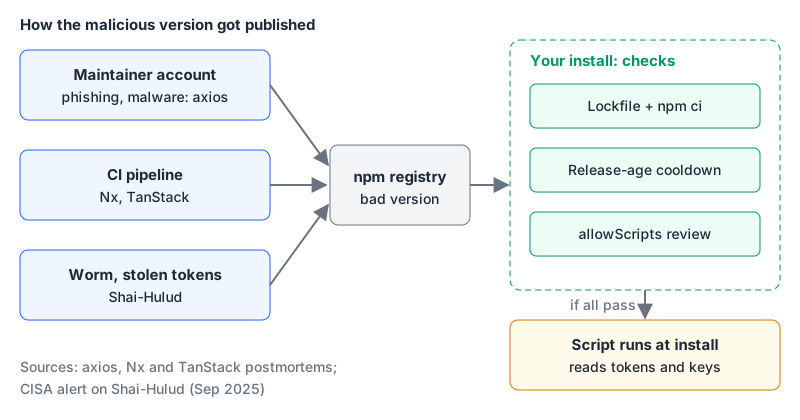
The common thread: the malicious code executed at install time, before anyone imported anything. So the cheapest defenses are the ones that stop or delay install-time code.
If you consume packages: the npm 12 defaults help
npm 12.0.0 shipped on 8 July 2026, and its release notes contain the line that matters most for this post: "Dependency lifecycle scripts are now blocked by default unless allowed by the root package's allowScripts policy." As of November 2026 the current release is 12.2.2. If you're on an npm 11 that came bundled with Node, none of this applies until you upgrade npm itself.
Here's how the new install flow decides whether a dependency's preinstall, install or postinstall runs:
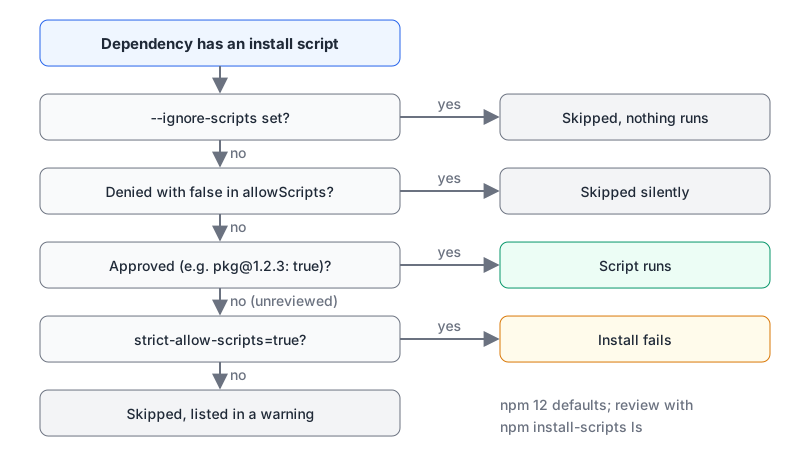
After an install, npm lists the packages whose scripts it skipped. You review them and record decisions with the install-scripts command:
npm install-scripts ls                 # what still needs a decision (read-only)
npm install-scripts approve canvas sharp    # pinned to the installed versions
npm install-scripts deny telemetry-pkg      # explicit false, survives "approve --all"
npm rebuild                            # run the scripts you just approved
Approvals are written to allowScripts in package.json and pinned to the exact version you reviewed by default, so a new release of an approved package has to be reviewed again. Commit that field. npm approve-scripts and npm deny-scripts are aliases, which is why GitHub's pre-release changelog uses those names.
For CI I'd also turn warnings into failures, so a new unreviewed script breaks the build instead of being silently skipped:
# .npmrc (committed)
strict-allow-scripts=true
min-release-age=7
min-release-age-exclude[]=@myorg/*
strict-allow-scripts makes any unreviewed install script fail the install. min-release-age only installs versions published more than the given number of days ago, and the exclude list lets your own scoped packages update immediately (the example is straight from npm's config definitions). A seven-day cooldown would have skipped both the axios and TanStack versions: axios's were gone in about three hours and TanStack's tarballs were removed the same evening. The trade-off is that urgent security fixes also wait, and npm warns and exits non-zero when the window blocks an npm audit fix.
Two other npm 12 defaults close side doors. allow-git and allow-remote now default to none, so a transitive dependency can't pull from a git repo or an arbitrary tarball URL unless you opt in. And --ignore-scripts still exists and still overrides everything, which is the right setting for jobs that only lint or test pure-JS code.
The parts that haven't changed
- Commit the lockfile and use
npm ciin CI.npm cierrors if the lockfile andpackage.jsondisagree and never writes to either, so CI installs exactly what you reviewed. npm 12 also droppednpm-shrinkwrap.jsonentirely; rename it topackage-lock.jsonif you still have one. - Verify signatures.
npm audit signatureschecks registry signatures and provenance attestations for everything installed. The npm docs note this "often means updating npm beyond the version that ships with Node.js." - Keep the blast radius small. Install-time malware steals what the process can read. Don't give the install step deploy keys or cloud credentials it doesn't need; split install and deploy into separate jobs.
pnpm users
pnpm got there earlier. Its dependency-resolution settings default minimumReleaseAge to 1440 minutes (one day) and blockExoticSubdeps to true, so only your direct dependencies may come from git or tarball URLs. The setting I'd add is trustPolicy: no-downgrade, which fails the install when a package's trust level drops compared with earlier releases. That is exactly the axios signal: Datadog notes that axios 1.14.0 was published through trusted publishing and for 1.14.1 "the trustedPublisher field is absent." Our pnpm vs npm and Yarn comparison covers the rest of the differences.
If you publish packages: no long-lived tokens
npm's account side changed a lot after Shai-Hulud. GitHub announced the plan on 22 September 2025, and the 9 December 2025 changelog made it real: all classic tokens were permanently revoked, npm login now gives a two-hour session, and granular write tokens are capped at 90 days.
The better answer is to have no token at all. Trusted publishing lets GitHub Actions, GitLab CI/CD or CircleCI publish with a short-lived OIDC credential. It needs npm 11.5.1+ and Node 22.14.0+, and only works on cloud-hosted runners:
name: Publish
on:
  push:
    tags: ['v*']
permissions:
  id-token: write   # required for OIDC
  contents: read
jobs:
  publish:
    runs-on: ubuntu-latest
    steps:
      - uses: actions/checkout@<full-commit-sha>
      - uses: actions/setup-node@<full-commit-sha>
        with:
          node-version: 24
          registry-url: https://registry.npmjs.org
      - run: npm install -g [email protected]   # stage publish needs 11.15.0+
      - run: npm ci
      - run: npm test
      - run: npm stage publish
Publishing this way from GitHub Actions or GitLab also generates a provenance attestation automatically for public packages from public repos. Be clear about what that proves. Provenance links a version to the repo and build that produced it. npm's docs say it does not guarantee the package is free of malicious code. TanStack's malicious versions came out of the real pipeline.
That's why the last line says npm stage publish rather than npm publish. Staged publishing went generally available in May 2026 for npm 11.15.0 and later: CI uploads to a queue, and nothing is installable until a maintainer approves it with a 2FA challenge. Since October 2026 it works for a package's first version too. It directly answers the gap TanStack's postmortem calls out, the lack of per-publish review in OIDC publishing. Once trusted publishing works, npm's docs recommend setting the package to "Require two-factor authentication and disallow tokens."
Also pin third-party actions to commit SHAs and audit any pull_request_target workflow: both the Nx and TanStack compromises started with one. Our GitHub Actions CI/CD patterns post has the permission and pinning basics.
If a bad version already ran
Assume the machine is compromised, not just the project. Combining the axios postmortem with CISA's Shai-Hulud alert:
- Find it: grep lockfiles (including nested ones) and any artifact caches for the affected versions.
- Pin back to the last known-good version and delete the malicious package from
node_modules. - Rotate every credential that machine or CI job could read: npm, GitHub, cloud keys, and secrets injected into the build.
- Check outbound network logs for the indicators in the advisory.
- Audit GitHub: unexpected public repos (Shai-Hulud pushed stolen secrets to one), webhooks, GitHub Apps and OAuth apps.
A short checklist
- [ ] Lockfile committed; CI uses
npm ci. - [ ] npm 12 or later everywhere, with
allowScriptsreviewed and committed andstrict-allow-scripts=truein CI. - [ ] A release-age cooldown (
min-release-ageor pnpm'sminimumReleaseAge) with an exclude list for your own scope. - [ ]
npm audit signaturesin CI. - [ ] Install jobs don't hold deploy credentials.
- [ ] Publishing via trusted publishing plus
npm stage publish, tokens disallowed on the package. - [ ] Dependency update PRs reviewed, not auto-merged: our post on Dependabot and Renovate covers cooldowns there, and the Dependabot config generator writes the YAML.
Written by AIDToolStack Editorial
Researched from official documentation, specifications and vendor pages, listed under Sources below. Last checked November 2026.
Sources
- github.com/axios/axios/issues/10636
- securitylabs.datadoghq.com/articles/axios-npm-supply-chain-compromise/
- nx.dev/blog/s1ngularity-postmortem
- www.cisa.gov/news-events/alerts/2025/09/23/widespread-supply-chain-compromise-impacting-npm-ecosystem
- tanstack.com/blog/npm-supply-chain-compromise-postmortem
- github.com/npm/cli/releases/tag/v12.0.0
- github.com/npm/cli/blob/v12.2.2/docs/lib/content/commands/npm-install-scripts.md
- github.blog/changelog/2026-06-24-upcoming-breaking-changes-for-npm-v12/
- github.com/npm/cli/blob/v12.2.2/workspaces/config/lib/definitions/definitions.js
- github.com/npm/cli/blob/v12.2.2/docs/lib/content/commands/npm-ci.md
- github.com/npm/cli/blob/v12.2.2/docs/lib/content/commands/npm-audit.md
- pnpm.io/settings/dependency-resolution
- github.blog/security/supply-chain-security/our-plan-for-a-more-secure-npm-supply-chain/
- github.blog/changelog/2025-12-09-npm-classic-tokens-revoked-session-based-auth-and-cli-token-management-now-available/
- docs.npmjs.com/trusted-publishers
- docs.npmjs.com/generating-provenance-statements
- github.blog/changelog/2026-05-29-staged-publishing-and-new-install-time-controls-for-npm/
- github.blog/changelog/2026-10-02-npm-staged-publishing-now-supports-creating-new-packages
- github.com/npm/cli/releases
- github.com/npm/cli/blob/v12.2.2/docs/lib/content/commands/npm-approve-scripts.md
Related Posts
Explore on AIDToolStack
Discover tools and servers featured in our directory.
AI Tools
MCP Servers
Sponsor Our Newsletter
Reach thousands of developers who are actively evaluating AI tools, MCP servers, and dev infrastructure. Our weekly newsletter goes to engaged technical decision-makers.
All sponsored content is clearly labeled per our editorial policy.