
nginx Redirects and Rewrites: return, rewrite, map and try_files
You're moving /blog/ to /articles/, forcing HTTPS, and picking one hostname. Search for "nginx redirect" and you'll find a dozen snippets, most built on rewrite with regexes like ^(.*)$. They usually work. They're also harder to read than they need to be, and a few of them quietly drop query strings, send 302s you meant to be permanent, or loop.
Most redirects in nginx need return, not rewrite. This post covers when each one fits, how map handles long lists of old URLs, and the defaults that bite. Versions as of November 2026: the nginx download page lists 1.30.6 as stable and 1.31.8 as mainline.
How nginx processes a request
Redirect directives come from the rewrite module, and the order they run in explains most surprises. nginx first picks a server block from the listen address and the Host header (falling back to the default server for that port, per the request processing docs). Rewrite-module directives at the server level run in order. Then nginx picks a location and runs that location's directives. If a rewrite changed the URI, the location search repeats, "but not more than 10 times". After that you get a 500.
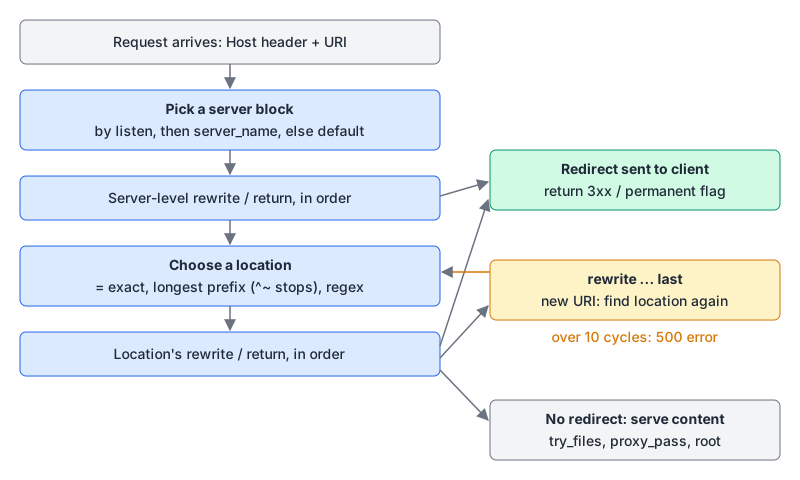
Location selection isn't top-to-bottom either. The core module docs describe it: an exact = match wins immediately; otherwise nginx remembers the longest matching prefix, skips regexes if that prefix has ^~, and else tries regex locations in the order they appear, using the first match. If you're unsure which block will catch a URL, our nginx location tester walks a URI through those steps against your location lines.
return: the default for redirects
return code URL; stops processing and sends the response. Codes 301, 302, 303, 307 and 308 take a URL; the docs note that 308 wasn't treated as a redirect until nginx 1.13.0, which is ancient history now. Here's the usual canonical setup, sending everything to https://www.example.com:
server {
    listen 80;
    listen [::]:80;
    server_name example.com www.example.com;
    return 301 https://www.example.com$request_uri;
}

server {
    listen 443 ssl;
    listen [::]:443 ssl;
    http2 on;
    server_name example.com;
    ssl_certificate     /etc/ssl/example.com/fullchain.pem;
    ssl_certificate_key /etc/ssl/example.com/privkey.pem;
    return 301 https://www.example.com$request_uri;
}

server {
    listen 443 ssl;
    listen [::]:443 ssl;
    http2 on;
    server_name www.example.com;
    # certificates and the real site config
}
A few choices in there are deliberate:
$request_uriis the "full original request URI (with arguments)", so paths and query strings survive the hop.- The hostname is written out instead of using
$host.$hostcomes from the request line or theHostheader, so a catch-all server that redirects tohttps://$hostwill happily redirect to whatever name the client sent. Hard-coding also letshttp://example.comgo straight to the final URL in one hop instead of two. http2 on;is its own directive since 1.25.1. The 1.25.1 changelog says thehttp2parameter onlisten"is now deprecated", so older snippets withlisten 443 ssl http2;are using the retired form.
Once HTTPS is the only way in, add HSTS; the security headers guide covers the Strict-Transport-Security settings.
Moving single pages and sections
For one URL, use an exact location:
location = /pricing-old {
    return 301 /pricing;
}
A relative URL like /pricing is fine. nginx turns it into a full URL using $scheme and the server_name_in_redirect and port_in_redirect settings. Keep that in mind behind a load balancer that terminates TLS: nginx sees plain HTTP, so $scheme is http. Either write the full https:// URL or set absolute_redirect off;, which makes nginx send relative redirects.
For a whole section, capture the rest of the path in a regex location:
location ~ ^/blog/(.*)$ {
    return 301 /articles/$1$is_args$args;
}
Note the $is_args$args. return sends exactly the URL you wrote, so without it /blog/x?page=2 loses its query string. $is_args is "?" when the request has arguments and empty otherwise, which avoids a dangling question mark.
rewrite: for internal changes, mostly
rewrite regex replacement [flag]; changes the URI. If the replacement starts with http://, https:// or $scheme, nginx stops and sends a redirect. Otherwise it's an internal rewrite and the flag decides what happens next:
| Flag | What it does (from the docs) |
|---|---|
last | Stops the current rewrite directives and searches for a new location with the changed URI |
break | Stops the current rewrite directives and stays in this location |
redirect | Returns a 302 |
permanent | Returns a 301 |
The section move above as a rewrite would be:
rewrite ^/blog/(.*)$ /articles/$1 permanent;That's one line, and rewrite appends the original query string automatically. The docs say that if the replacement adds its own arguments, the old ones go after them, and ending the replacement with ? stops that. Two traps: permanent only gives you 301, so use return 308 if you need method preservation; and regexes containing } or ; must be quoted.
Where rewrite really earns its place is internal mapping. The docs' own example lives inside a location and uses break:
location /download/ {
    rewrite ^(/download/.*)/media/(.*)\..*$ $1/mp3/$2.mp3 break;
    rewrite ^(/download/.*)/audio/(.*)\..*$ $1/mp3/$2.ra  break;
    return  403;
}
With last instead of break there, the docs warn that nginx "will make 10 cycles and return the 500 error", because the rewritten URI matches the same location again.
map: hundreds of redirects without hundreds of locations
After a site migration you often have a spreadsheet of old-to-new URLs. Don't turn that into hundreds of location blocks. The map module builds a lookup table in the http context:
map $uri $redirect_to {
    default                          "";
    /old-pricing                     /pricing;
    /docs/v1/                        /docs/;
    ~^/blog/(?<slug>[^/]+)/?$        /articles/$slug;
}

server {
    # ...
    if ($redirect_to) {
        return 301 $redirect_to;
    }
}
The if condition is false when the variable is empty or "0", so unmatched URLs fall through to normal processing. Some details from the docs that matter here:
- Plain strings are matched ignoring case.
/Old-Pricinghits the same entry. Use a~regex if case matters. - Exact strings win over regexes, and regexes are tried in the order they appear, before falling back to
default. - Regexes can capture into named or numbered variables you use in the value, as
$slugdoes. - Maps are lazy. Variables "are evaluated only when they are used", so a big map costs nothing on requests that never read it. The table size is governed by
map_hash_max_size(default 2048) andmap_hash_bucket_size.
$uri is the current, normalized URI; the query string lives separately in $args. Since return doesn't append it, add $is_args$args to the value if old links carried meaningful query strings.
try_files isn't a redirect
Single-page apps need every unknown path to serve index.html. That's try_files, which checks files in order and, if none exists, makes an internal redirect to the last parameter:
location / {
    try_files $uri $uri/ /index.html;
}
The browser's URL doesn't change and no 3xx is sent. If you want a real 404 for missing files instead, end with =404.
Gotchas worth knowing
- Automatic trailing-slash 301s. If a prefix location ends in
/and usesproxy_pass(or fastcgi, uwsgi, scgi, memcached or grpc), a request for the same path without the slash gets a 301 to the slashed version. Add alocation = /pathblock if you don't want that. - Browsers cache 301s. RFC 9110 says a 301 "is heuristically cacheable", so a wrong permanent redirect can stick in browsers after you fix it. Test new rules with 302, then switch.
- 301 can turn POST into GET. The same RFC allows that "for historical reasons" and points to 308 instead. For API paths, use 308 or 307; the HTTP status codes post explains the method-change rules.
- Search engines treat 301 and 308 the same. Google's redirect docs list both as permanent and as a canonical signal; 302, 303 and 307 are temporary.
merge_slashesis on by default, collapsing//in URIs before matching. The docs advise against turning it off for security reasons.
Testing a change
sudo nginx -t                 # syntax and config check
sudo nginx -s reload          # old workers finish their current requests
curl -sI http://example.com/blog/hello?page=2
curl -sIL http://example.com/blog/hello?page=2   # follow the whole chain
Read the Location header in each response and count the hops. To see what the rewrite module is doing, set rewrite_log on; together with an error_log at the notice level; the processing results are logged there. Paste a curl -sI response into the HTTP header parser if you want it broken down field by field.
Checklist
- Use
returnfor redirects,rewritefor internal URI changes,try_filesfor fallbacks. - Use
$request_urifor whole-site redirects; add$is_args$argswhenreturnbuilds a new path. - Hard-code the canonical hostname instead of redirecting to
$host. - Use 308 or 307 where non-GET requests might hit the old URL.
- Use
mapfor long redirect lists, and remember string keys ignore case. - Test with 302 first, check with
curl -sIL, then make it permanent.
Written by AIDToolStack Editorial
Researched from official documentation, specifications and vendor pages, listed under Sources below. Last checked November 2026.
Sources
- nginx.org/en/download.html
- nginx.org/en/docs/http/ngx_http_rewrite_module.html
- nginx.org/en/docs/http/ngx_http_core_module.html
- nginx.org/en/docs/http/ngx_http_map_module.html
- nginx.org/en/docs/http/ngx_http_v2_module.html
- nginx.org/en/docs/http/request_processing.html
- nginx.org/en/docs/beginners_guide.html
- nginx.org/en/CHANGES-1.26
- www.rfc-editor.org/rfc/rfc9110.html
- developers.google.com/search/docs/crawling-indexing/301-redirects
Related Posts
Explore on AIDToolStack
Discover tools and servers featured in our directory.
AI Tools
MCP Servers
Sponsor Our Newsletter
Reach thousands of developers who are actively evaluating AI tools, MCP servers, and dev infrastructure. Our weekly newsletter goes to engaged technical decision-makers.
All sponsored content is clearly labeled per our editorial policy.