
MongoDB Schema Design Patterns: Embed vs Reference, Bucket, Outlier, Subset and Versioning
A product page that loads in one query is the reason most people pick MongoDB. A product document that has quietly grown to 40,000 embedded reviews is the reason some of them regret it. Both come from the same decision: what goes inside a document and what lives next to it.
MongoDB's own manual is fairly prescriptive about this. As of November 2026 the current manual is for MongoDB 9.0 (9.0.0 shipped on 28 September 2026, and 9.0.4 on 13 October), and it now has a dedicated schema design patterns section plus a list of anti-patterns. This post walks through the decision rules, the patterns worth knowing, and the few hard limits that end arguments quickly.
I didn't run these snippets against a live server; the shell examples are taken from or modelled on the MongoDB docs pages linked next to them.
The limits that frame everything
Three numbers from the limits page are worth memorising:
- 16 mebibytes per BSON document. Bigger than that and you need GridFS, which is for files, not for your order history.
- 100 levels of nesting. Each object or array adds one.
- 64 indexes per collection. Polymorphic collections and versioned schemas eat into this faster than you'd think.
And one guarantee: a write is atomic on a single document, so "even if an update operation affects several sub-documents, either all of those sub-documents are updated, or the operation fails entirely" (best practices). Multi-document transactions exist, but the same page says they usually cost more than single-document writes and "should not be a replacement for effective schema design." Transactions also have a default lifetime limit of 60 seconds.
That atomicity is the real argument for embedding. If an order and its line items must change together, putting them in one document gets you consistency without a transaction.
Embed or reference: the manual's rules
The best practices page gives two lists. Paraphrased, embed when the data has a "has-a" or "contains" relationship, is queried together, is updated together, or is archived together. Reference when the child side has high cardinality, the embedded data "grows without bounds", the pieces are written at different times in a write-heavy workload, or the child can exist without the parent.
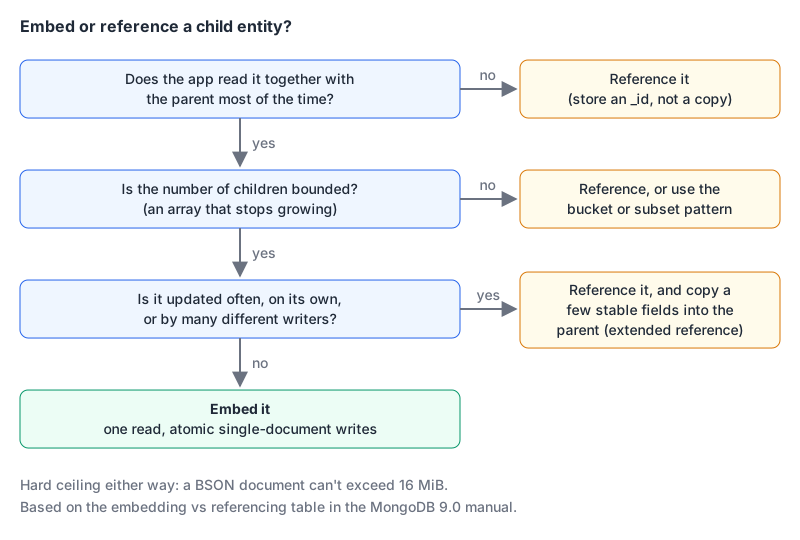
The middle question is where most real schemas go wrong. An array that grows with user activity (comments, events, followers, purchase history) is unbounded even if it's small in your test data. MongoDB lists "Avoid Unbounded Arrays" first among its schema design anti-patterns, because such an array can hit the document size limit and degrade index performance. The other four on that list are worth a glance before you ship: too many collections, unnecessary indexes, bloated documents, and too many $lookup stages.
If you're coming from SQL, the instinct is to normalise everything and $lookup your way back. That works, but it gives up the main thing MongoDB is good at. Our MongoDB vs PostgreSQL comparison is the place to decide if you want documents at all; if your data is mostly relational with a few flexible fields, Postgres JSONB may be the better home.
Duplication is allowed, on purpose
The manual is unusually candid that copying data is fine when you do it deliberately. It sorts duplicated data into four kinds:
| Kind | Example from the docs | How to keep it right |
|---|---|---|
| Immutable | account creation date | copy freely, it never changes |
| Temporal | customer address at the time of an order | copy and never update, the old value is the point |
| Sensitive to staleness | stock count | transactions or triggers |
| Not sensitive to staleness | recommended products | a background job |
This is the idea behind the extended reference pattern. It's no longer a page in the current patterns section, but MongoDB's 2019 "Building with Patterns" post describes it: keep customers and orders separate, and copy only the few customer fields an order needs (name, shipping address) into the order. Pick fields that rarely change. An order that records the address it was shipped to is correct even after the customer moves, which is the "temporal" row in the table above.
// orders: the reference plus a small, stable copy
{
  _id: 5001,
  customer: { _id: 101, name: "Jane Doe", shipTo: "12 Elm St" },
  items: [ { sku: "A-1", qty: 2, price: NumberDecimal("19.99") } ]
}
The patterns, grouped the way the manual groups them
The current manual files its patterns under six headings. Here's what each is for, and when I'd reach for it.
Grouping data: bucket, outlier, subset, attribute
Bucket. Instead of one document per event, group a series into fixed-size documents. The bucket pattern page uses stock trades per customer, with a count field that caps each bucket at 10 entries. The insert is a conditional upsert:
db.trades.updateOne(
  { "_id": /^123_/, "count": { $lt: 10 } },
  {
    "$push": { "history": { "type": "buy", "ticker": "MSFT", "qty": 42,
                            "date": ISODate("2023-11-02T11:43:10") } },
    "$inc": { "count": 1 },
    "$setOnInsert": { "_id": "123_1698939791", "customerId": 123 }
  },
  { upsert: true }
)
If a bucket with room exists, the trade lands there; otherwise a new bucket is created. Because the bucket size equals the page size, each document is one page of results, and the _id prefix query uses the default _id index. One caveat the docs spell out: if your data is a time series, time series collections "apply the bucket pattern automatically" and suit most of the same use cases. Don't hand-roll buckets for sensor readings.
Outlier. Most books have a handful of buyers; a bestseller has thousands. The outlier pattern keeps the first 50 purchases in the main document, sets has_extras: true when that threshold is crossed, and pushes the rest into an overflow collection keyed by book_id. Typical documents stay small, and only the rare outlier pays for an extra query. The cost is application logic: every write has to check the flag and route accordingly. (The docs page itself calls the overflow collection extra_sales in one step and sales_extras in another, which is a nice reminder to write the name down once.)
Subset. Keep the hot slice embedded and the rest elsewhere. The subset example embeds the ten most recent reviews in each product and keeps the full history in a reviews collection with a product_id. The page is honest about the cost: you manage two collections and query both when someone clicks "see all reviews."
Attribute. When a document has many similar fields (the attribute example has release_US, release_France and so on), each one needs its own index. Fold them into an array of key-value pairs, releases: [ { location: "USA", date: ... } ], and one index on releases covers every country. It's also the usual answer for product specs that differ per item.
Computed values: computed and approximation
The computed values section covers precomputing results that are read far more often than the inputs change (its example is a "100 Best-Reviewed Gadgets" list refreshed periodically) and the approximation pattern, which updates a value in coarse steps, like a city population that changes in increments of 100 rather than on every birth. Both trade exactness or freshness for far fewer writes or reads. The question to ask: does anyone notice if this number is a minute old? If not, compute it on a schedule.
Polymorphic data: polymorphic and inheritance
One collection can hold documents with different shapes. The polymorphic section uses athletes from different sports, and the inheritance variant uses books where ebooks, print books and audiobooks share title, author and genre but add format-specific fields. In practice you add a discriminator field and index what you query by. Watch the 64-index limit if every subtype wants its own.
Versioning: schema, document and slowly changing dimensions
Schema versioning adds a schemaVersion field so old and new shapes can coexist without a big-bang migration. The docs example moves phone numbers from top-level fields into a contactInfo sub-document, which means queries must look in both places:
db.contacts.find({
  $or: [ { work: "503-555-0110" }, { "contactInfo.work": "503-555-0110" } ]
})
The page notes you may need an index for each location. My rule: use schema versioning to avoid downtime, then backfill old documents in the background and delete the $or branch once version 1 is gone. Leaving two shapes in place forever makes every query pay for it. The same heading also covers keeping document history and slowly changing dimensions.
Archive and single collection
The last two headings cover moving cold data out of the hot collection (archive), and using references to keep related documents of different types in one collection (single collection).
Enforcing a shape: schema validation and the new constraint level
Flexible doesn't have to mean unchecked. MongoDB supports validation rules on a collection, and 9.0 adds a stricter option. The validation level docs list three levels:
moderate: validates inserts, and updates to documents that were already valid.strict(the default): validates all inserts and updates, but doesn't check documents that existed before.constraint, new in 9.0: validates everything and guarantees every document in the collection satisfies the rules. Setting it on an existing collection scans all documents and fails if any are invalid; you can't change the rules while it's on, and you can't bypass validation.
db.runCommand({ collMod: "orders", prepareConstraintValidationLevel: true })
db.runCommand({ collMod: "orders", validationLevel: "constraint", validationAction: "error" })
For a collection where downstream code assumes a field exists, constraint is the first time MongoDB can actually promise that.
Gotchas worth knowing before you model
- Mongoose and 9.0 indexes. The 9.0 release notes list a known issue (SERVER-89953) where
listIndexesreports a simple collation on indexes, which can make ODMs such as Mongoose drop and rebuild unchanged indexes duringsyncIndexes(). The notes say Mongoose 9.10.4 or 8.24.5 resolves it; until you're on those, don't runsyncIndexes()at startup. If you scaffold models with our JSON to Mongoose Schema converter, it infers types from a sample document and addstimestamps: true; that's a starting point, so reviewrequiredflags and indexes by hand. - Per-operation memory. 9.0 caps a query at 1 GB or 20% of server memory, whichever is greater, so a bloated document feeding a big aggregation can now fail with
ExceededMemoryLimitinstead of just being slow. $lookupisn't free. If a page needs three lookups to render, that's usually a sign the data accessed together isn't stored together.- Translating SQL habits. If you think in SQL, our SQL to MongoDB converter turns simple SELECT, JOIN, INSERT, UPDATE and DELETE statements into shell queries (joins become
$lookupstages). It's useful for learning the syntax, but a JOIN that becomes a$lookupis often a hint to embed instead.
A checklist for each relationship
Before you commit a collection design, answer these for every parent-child pair:
- Is the child read with the parent most of the time? If not, reference it.
- Can the child list grow without limit? If so, reference, bucket or subset it. Never let an array grow with user activity.
- Is the child updated independently, or by many writers? Reference it, and copy only stable fields with an extended reference.
- Will duplicated fields go stale, and does anyone care? Decide between "never update", a trigger, or a background job.
- Would a time series collection, the computed pattern or the archive pattern remove the problem entirely?
- Which shape do you want the database to guarantee? Add a validator, and on 9.0 consider
constraint.
If you're giving an AI assistant access while you explore an existing database, the official MongoDB MCP server can infer collection schemas and list indexes; run it with --readOnly, since read-only isn't its default.
Written by AIDToolStack Editorial
Researched from official documentation, specifications and vendor pages, listed under Sources below. Last checked November 2026.
Sources
- www.mongodb.com/docs/manual/release-notes/9.0/
- www.mongodb.com/docs/manual/data-modeling/design-patterns/
- www.mongodb.com/docs/manual/data-modeling/best-practices/
- www.mongodb.com/docs/manual/reference/limits/
- www.mongodb.com/docs/manual/data-modeling/design-antipatterns/
- www.mongodb.com/docs/manual/data-modeling/design-patterns/group-data/
- www.mongodb.com/docs/manual/data-modeling/design-patterns/group-data/bucket-pattern/
- www.mongodb.com/docs/manual/data-modeling/design-patterns/group-data/outlier-pattern/
- www.mongodb.com/docs/manual/data-modeling/design-patterns/group-data/subset-pattern/
- www.mongodb.com/docs/manual/data-modeling/design-patterns/group-data/attribute-pattern/
- www.mongodb.com/docs/manual/data-modeling/design-patterns/handle-computed-values/
- www.mongodb.com/docs/manual/data-modeling/design-patterns/polymorphic-data/
- www.mongodb.com/docs/manual/data-modeling/design-patterns/data-versioning/
- www.mongodb.com/docs/manual/data-modeling/design-patterns/data-versioning/schema-versioning/
- www.mongodb.com/docs/manual/core/schema-validation/specify-validation-level/
- www.mongodb.com/company/blog/building-with-patterns-the-extended-reference-pattern
- github.com/mongodb-js/mongodb-mcp-server
Related Posts
Explore on AIDToolStack
Discover tools and servers featured in our directory.
AI Tools
MCP Servers
Sponsor Our Newsletter
Reach thousands of developers who are actively evaluating AI tools, MCP servers, and dev infrastructure. Our weekly newsletter goes to engaged technical decision-makers.
All sponsored content is clearly labeled per our editorial policy.