
Modern CSS Selectors: How :is(), :where() and :has() Score and Fail
You add :focus-visible to a selector list next to :focus, ship it, and in one older browser the whole rule stops applying, including the :focus half that used to work. Or you write a tidy reset, and three weeks later someone needs !important to override a margin because your reset quietly carries an ID's worth of specificity. Both problems have the same fix, and it's two pseudo-classes most of us use without thinking about how they score.
:is(), :where() and :has() look like siblings. They behave differently in the two places that cause real bugs: specificity and error handling. Here's how each one works, what the specs actually say, and where I'd use which.
The short version
:is() | :where() | :has() | |
|---|---|---|---|
| Matches | elements matching any argument | same as :is() | elements with a match relative to them |
| Specificity | most specific argument | always zero | most specific argument |
| Bad argument in the list | ignored (forgiving) | ignored (forgiving) | whole rule dropped |
| Baseline | widely available since January 2021 | widely available since January 2021 | widely available since December 2023 |
Support dates are MDN's Baseline labels for :is(), :where() and :has(). The underlying compat data lists :has() in Chrome 105, Safari 15.4 and Firefox 121, which is why it reached "widely available" almost three years after the other two. As of November 2026 none of them needs a fallback unless you support browsers older than those versions.
:is() shortens selectors and takes the heaviest argument's weight
:is() is the one you reach for to collapse repetition:
/* Before */
.article h2 a:hover,
.article h3 a:hover,
.article h4 a:hover { text-decoration-thickness: 2px; }

/* After */
.article :is(h2, h3, h4) a:hover { text-decoration-thickness: 2px; }
The catch is specificity. The Selectors Level 4 draft says the specificity of an :is(), :not() or :has() pseudo-class "is replaced by the specificity of the most specific complex selector in its selector list argument." Not the argument that matched. The heaviest one in the list.
So :is(em, #foo) scores (1,0,0) even on a plain <em> with no ID. I checked this in a page running Chrome 152:
#t1 :is(#nope, p) { color: red; }   /* (2,0,0), though nothing has id="nope" */
#t1 .x            { color: green; } /* (1,1,0) */
The <p class="x"> inside #t1 came out red. An ID you never use, sitting in an :is() list, still outranks a class. If you're cleaning up an old stylesheet by merging selectors into :is(), check that none of the merged items carried an ID or a long chain, because now all of them do.
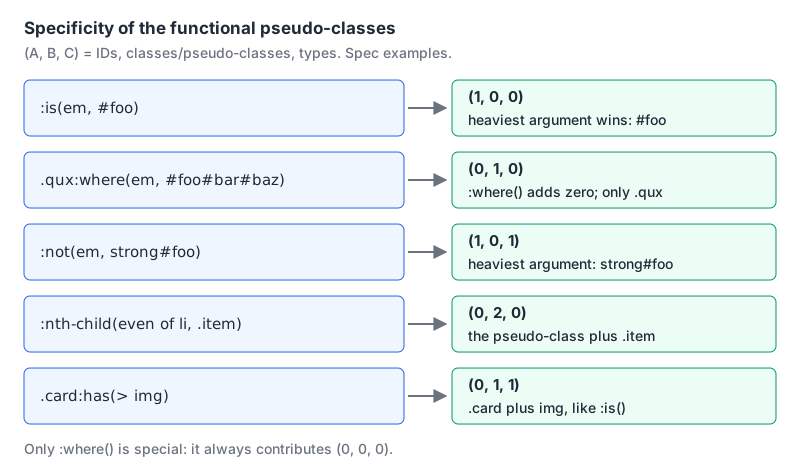
:not() follows the same rule, which surprises people who think of it as "the opposite of a class". The spec's own example: :not(em, strong#foo) has a specificity of (1,0,1) when matched against any element.
:where() is for defaults you want people to override
:where() matches exactly like :is() but contributes zero specificity. Wrap anything you want to be easy to beat:
/* Only the [role] attribute counts: (0,1,0) */
:where(ul, ol)[role="list"] { list-style: none; padding: 0; }

/* Library defaults scoped to a component, still weightless */
:where(.prose) :where(h2, h3) { margin-block: 1.5em 0.5em; }
In that second rule the whole selector scores (0,0,0), so a consumer's h2 { margin-top: 0 } wins without a fight. Same check in Chrome 152: :where(#t2) p lost to p.y, even with an ID inside.
The spec example shows how selective this is: .qux:where(em, #foo#bar#baz) is (0,1,0). Only the .qux outside the parentheses counts. That gives you a precise tool: put the part that should carry weight outside :where(), and the scoping you only need for matching inside it. If you also use cascade layers, :where() and @layer solve overlapping problems; I cover layers in the theming post on custom properties.
Forgiving lists, and the one that isn't
Normal selector lists are all-or-nothing. If any item fails to parse, the browser throws away the whole rule. :is() and :where() take what the spec calls a <forgiving-selector-list>: invalid items are dropped and the rest still work. The spec adds that wrapping a selector in :is() "effectively upgrades it to become forgiving", as long as it has no pseudo-elements.
:has() is not on that list. The spec says the forgiving form "is used in :is() and :where() only", and :has() takes a plain <relative-selector-list>. Here's what Chrome 152 kept after parsing four rules, read back from document.styleSheets:
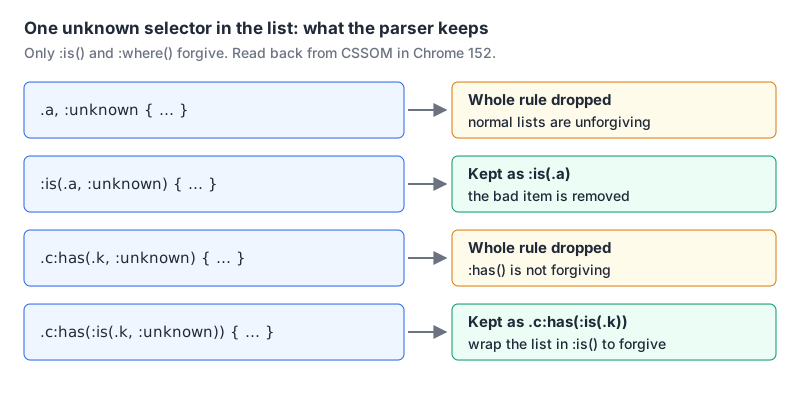
The second rule came back serialized as :is(.a): the browser removed the unknown item and kept the rest. The fourth trick is worth remembering. If you want to use a brand-new pseudo-class inside :has() without risking the rule, nest the list in :is().
The forgiving behaviour cuts both ways. A typo like :is(.card, .crad:hovr) won't break anything, which also means nothing tells you it's wrong. A CSS linter is your best chance of catching it.
What :has() is actually good for
:has() anchors on one element and asks about others relative to it. The MDN page compares .abc:has(+ .xyz) to a regex lookahead, abc(?=xyz), which is a good mental model if you've read our regex cheat sheet. The parent-selector uses get all the attention, and our post on responsive CSS beyond media queries already covers card layouts and scroll locking. A few others that replace JavaScript:
/* Style a heading differently when a paragraph follows it directly */
h1:has(+ p) { margin-bottom: 0; }

/* Previous sibling: a label before an invalid required input */
label:has(+ input:invalid) { color: #b91c1c; }

/* AND vs OR */
.player:has(video, audio) { }          /* has either */
.player:has(video):has(audio) { }      /* has both */

/* Sections with no headings at all (spec example) */
section:not(:has(h1, h2, h3, h4, h5, h6)) { outline: 2px dashed orange; }

/* Quantity query: lists with six or more items go two-column */
ul:has(> li:nth-child(6)) { columns: 2; }
The previous-sibling one matters: before :has() there was no way to select an element based on what comes after it. The label rule turned red in Chrome 152 while the input was empty and required. In practice you'd add :user-invalid or a class so the form doesn't start out red.
Three rules from the spec and MDN that will bite if you don't know them:
:has()can't be nested inside another:has().- Pseudo-elements aren't allowed inside it, and they can't be its anchor either.
- Keep the anchor narrow. MDN advises against anchoring on
body,:rootor*, and recommends limiting the inner selector with>or+so the browser doesn't walk a whole subtree on every DOM change:.ancestor:has(> .foo)over.ancestor:has(.foo).
Feature-testing a selector
For anything newer than these three, @supports selector() tells you whether the browser parses a selector. MDN's example uses the negated form for a fallback:
@supports not selector(:has(a, b)) {
  ul > li,
  ol > li { /* the long-hand version */ }
}
You won't need that for :has() itself any more, but the pattern is the right one for whatever ships next.
Gotchas worth a code-review comment
- Merged lists inherit the heaviest weight.
:is(#main, .sidebar) ascores (1,0,1) for links in the sidebar too. :where()makes overrides easy for everyone, including rules you didn't mean to lose to. Don't use it on state styles like:focus-visibleoutlines that must survive.- No pseudo-elements inside
:is()or:where(). Chrome 152 parsed.q:is(::before, ::after)as.q:is(), an empty list that matches nothing. Write.q::before, .q::afteras a normal list. - Forgiving hides typos. Lint your CSS.
- Tools disagree. Specificity calculators that sum every argument inside
:is()or:not()will overstate scores. Check against the spec examples above before trusting one. - A formatter won't save you, but it helps you read. Pasting a long minified selector into our CSS formatter and beautifying it makes nested
:is()lists much easier to audit.
Which one to reach for
Use :where() for resets, base styles and anything a library ships, so consumers can override it with a single class. Use :is() to shorten selectors you write yourself, after checking that nothing in the list is heavier than the rest. Use :has() when the style depends on a child, a following sibling or a count, and keep its anchor as specific as you can. If you're laying out the result, our Grid vs Flexbox guide picks up from there.
Written by AIDToolStack Editorial
Researched from official documentation, specifications and vendor pages, listed under Sources below. Last checked November 2026.
Sources
- drafts.csswg.org/selectors-4/
- developer.mozilla.org/en-US/docs/Web/CSS/Reference/Selectors/:is
- developer.mozilla.org/en-US/docs/Web/CSS/Reference/Selectors/:where
- developer.mozilla.org/en-US/docs/Web/CSS/Reference/Selectors/:has
- developer.mozilla.org/en-US/docs/Web/CSS/Reference/At-rules/@supports
- github.com/mdn/browser-compat-data/blob/main/css/selectors/has.json
- github.com/mdn/browser-compat-data/blob/main/css/selectors/is.json
- github.com/mdn/browser-compat-data/blob/main/css/selectors/where.json
Related Posts
Explore on AIDToolStack
Discover tools and servers featured in our directory.
AI Tools
MCP Servers
Sponsor Our Newsletter
Reach thousands of developers who are actively evaluating AI tools, MCP servers, and dev infrastructure. Our weekly newsletter goes to engaged technical decision-makers.
All sponsored content is clearly labeled per our editorial policy.