
MCP Servers for DevOps and CI: GitHub Actions, CircleCI, Jenkins, Terraform, Argo CD and Kubernetes
The best first job for an agent in a delivery pipeline is reading failed build logs. It's tedious for people, the answer is usually in the last 200 lines, and nothing breaks if the agent gets it wrong. The worst first job is "sync production" or "apply the plan". Most DevOps MCP servers can do both, from the same connection, unless you set them up otherwise.
This roundup follows a change from commit to cluster: GitHub, the CI systems (GitHub Actions, CircleCI, Jenkins), Terraform, Argo CD, Kubernetes, and Docker's gateway for running the servers themselves. For each one: who maintains it, how to connect, what it can change, and the switch that keeps it read-only. All of it is from the projects' own READMEs and docs as of November 2026.
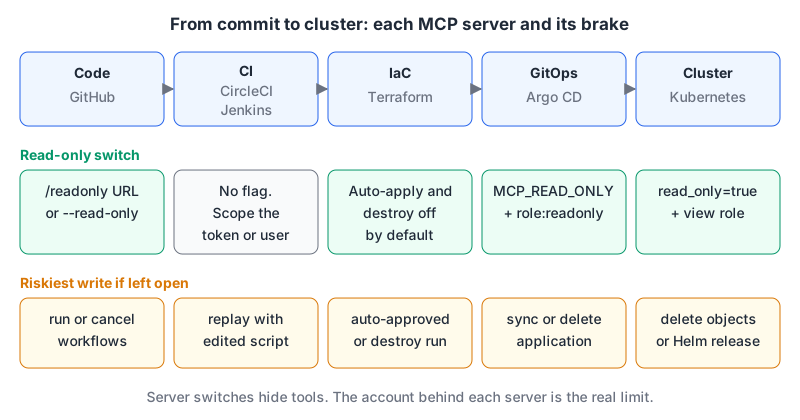
Summary table
| Stage | Server | Maintainer | Riskiest tool | Read-only switch |
|---|---|---|---|---|
| Code and Actions | GitHub MCP | GitHub | actions_run_trigger | /readonly URL or --read-only |
| CI | CircleCI hosted | CircleCI | rerun_workflow, cancel_workflow | None; use a scoped token |
| CI | Jenkins MCP plugin | Jenkins project | replayBuild, createPipeline | None; use Jenkins permissions |
| IaC | Terraform MCP | HashiCorp | create_run | Destructive run types off by default |
| GitOps | Argo CD MCP | argoproj-labs | sync_application, delete_application | MCP_READ_ONLY=true |
| Cluster | Kubernetes MCP | containers org | Helm uninstall, resource delete | read_only = true in TOML |
GitHub: the Actions toolset isn't on by default
GitHub's server (v2.1.0, 3 November 2026) runs hosted at https://api.githubcopilot.com/mcp/ or locally from Docker or a binary. Its default toolsets are context, repos, issues, pull_requests and users. Actions isn't in that list, which surprises people who wonder why the agent can't see their failed workflow.
On the hosted server each toolset has its own URL, and appending /readonly keeps only the read tools (remote server docs):
claude mcp add --transport http gh-actions https://api.githubcopilot.com/mcp/x/actions/readonlyLocally, the same thing is --toolsets actions --read-only. With write access, actions_run_trigger can run, rerun and cancel workflows and delete run logs, and it asks for the repo OAuth scope. There's also --lockdown-mode, which hides content from public-repo authors without push access to reduce prompt injection. The README says plainly that it's a content filter, not an authorization boundary. For comparing the platforms themselves there's GitHub MCP vs GitLab MCP and GitHub Actions vs GitLab CI.
CircleCI: hosted server or the CLI
The original @circleci/mcp-server-circleci package is deprecated and the repo will be archived. CircleCI's MCP overview offers two replacements: a hosted server at https://mcp.circleci.com/v1/mcp (OAuth2 or a personal API token), and an MCP mode built into the CircleCI CLI, which you add to a client with circleci mcp claude enable, circleci mcp cursor enable and so on.
The hosted server's tool list is mostly reads (list_runs, get_job_logs, list_job_tests, list_artifacts), plus two writes: rerun_workflow and cancel_workflow. That's a small blast radius. The CLI MCP mirrors the whole CLI, including org and project settings, orb publishing and runners, so it can change a lot more. For an agent that triages failures, the hosted server is the better fit.
Jenkins: a plugin, not a separate server
The MCP Server plugin adds endpoints to Jenkins itself: Streamable HTTP at /mcp-server/mcp, SSE at /mcp-server/sse, and a stateless endpoint at /mcp-server/stateless. You authenticate with a Jenkins API token over HTTP Basic:
claude mcp add jenkins https://jenkins.example.com/mcp-server/mcp \
  --transport http --header "Authorization: Basic $(printf '%s' 'mcp-bot:API_TOKEN' | base64)"
The tools go well past reading logs: triggerBuild, cancelBuild, rebuildBuild, replayBuild (rerun a Pipeline with a modified script) and createPipeline. There's no read-only flag. The boundary is Jenkins's own permission model, so create a dedicated user and give it what the permissions reference calls Overall/Read and Job/Read. Job/Build allows starting builds, and Run/Replay, which is implied by Job/Configure, allows running edited Pipeline scripts. I'd keep both away from an agent's account.
Terraform: plans yes, auto-apply no (by default)
HashiCorp's Terraform MCP server (v1.4.1, 23 October 2026) does two jobs: looking up providers, modules and policies in the public registry, and working with HCP Terraform or Terraform Enterprise workspaces. Registry lookups need no token. Workspace tools need TFE_TOKEN.
claude mcp add terraform -s user -t stdio -- docker run -i --rm \
  -e TFE_TOKEN -e TFE_ADDRESS=https://app.terraform.io hashicorp/terraform-mcp-server
There's also a hosted endpoint at https://mcp.terraform.io/mcp that takes the token as a bearer header. --toolsets registry keeps it to registry tools only.
The safety design is worth knowing. ENABLE_TF_OPERATIONS defaults to false, and in that mode create_run uses a "safe" variant: in the source, the allowed run types are plan_and_apply (with auto-apply forced off), refresh_state, plan_only and allow_empty_apply. The auto_approve and is_destroy run types only appear when you set ENABLE_TF_OPERATIONS=true, as do the changelog's destructive tools such as delete_team. So by default the agent can queue a plan, and a person still confirms the apply in HCP Terraform. The token's own workspace permissions still apply on top, so give the agent a team token rather than your personal one. If you haven't picked your IaC tool yet, there's Terraform vs Pulumi.
Argo CD
mcp-for-argocd (v0.9.0) lives under argoproj-labs rather than the main project. It reads applications, resource trees, events and workload logs, and can create, update, delete and sync applications and run resource actions.
{
  "mcpServers": {
    "argocd": {
      "command": "npx",
      "args": ["argocd-mcp@latest", "stdio"],
      "env": {
        "ARGOCD_BASE_URL": "https://argocd.example.com",
        "ARGOCD_API_TOKEN": "<token>",
        "MCP_READ_ONLY": "true"
      }
    }
  }
}
MCP_READ_ONLY=true disables create, update, delete, sync and run_resource_action. Back it with a dedicated local account: the user management docs show accounts.mcp-bot: apiKey in argocd-cm and argocd account generate-token --account mcp-bot --expires-in 24h, and warn that tokens without --expires-in never expire. Bind the account to the built-in role:readonly, which the RBAC docs describe as read-only access to all resources.
Kubernetes
Of the several Kubernetes servers around, the one I'd start with is containers/kubernetes-mcp-server (v0.1.2): a single Go binary that talks to the API server directly instead of shelling out to kubectl, with Helm and multi-cluster support. Our Kubernetes page currently describes a different community server, strowk/mcp-k8s-go, which is also maintained but smaller.
In current releases, runtime settings live in a TOML file rather than CLI flags:
read_only = true
toolsets = ["core", "config"]

[[denied_resources]]
group = ""
version = "v1"
kind = "Secret"
npx -y kubernetes-mcp-server@latest --config ./mcp-k8s.tomlThe README calls read_only and denied_resources best-effort guardrails, and the configuration reference points out that read_only keeps tools that can still read any object the identity can get, Secrets included. So give the server its own kubeconfig for a service account bound to the built-in view ClusterRole. The Kubernetes RBAC docs say view doesn't allow reading Secrets, since that would expose ServiceAccount credentials:
kubectl create rolebinding mcp-view --clusterrole=view \
  --serviceaccount=staging:mcp-reader --namespace=staging
Docker: running the servers themselves
Docker's MCP Gateway is a different kind of tool. It's the docker mcp CLI plugin behind Docker Desktop's MCP Toolkit (Desktop 4.59+), and it runs other MCP servers from the Docker MCP Catalog in isolated containers behind one gateway, with secrets kept in Docker Desktop instead of environment variables. docker mcp gateway run --profile dev-tools starts a profile, and docker mcp client connect claude-code --profile dev-tools --global points a client at it. It doesn't change what a server's token can do, but it does run each server in a container with minimal host privileges instead of directly on your machine. If Podman is your runtime, our Docker vs Podman comparison covers the differences.
A rollout order that won't bite
- Start with log and status reading: GitHub's
actionstoolset at/readonly, CircleCI's hosted server, a Jenkins user with Read only. - Add Terraform with
ENABLE_TF_OPERATIONSunset, so the agent can propose plans that a human applies. - Add Argo CD and Kubernetes read-only, each backed by a read-only account, not just the server flag.
- Grant writes one stage at a time, under a separately named MCP entry with per-call approval on. Our GitHub Actions patterns post has the pipeline-side controls (environments, required reviewers) that make an agent-triggered deploy reversible.
If a stage has no read-only switch, the account you hand it is the switch.
Written by AIDToolStack Editorial
Researched from official documentation, specifications and vendor pages, listed under Sources below. Last checked November 2026.
Sources
- github.com/github/github-mcp-server
- github.com/github/github-mcp-server/blob/main/docs/remote-server.md
- github.com/CircleCI-Public/mcp-server-circleci
- circleci.com/docs/guides/toolkit/circleci-mcp-overview/
- github.com/jenkinsci/mcp-server-plugin
- www.jenkins.io/doc/book/security/access-control/permissions/
- github.com/hashicorp/terraform-mcp-server
- github.com/hashicorp/terraform-mcp-server/blob/main/pkg/tools/tfe/create_run.go
- github.com/argoproj-labs/mcp-for-argocd
- argo-cd.readthedocs.io/en/stable/operator-manual/user-management/
- argo-cd.readthedocs.io/en/stable/operator-manual/rbac/
- github.com/containers/kubernetes-mcp-server
- github.com/containers/kubernetes-mcp-server/blob/main/docs/configuration.md
- kubernetes.io/docs/reference/access-authn-authz/rbac/
- github.com/docker/mcp-gateway
- github.com/CircleCI-Public/circleci-cli
- github.com/hashicorp/terraform-mcp-server/releases
- github.com/github/github-mcp-server/blob/main/pkg/github/actions.go
Related Posts
Explore on AIDToolStack
Discover tools and servers featured in our directory.
AI Tools
MCP Servers
Sponsor Our Newsletter
Reach thousands of developers who are actively evaluating AI tools, MCP servers, and dev infrastructure. Our weekly newsletter goes to engaged technical decision-makers.
All sponsored content is clearly labeled per our editorial policy.