
MCP Servers for Data Warehouses: BigQuery, Snowflake, Databricks, ClickHouse, MotherDuck
Giving an agent your warehouse is different from giving it a Postgres replica. The tables are bigger, the questions are vaguer ("why did signups dip in March?"), and a careless SELECT * costs real money on a pay-per-scan engine. Most of the work is deciding what the agent can't do, and where that limit is enforced.
The good news, as of November 2026, is that all five warehouses covered here now have a vendor-run MCP server, and several of the community servers people set up in 2025 are deprecated. If you configured Snowflake or Databricks MCP access last year from a GitHub repo, it's worth checking which one you're on.
What changed this year
| Warehouse | Use now | Deprecated or legacy |
|---|---|---|
| BigQuery | Google's remote server at bigquery.googleapis.com/mcp; MCP Toolbox for local | (none) |
| Snowflake | Snowflake-managed MCP server (CREATE MCP SERVER) | Snowflake-Labs/mcp is "deprecated and no longer maintained" |
| Databricks | Databricks-provided MCP servers in the workspace | The Unity Catalog server in databrickslabs/mcp |
| ClickHouse | Cloud remote server, or open-source mcp-clickhouse | (none) |
| MotherDuck | Remote server at api.motherduck.com/mcp, or local mcp-server-motherduck | (none) |
BigQuery
Google's remote BigQuery MCP server is switched on when the BigQuery API is enabled, which new projects have by default. It speaks Streamable HTTP and uses OAuth with IAM. The caller needs three roles: MCP Tool User (roles/mcp.toolUser), BigQuery Job User and BigQuery Data Viewer.
The tool list is short: dataset and table listing and metadata, execute_sql, and execute_sql_readonly. The read-only variant rejects DML, DDL and Python UDFs. The docs say execute_sql is the only tool that isn't read-only and suggest restricting it with an IAM deny policy, which is exactly what I'd do for any analyst-style agent. Two limits shape what the agent can do: queries are cancelled after three minutes by default, and results stop at 3,000 rows. The MCP server has no quota of its own, so normal BigQuery job quotas and query pricing apply.
For a local option, Google's MCP Toolbox for Databases (v1.16.0) has prebuilt BigQuery tools. Note the repo was renamed from genai-toolbox, so old links redirect. It runs with npx @toolbox-sdk/server --prebuilt=<database> --stdio, and it's also how you'd define your own parameterized SQL tools in a tools.yaml instead of handing the agent free-form SQL. Toolbox also lists ClickHouse and Snowflake among its prebuilt sources.
There's also a community server, ergut/mcp-bigquery-server, worth knowing for one reason: it validates every query through BigQuery's dry-run planner before running it, allows SELECT only, caps spend with --maximum-bytes-billed, and can hide sensitive columns via preventedFields in its config.json. That last feature is something the managed server doesn't advertise. Our page: BigQuery MCP server.
Snowflake
The community-era Snowflake-Labs/mcp repo now opens with a deprecation notice pointing at the Snowflake-managed MCP server. Unlike the others, you create it as a database object:
CREATE MCP SERVER analytics_mcp
  FROM SPECIFICATION $$
  <specification_yaml>
  $$;
Clients connect to https://<account_url>/api/v2/databases/{database}/schemas/{schema}/mcp-servers/{name}. One odd but documented gotcha: use hyphens rather than underscores in the account hostname, because MCP connections have trouble with underscores.
Tool types include CORTEX_AGENT_RUN, CORTEX_SEARCH_SERVICE_QUERY, CORTEX_ANALYST_MESSAGE (semantic views only), SYSTEM_EXECUTE_SQL and GENERIC for UDFs and stored procedures. The SQL tool's read_only option defaults to true, allowing only SELECT. Access to the server doesn't grant access to its tools; each tool needs its own grant. Snowflake recommends OAuth and, if you must use a programmatic access token, the least-privileged role that works.
The limits are worth reading before you design anything: 50 tools per server, generic and SQL tool responses truncated at 250 KB, a maximum recursion depth of 10, and tools only (no MCP resources, prompts or sampling). Snowflake also recommends exposing a Cortex Agent as the client-facing tool rather than many raw tools. Our pages: Snowflake MCP server and Snowflake Cortex.
Databricks
The databrickslabs/mcp repo marks its Unity Catalog server as deprecated in favour of managed servers. The Databricks managed MCP docs now describe two families, which is confusing at first:
- Workspace endpoints (Public Preview, enabled by an admin) under
https://<workspace-hostname>/api/2.0/mcp/...: Genie spaces, AI Search (vector search) indexes, Unity Catalog functions, and a Databricks SQL endpoint the page labels legacy. Each uses OAuth with its own scope, and access follows permissions on the underlying resources. The docs say these calls bypass Unity Gateway, so there are no MCP-level grants or guardrails. - Unity Gateway MCPs under
/ai-gateway/mcp-services/..., such assystem.ai.genie_one_mcp(generally available) andsystem.ai.dbsql(Beta), governed by gateway grants and policies.
Billing follows the underlying service: Databricks SQL pricing for SQL, serverless compute for functions, AI Search pricing for indexes. For an analytics agent, a Genie space is the closest thing to "ask questions of curated tables", and it keeps the agent away from raw SQL. Our pages: Databricks MCP server and Databricks AI.
ClickHouse
Our databases roundup covers the open-source server in detail, so here's what's relevant for warehouse use. mcp-clickhouse (v0.7.0) runs queries with readonly=1 unless you set CLICKHOUSE_ALLOW_WRITE_ACCESS=true, and destructive statements need a second flag, CLICKHOUSE_ALLOW_DROP=true. The README is candid that the drop check is "a best-effort guard" and the ClickHouse user's grants are the real boundary. It also suggests checking a query with EXPLAIN ESTIMATE before running it, which is a nice habit to put in your agent's instructions for big tables.
ClickHouse Cloud adds a remote server at https://mcp.clickhouse.cloud/mcp. You enable it per service from the Connect panel, sign in with OAuth, and its run_select_query tool only permits SELECT. It also exposes organization-level tools such as get_services_list and get_organization_cost, so think about who should see billing data. Our page: ClickHouse MCP server.
MotherDuck and DuckDB
MotherDuck runs a remote MCP server at https://api.motherduck.com/mcp, with OAuth or a Bearer <motherduck_token> header. It has both read-only and read-write tools; restricting to read-only is covered in a separate guide.
The local mcp-server-motherduck (v1.1.0) is the more interesting one for developers, since it handles local DuckDB files, S3-hosted databases and MotherDuck. Its default is read-only, and writes need an explicit flag:
{
  "mcpServers": {
    "duckdb-readonly": {
      "command": "uvx",
      "args": ["mcp-server-motherduck", "--db-path", "/abs/path/warehouse.duckdb"]
    }
  }
}
In read-only mode it doesn't hold the file lock, so it can sit alongside a writer process. Avoid copying the README's dev-mode example into anything shared: --read-write --allow-switch-databases gives the agent write access and lets it switch to any database at runtime. Our page: MotherDuck MCP server.
Where the limits actually live
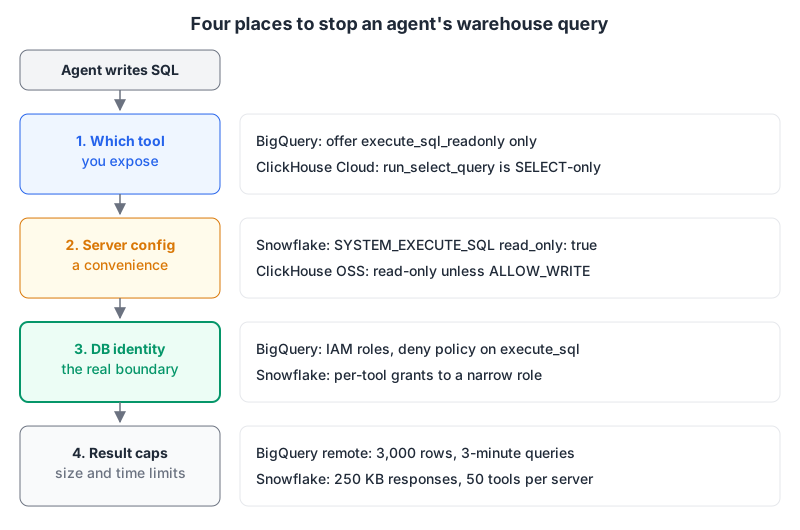
Tool choice and server flags are easy to set and easy to undo by accident. The identity the server connects as is the one layer an agent, or a prompt injected through a table comment, can't talk its way past. Our MCP server security guide goes deeper on that.
A setup checklist
- Create a dedicated identity for the agent: a service account, Snowflake role or ClickHouse user with read access to the schemas it needs and nothing else.
- Expose the read-only tool path:
execute_sql_readonlyon BigQuery,read_only: trueon Snowflake's SQL tool, the default mode on ClickHouse and DuckDB. - Block the write tool at the identity layer too (an IAM deny on
execute_sql, no write grants on the role). - Prefer curated interfaces for business questions: a Snowflake Cortex Agent, a Databricks Genie space, or Toolbox's parameterized tools.
- Know your caps (3,000 rows on BigQuery's remote server, 250 KB on Snowflake) and tell the agent to aggregate rather than page through raw rows.
- Watch cost on scan-priced engines. A bytes-billed cap, like the community BigQuery server's
--maximum-bytes-billed, is cheap insurance.
Written by AIDToolStack Editorial
Researched from official documentation, specifications and vendor pages, listed under Sources below. Last checked November 2026.
Sources
- docs.cloud.google.com/bigquery/docs/use-bigquery-mcp
- github.com/googleapis/mcp-toolbox
- github.com/ergut/mcp-bigquery-server
- github.com/Snowflake-Labs/mcp
- docs.snowflake.com/en/user-guide/snowflake-cortex/cortex-agents-mcp
- github.com/databrickslabs/mcp
- docs.databricks.com/aws/en/generative-ai/mcp/managed-mcp
- github.com/ClickHouse/mcp-clickhouse
- clickhouse.com/docs/use-cases/AI/MCP/remote_mcp
- motherduck.com/docs/sql-reference/mcp/
- github.com/motherduckdb/mcp-server-motherduck
Related Posts
Explore on AIDToolStack
Discover tools and servers featured in our directory.
AI Tools
MCP Servers
Sponsor Our Newsletter
Reach thousands of developers who are actively evaluating AI tools, MCP servers, and dev infrastructure. Our weekly newsletter goes to engaged technical decision-makers.
All sponsored content is clearly labeled per our editorial policy.