
Formatting Dates in JavaScript with Intl, and Where Temporal Stands
A timestamp renders as "3:30 PM" on your laptop, "6:30 AM" in CI, and a user in Auckland reports that tonight's event shows tomorrow's date. Nothing is wrong with the data. Every one of those outputs came from the same instant, formatted with whatever locale and time zone the runtime happened to have. JavaScript's Date hides that choice; Intl makes you state it.
This post covers the parts of the built-in Intl API that handle dates, with output from real runs, plus where Temporal stands in November 2026. Unless I say otherwise, output comes from Node.js 24.4 with ICU 77.1 and the system zone set to Europe/Stockholm. Change any of those and some strings will change; that's the point.
Store instants, format at the edge
The rule that prevents most date bugs: keep an unambiguous instant (an ISO 8601 string with Z, or epoch milliseconds) everywhere in your system, and only turn it into human text at the very last step, with an explicit locale and time zone. Our Unix timestamps guide covers storage and units; the Unix timestamp converter is handy for checking what a stored number actually means, since it shows the UTC, ISO and local reading side by side.
Here's why the "last step" needs to be explicit. Same Date, two ways of printing it with no options:
const d = new Date("2026-11-07T14:30:00Z");
d.toString();        // Sat Nov 07 2026 15:30:00 GMT+0100 (Central European Standard Time)
d.toLocaleString();  // 11/7/2026, 3:30:00 PM
Run the same file with TZ=America/Los_Angeles and you get 06:30:00 GMT-0800 and 6:30:00 AM. On a server, "local" means wherever the container is configured, which is usually UTC and almost never where your user is.
Intl.DateTimeFormat: say the zone out loud
const d = new Date("2026-11-07T14:30:00Z");

new Intl.DateTimeFormat("en-US", {
  dateStyle: "medium", timeStyle: "short", timeZone: "America/New_York",
}).format(d);
// "Nov 7, 2026, 9:30 AM"

new Intl.DateTimeFormat("de-DE", {
  dateStyle: "full", timeStyle: "short", timeZone: "Europe/Berlin",
}).format(d);
// "Samstag, 7. November 2026 um 15:30"

new Intl.DateTimeFormat("en-GB", {
  day: "numeric", month: "short", hour: "2-digit", minute: "2-digit",
  timeZone: "Pacific/Auckland", timeZoneName: "shortOffset",
}).format(d);
// "8 Nov, 03:30 GMT+13"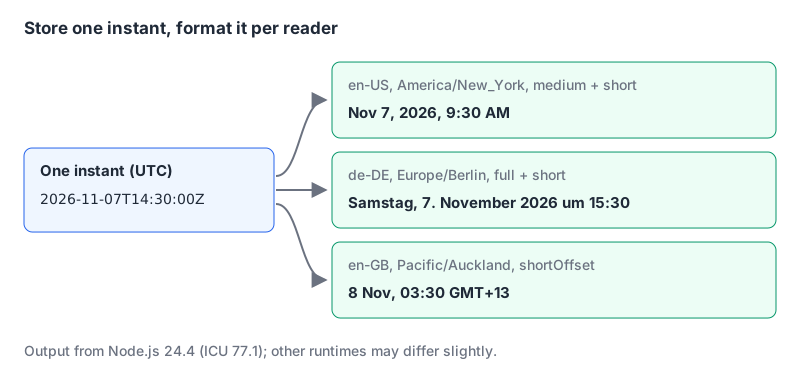
That third one is the Auckland bug from the intro: it's already the 8th there. The constructor docs list what timeZone accepts: IANA names like "America/New_York" and offset identifiers like "+01:00". The default is the runtime's zone. An unknown zone throws: RangeError: Invalid time zone specified: Mars/Olympus.
The options trap everyone hits once: dateStyle and timeStyle can't be mixed with component options like hour or timeZoneName. MDN only lists RangeError for bad options, but ECMA-402 specifies a TypeError for this case, and that's what V8 throws:
new Intl.DateTimeFormat("en", { dateStyle: "short", hour: "numeric" });
// TypeError: Invalid option : option
That message is useless, so remember the rule: styles or components, never both.
Three more methods worth knowing:
// Pieces instead of a string, for custom layouts
new Intl.DateTimeFormat("en-US", {
  year: "numeric", month: "2-digit", day: "2-digit",
  hour: "2-digit", minute: "2-digit", hourCycle: "h23", timeZone: "Asia/Kolkata",
}).formatToParts(d).filter(p => p.type !== "literal");
// month 11, day 07, year 2026, hour 20, minute 00

// Ranges that drop repeated parts
const fmt = new Intl.DateTimeFormat("en-US", { month: "short", day: "numeric", timeZone: "UTC" });
fmt.formatRange(new Date("2026-11-07T00:00:00Z"), new Date("2026-11-12T00:00:00Z")); // "Nov 7 – 12"
fmt.formatRange(new Date("2026-11-28T00:00:00Z"), new Date("2026-12-03T00:00:00Z")); // "Nov 28 – Dec 3"

// What did the runtime pick?
Intl.DateTimeFormat().resolvedOptions().timeZone; // "Europe/Stockholm" here
Build formatters once and reuse them. MDN's toLocaleString page explains that each call searches a large localization database, while a DateTimeFormat object "may decide to cache a slice of the database". In a long table, create the formatter outside the loop.
Daylight saving shows up in the output
A named zone carries its DST rules; a fixed offset doesn't. US clocks fell back on 1 November 2026 (the Temporal example further down shows the switch), and New Zealand is on daylight time in November:
const ny = new Intl.DateTimeFormat("en-US", {
  timeZone: "America/New_York", hour: "numeric", minute: "2-digit", timeZoneName: "short",
});
ny.format(new Date("2026-10-30T16:00:00Z")); // "12:00 PM EDT"
ny.format(new Date("2026-11-06T16:00:00Z")); // "11:00 AM EST"

const nz = new Intl.DateTimeFormat("en-NZ", {
  timeZone: "Pacific/Auckland", hour: "numeric", minute: "2-digit", timeZoneName: "shortOffset",
});
nz.format(new Date("2026-07-07T00:00:00Z")); // "12:00 pm GMT+12"
nz.format(new Date("2026-11-07T00:00:00Z")); // "1:00 pm GMT+13"
Any code that stores "Auckland = +12" is wrong for about half the year. Store the IANA name, not the offset. The same trap applies to scheduled jobs, which our cron best practices post covers.
Intl.RelativeTimeFormat: you do the maths
RelativeTimeFormat only words a number and a unit. You compute the difference yourself. numeric: "auto" turns -1 day into "yesterday", per MDN:
const rtf = new Intl.RelativeTimeFormat("en", { numeric: "auto" });
rtf.format(-1, "day");   // "yesterday"
rtf.format(-3, "hour");  // "3 hours ago"
rtf.format(2, "week");   // "in 2 weeks"
rtf.format(0, "day");    // "today"
new Intl.RelativeTimeFormat("es", { numeric: "auto" }).format(-1, "day"); // "ayer"
A small "time ago" helper. The month and year lengths are my approximations (30 and 365 days); fine for "3 months ago", wrong for billing:
const UNITS = [["year", 31536000], ["month", 2592000], ["week", 604800],
  ["day", 86400], ["hour", 3600], ["minute", 60], ["second", 1]];

function timeAgo(date, now = new Date(), locale = "en") {
  const rtf = new Intl.RelativeTimeFormat(locale, { numeric: "auto" });
  const diff = (date - now) / 1000;
  for (const [unit, secs] of UNITS) {
    if (Math.abs(diff) >= secs || unit === "second") {
      return rtf.format(Math.round(diff / secs), unit);
    }
  }
}

const now = new Date("2026-11-07T14:30:00Z");
timeAgo(new Date("2026-11-07T14:29:20Z"), now);       // "40 seconds ago"
timeAgo(new Date("2026-11-06T09:00:00Z"), now);       // "yesterday"
timeAgo(new Date("2026-10-20T09:00:00Z"), now);       // "3 weeks ago"
timeAgo(new Date("2026-11-20T09:00:00Z"), now, "fr"); // "dans 2 semaines"
Note "yesterday" for something 29.5 hours ago: Math.round gives 1 day, which is the conventional reading. Pass a fixed now in tests, or the output changes every second.
Intl.DurationFormat: "1 hr, 46 min, 40 sec"
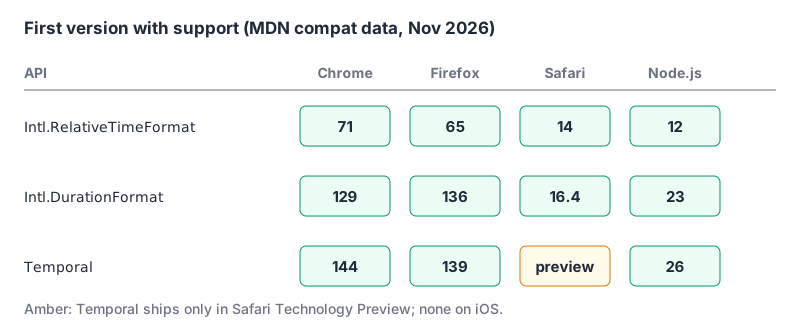
Intl.DurationFormat is Baseline 2025, newly available since March 2025, and TC39's ECMA-402 finished proposals list records its Stage 4 discussion in December 2024.
const dur = { hours: 1, minutes: 46, seconds: 40 };
new Intl.DurationFormat("en", { style: "long" }).format(dur);    // "1 hour, 46 minutes, 40 seconds"
new Intl.DurationFormat("en", { style: "short" }).format(dur);   // "1 hr, 46 min, 40 sec"
new Intl.DurationFormat("en", { style: "digital" }).format(dur); // "1:46:40"
new Intl.DurationFormat("de", { style: "long" }).format(dur);    // "1 Stunde, 46 Minuten und 40 Sekunden"
MDN's own example shows the English short form as "1 hr, 46 min and 40 sec". Node 24 and Chrome 152 both print it without "and". Locale data changes between ICU and CLDR versions, which is a good reason never to snapshot-test formatted strings across environments.
Temporal in November 2026
The proposal README lists Temporal at Stage 4, shipped in Firefox 139 (May 2025), Chrome 144 (January 2026) and Node 26 (May 2026). TC39's finished proposals table gives 2027 as the expected publication year. MDN's compat data still lists Safari as preview only and iOS Safari as unsupported, so a browser app needs a polyfill for now. The Node 24 I used above doesn't have it (typeof Temporal is "undefined"), so these ran in Chrome 152:
// Calendar days vs elapsed hours across the US DST change
const start = Temporal.ZonedDateTime.from("2026-10-31T09:00[America/New_York]");
start.add({ days: 1 }).toString();  // "2026-11-01T09:00:00-05:00[America/New_York]"
start.add({ hours: 24 }).toString(); // "2026-11-01T08:00:00-05:00[America/New_York]"

// Month arithmetic clamps instead of overflowing
Temporal.PlainDate.from("2026-01-31").add({ months: 1 }).toString(); // "2026-02-28"
const legacy = new Date(2026, 0, 31); legacy.setMonth(1);
legacy.toDateString(); // "Tue Mar 03 2026"

// Differences you can format
const a = Temporal.PlainDate.from("2026-11-07"), b = Temporal.PlainDate.from("2026-12-25");
a.until(b).toString();                           // "P48D"
a.until(b, { largestUnit: "months" }).toString(); // "P1M18D"
Temporal.Duration.from({ hours: 1, minutes: 46, seconds: 40 }).toLocaleString("en"); // "1 hr, 46 min, 40 sec"
The first pair is the reason to switch: "same time tomorrow" and "24 hours later" are different questions, and Date can't tell them apart. The 48-day count is easy to cross-check with our date difference calculator.
Gotchas
- Date-only strings are UTC; date-time strings without a zone are local. In Stockholm,
new Date("2026-11-07")printed01:00:00 GMT+0100, whilenew Date("2026-11-07T00:00")printed00:00:00. new Date(2026, 0, 31)is January. Months count from zero in the legacy API, not in Temporal.- Server and client disagree by default. If you render dates on the server and again in the browser, pass the same
timeZoneand locale to both, or the text won't match. Our Next.js internationalization guide covers picking the locale. timeZoneNamecounts as a component option, so it can't sit next todateStyle.- Your runtime's zone list is finite.
Intl.supportedValuesOf("timeZone")returned 418 entries in Node 24.4; validate user-supplied zones against it.
A checklist for any date you display
- Is it stored as an instant (ISO with
Zor epoch ms)? - Does the formatter get an explicit
timeZoneand locale? - Is the formatter created once and reused?
- Does any code store a UTC offset where an IANA zone name belongs?
- Do tests pin
now, the locale and the zone, and avoid comparing full localized strings across environments? - If you need date arithmetic, are you on Temporal (natively or via polyfill) rather than
setMonth?
Written by AIDToolStack Editorial
Researched from official documentation, specifications and vendor pages, listed under Sources below. Last checked November 2026.
Sources
- developer.mozilla.org/en-US/docs/Web/JavaScript/Reference/Global_Objects/Intl/DateTimeFormat/DateTimeFormat
- tc39.es/ecma402/
- developer.mozilla.org/en-US/docs/Web/JavaScript/Reference/Global_Objects/Date/toLocaleString
- developer.mozilla.org/en-US/docs/Web/JavaScript/Reference/Global_Objects/Intl/RelativeTimeFormat/RelativeTimeFormat
- developer.mozilla.org/en-US/docs/Web/JavaScript/Reference/Global_Objects/Intl/DurationFormat
- github.com/tc39/proposals/blob/main/ecma402/finished-proposals.md
- github.com/tc39/proposal-temporal
- github.com/tc39/proposals/blob/main/finished-proposals.md
- github.com/mdn/browser-compat-data/blob/main/javascript/builtins/Temporal.json
- github.com/mdn/browser-compat-data/blob/main/javascript/builtins/Intl/DurationFormat.json
- github.com/mdn/browser-compat-data/blob/main/javascript/builtins/Intl/RelativeTimeFormat.json
Related Posts
Explore on AIDToolStack
Discover tools and servers featured in our directory.
AI Tools
MCP Servers
Sponsor Our Newsletter
Reach thousands of developers who are actively evaluating AI tools, MCP servers, and dev infrastructure. Our weekly newsletter goes to engaged technical decision-makers.
All sponsored content is clearly labeled per our editorial policy.