
Implementing Passkeys with WebAuthn and SimpleWebAuthn: Registration, Sign-in and Storage
The case for passkeys is made elsewhere (our password security post covers where they stand next to NIST's password rules). This one is about the plumbing: the two WebAuthn ceremonies, the code for each using a maintained library, what goes in your database, and the defaults that trip people up.
A status note first. Web Authentication Level 3 became a W3C Recommendation on 25 August 2026, following a Candidate Recommendation Snapshot in May with no substantive changes since. The spec uses "passkey" as another name for a client-side discoverable credential, a credential the authenticator can use given only the site's RP ID, without the site first telling it which credential ID to use.
I'll use SimpleWebAuthn, which splits into @simplewebauthn/server (14.1.0 on npm as of November 2026, Node 22 or later per its engines field) and @simplewebauthn/browser (14.0.0). Its job is to produce options for the browser API and do the long list of checks on what comes back. You could call navigator.credentials.create() and parse CBOR yourself; I wouldn't.
Registration: creating the credential
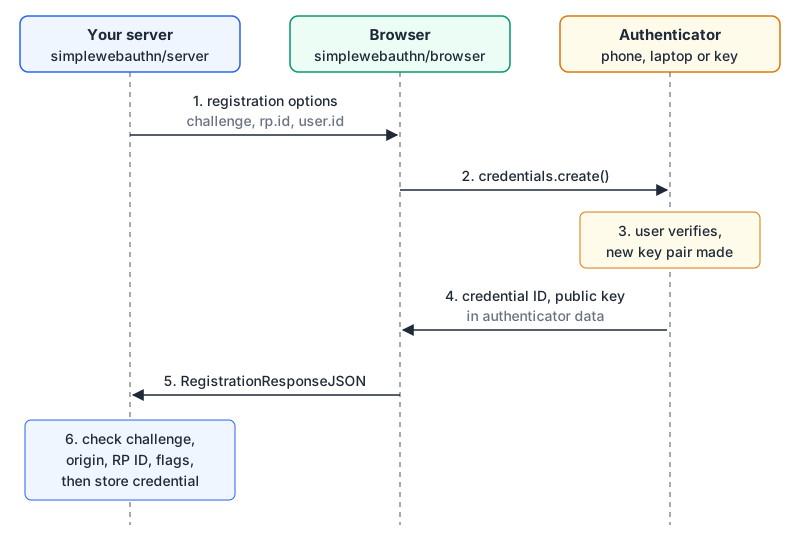
Server side, step 1. These are the option names from the library's type definitions:
import {
  generateRegistrationOptions,
  verifyRegistrationResponse,
} from "@simplewebauthn/server";

const rpName = "Acme";
const rpID = "acme.example";              // your registrable domain, no scheme or port
const origin = "https://acme.example";

app.post("/passkeys/register/options", async (req, res) => {
  const user = req.user;                    // already signed in
  const existing = await db.passkeys.forUser(user.id);

  const options = await generateRegistrationOptions({
    rpName,
    rpID,
    userName: user.email,
    userDisplayName: user.name,
    // userID: omit on first passkey (random bytes are generated), then reuse
    excludeCredentials: existing.map((p) => ({ id: p.id, transports: p.transports })),
    authenticatorSelection: {
      residentKey: "required",
      userVerification: "preferred",
    },
  });

  req.session.regChallenge = options.challenge;
  req.session.webauthnUserID = options.user.id; // base64url; persist with the user
  res.json(options);
});
A few of those choices deserve a sentence each:
attestationTypedefaults to"none". Unless you need to restrict which authenticator models are allowed (enterprise policy, certification requirements), leave it.residentKey: "required"is what SimpleWebAuthn's passkeys guide recommends, because it forces a discoverable credential. The library's own default is"preferred".userIDdefaults to random bytes. Keep the generated value (options.user.id) with the user record and pass it back asuserIDfor later registrations, so every passkey for one account shares the same user handle.excludeCredentialsstops the same authenticator registering twice. When it would, the browser rejects withInvalidStateError, which the browser package docs treat as "already registered".- Algorithms default to EdDSA, ES256 and RS256 (COSE
-8,-7,-257). The source puts ML-DSA-44 first when the runtime supports post-quantum algorithms.
Steps 2 to 5 are driven from the browser, and the code is short:
import { startRegistration } from "@simplewebauthn/browser";

const optionsJSON = await fetch("/passkeys/register/options", { method: "POST" }).then((r) => r.json());
let attResp;
try {
  attResp = await startRegistration({ optionsJSON });
} catch (err) {
  if (err.name === "InvalidStateError") showMessage("This device already has a passkey here.");
  throw err;
}
await fetch("/passkeys/register/verify", {
  method: "POST",
  headers: { "Content-Type": "application/json" },
  body: JSON.stringify(attResp),
});
Note the object argument. Since v11, options go under optionsJSON; passing them directly is the old form and fails with a "reading 'challenge'" TypeError, per the docs.
Step 6, back on the server:
app.post("/passkeys/register/verify", async (req, res) => {
  const expectedChallenge = req.session.regChallenge;
  delete req.session.regChallenge;          // one use only

  const { verified, registrationInfo } = await verifyRegistrationResponse({
    response: req.body,
    expectedChallenge,
    expectedOrigin: origin,
    expectedRPID: rpID,
    requireUserVerification: false,         // match "preferred" above (see gotchas)
  });
  if (!verified) return res.status(400).json({ error: "verification failed" });

  const { credential, credentialDeviceType, credentialBackedUp } = registrationInfo;
  await db.passkeys.insert({
    id: credential.id,                      // base64url string
    publicKey: credential.publicKey,        // Uint8Array, store as bytes
    counter: credential.counter,
    transports: credential.transports ?? [],
    deviceType: credentialDeviceType,       // "singleDevice" | "multiDevice"
    backedUp: credentialBackedUp,
    webauthnUserID: req.session.webauthnUserID,
    userId: req.user.id,
  });
  res.json({ ok: true });
});
What's inside the response you just stored
The verify call parses the authenticator data, a binary structure the authenticator signs. Knowing its layout makes the flags in registrationInfo less mysterious:
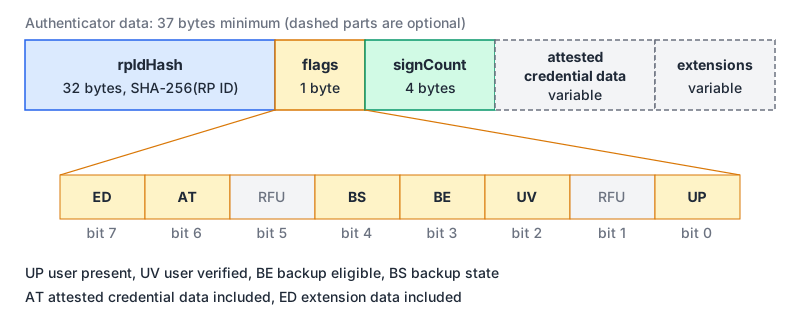
Per section 6.1 of the spec, the structure is at least 37 bytes. rpIdHash is the SHA-256 of the RP ID, which is how a credential stays bound to your domain and why expectedRPID matters. signCount is a 32-bit big-endian counter. The backup flags are where credentialDeviceType and credentialBackedUp come from: backup eligible means the credential can sync between devices, backup state means it currently is backed up.
| Column | Type | Why you need it |
|---|---|---|
id | text (base64url), unique | Look up the credential at sign-in |
public_key | bytes | Verify every future signature |
counter | integer | Clone detection, where the authenticator implements it |
transports | text array | Pass back in allowCredentials so the browser offers the right options |
device_type, backed_up | text, boolean | Decide whether to nudge the user to add a second passkey |
webauthn_user_id | text (base64url) | Map a discoverable sign-in back to an account |
user_id, created_at, last_used_at | FK, timestamps | Let users see and delete their passkeys |
Sign-in: proving possession
Authentication is the same shape with fewer moving parts. With discoverable credentials you can skip the username step: send an empty allowCredentials and let the user pick.
import {
  generateAuthenticationOptions,
  verifyAuthenticationResponse,
} from "@simplewebauthn/server";

app.post("/passkeys/login/options", async (req, res) => {
  const options = await generateAuthenticationOptions({ rpID, allowCredentials: [] });
  req.session.authChallenge = options.challenge;
  res.json(options);
});

app.post("/passkeys/login/verify", async (req, res) => {
  const expectedChallenge = req.session.authChallenge;
  delete req.session.authChallenge;

  const passkey = await db.passkeys.byId(req.body.id);
  if (!passkey) return res.status(401).end();

  const { verified, authenticationInfo } = await verifyAuthenticationResponse({
    response: req.body,
    expectedChallenge,
    expectedOrigin: origin,
    expectedRPID: rpID,
    credential: {
      id: passkey.id,
      publicKey: passkey.publicKey,
      counter: passkey.counter,
      transports: passkey.transports,
    },
    requireUserVerification: false,
  });
  if (!verified) return res.status(401).end();

  await db.passkeys.update(passkey.id, {
    counter: authenticationInfo.newCounter,
    lastUsedAt: new Date(),
  });
  await startSession(req, passkey.userId);
  res.json({ ok: true });
});
In the browser, the nicest version is conditional UI, where passkeys show up in the username field's autofill list. passkeys.dev recommends adding webauthn to the field's autocomplete tokens:
<input type="text" name="username" autocomplete="username webauthn" />import { startAuthentication, browserSupportsWebAuthnAutofill } from "@simplewebauthn/browser";
if (await browserSupportsWebAuthnAutofill()) {
const optionsJSON = await fetch("/passkeys/login/options", { method: "POST" }).then((r) => r.json());
// Resolves only when the user picks a passkey from autofill
const asseResp = await startAuthentication({ optionsJSON, useBrowserAutofill: true });
await fetch("/passkeys/login/verify", {
method: "POST",
headers: { "Content-Type": "application/json" },
body: JSON.stringify(asseResp),
});
}startAuthentication checks for an input with webauthn as the last autocomplete token and errors if there isn't one, unless you pass verifyBrowserAutofillInput: false.
Gotchas
- The user verification mismatch.
generateRegistrationOptionsandgenerateAuthenticationOptionsdefaultuserVerificationto"preferred", but both verify functions defaultrequireUserVerificationtotrue. If an authenticator doesn't perform user verification, your server rejects the response even though the browser happily completed the ceremony. Pick one policy and make both sides agree:"preferred"withrequireUserVerification: false, or"required"withtrue, which is what the passkeys guide suggests for sites with regulatory MFA requirements. - Counters of zero. Section 6.1.1 says authenticators without a counter leave
signCountat zero. The clone warning only applies when either the stored or the new value is non-zero and the new one isn't greater. So store and update the counter, but don't treat zero as an error. - RP ID is forever. Credentials are scoped to the RP ID through
rpIdHash. Moving fromapp.acme.exampletoacme.examplelater means users re-register. Choose the broadest domain you control up front. - Challenges are single-use and short-lived. Store them server-side, delete on first use, and expire them. The library's
timeoutdefault is 60 seconds. - Empty display names on older Chrome. The browser docs note a
NotAllowedErrorin Chrome up to 127 whenuser.displayNameis an empty string; set it to the username if you have nothing better. - Account recovery still exists. A user who loses their only device-bound passkey needs another way in. Encourage a second passkey and keep recovery as strong as sign-in, or it becomes the soft spot.
If you'd rather buy than build, the auth provider comparison covers hosted options and their plan limits, and the Clerk in Next.js post shows one integration. For the underlying signature primitives, the Web Crypto post walks through Ed25519 signatures in the browser.
Before you ship
rpIDis the right domain andexpectedOriginlists every origin that will call WebAuthn.- Challenges live server-side, are deleted on use, and expire.
userVerificationandrequireUserVerificationagree.excludeCredentialsis populated on registration;InvalidStateErrorgets a friendly message.- Public keys are stored as bytes; counters and
last_used_atupdate on every sign-in. - Users can list, rename and delete passkeys, and add a second one.
- The username field has
autocomplete="username webauthn"for autofill sign-in.
Written by AIDToolStack Editorial
Researched from official documentation, specifications and vendor pages, listed under Sources below. Last checked November 2026.
Sources
- www.w3.org/TR/webauthn-3/
- simplewebauthn.dev/docs/packages/server
- simplewebauthn.dev/docs/packages/browser
- simplewebauthn.dev/docs/advanced/passkeys
- github.com/MasterKale/SimpleWebAuthn/blob/master/packages/server/src/registration/generateRegistrationOptions.ts
- www.npmjs.com/package/@simplewebauthn/server
- www.npmjs.com/package/@simplewebauthn/browser
- passkeys.dev/docs/use-cases/bootstrapping/
Related Posts
Explore on AIDToolStack
Discover tools and servers featured in our directory.
AI Tools
MCP Servers
Sponsor Our Newsletter
Reach thousands of developers who are actively evaluating AI tools, MCP servers, and dev infrastructure. Our weekly newsletter goes to engaged technical decision-makers.
All sponsored content is clearly labeled per our editorial policy.