
HTTP/2 and HTTP/3 Explained: Multiplexing, QUIC and What Changes for Your App
Open DevTools on almost any site you work on, add the Protocol column to the Network panel, and you'll probably see h2 and maybe h3 next to most requests. Nobody on your team wrote code for that. The CDN or reverse proxy negotiated it. MDN's history of HTTP puts the quick uptake of HTTP/2 down to exactly that: it "didn't require changes to websites and applications".
So why should an application developer care? Because a handful of things really do change: what your headers may contain, which old performance tricks stopped making sense, why a feature like server push quietly disappeared, and what you need to open on a firewall before HTTP/3 works on your own server. This post covers the mechanics briefly and spends most of its time on those.
The specs, with dates
| Spec | What it is | Published |
|---|---|---|
| RFC 7540 | HTTP/2, first version | May 2015 (per MDN) |
| RFC 9000 | QUIC transport | May 2021 |
| RFC 9113 | HTTP/2, revised; obsoletes 7540 and 8740 | June 2022 |
| RFC 9114 | HTTP/3 over QUIC | June 2022 |
| RFC 9204 | QPACK, HTTP/3's header compression | referenced by RFC 9114 |
The thing to hold onto: methods, status codes, headers and caching rules are the same in all three versions. MDN says HTTP/3 "has the same semantics as earlier versions of HTTP". What differs is how messages are packaged and carried.
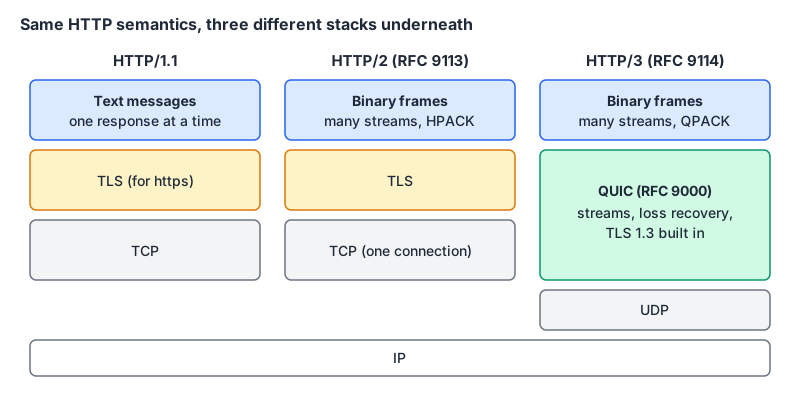
HTTP/2: one connection, many streams
In practice an HTTP/1.1 connection handles one request at a time: send it, wait for the whole response, then the next. Browsers worked around it by opening several connections; MDN says "most browsers allow up to six TCP connections per website (or origin)".
HTTP/2 switched to a binary framing layer. RFC 9113's abstract describes the result as "field compression and allowing multiple concurrent exchanges on the same connection". Each request/response pair is a stream, frames from different streams interleave on one TCP connection, and headers are compressed with HPACK because most of them repeat on every request.
The 2022 revision also cleaned house. It deprecates HTTP/2's original priority signalling scheme, which it says saw little uptake, and points to RFC 9218 instead. It deprecates the cleartext h2c upgrade, which "was never widely deployed". And it's candid about the limit of the design: "TCP head-of-line blocking is not addressed by this protocol."
That last sentence is the whole reason HTTP/3 exists.
HTTP/3: the same idea, moved onto QUIC
TCP delivers one ordered stream of bytes. If a single packet goes missing, everything behind it waits in the kernel until the retransmission arrives, even bytes that belong to a completely different HTTP/2 stream. MDN puts it plainly: because HTTP/2 runs over one TCP connection, loss handling at the TCP layer "can block all streams."
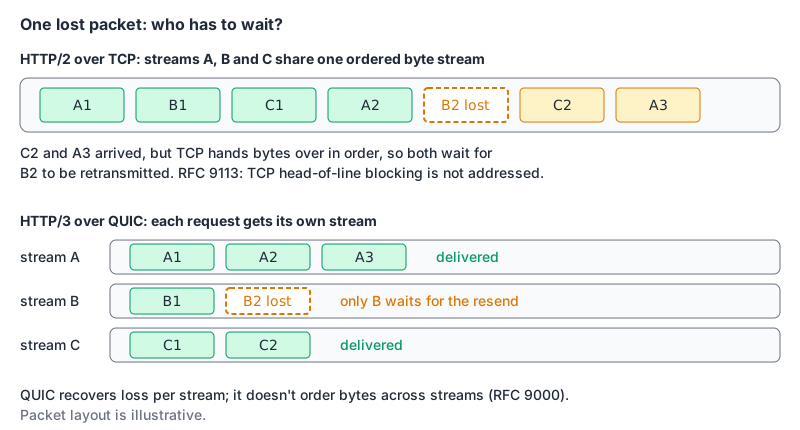
QUIC runs over UDP and does its own reliability per stream. RFC 9000 says data within a stream arrives in order, but "QUIC does not provide any means of ensuring ordering between bytes on different streams", and RFC 9114 maps each request to its own stream, so a lost packet only stalls the stream it belonged to. A few other properties fall out of the design:
- TLS is built in. RFC 9000 says "QUIC integrates the TLS handshake", using TLS 1.3 (the details are in RFC 9001). There's no unencrypted HTTP/3.
- Connections survive network changes. QUIC identifies connections by connection IDs rather than by IP and port, and "connection migration uses connection identifiers to allow connections to transfer to a new network path", which is what you want when a phone hops from Wi-Fi to mobile data.
- New header compression. HPACK assumes in-order delivery, which QUIC no longer guarantees across streams, so RFC 9114 replaces it with QPACK.
How a browser ends up on HTTP/3
A browser can't just try UDP on a hunch. The server has to advertise it. RFC 9114 describes the Alt-Svc response header, plus ALPN in the TLS handshake where "the token "h3" is used". A typical header:
Alt-Svc: h3=":443"; ma=86400ma is how long the client may remember the alternative, in seconds; MDN's Alt-Svc reference says it "defaults to 24 hours" when omitted. Since the advert arrives in a response, a client that learns about HTTP/3 only through Alt-Svc has already made at least one request over TCP. DNS can short-circuit that: RFC 9460 (November 2023) defines HTTPS records, which can carry alpn=h2,h3 so a client knows before it connects.
Browser support is no longer the constraint. caniuse lists HTTP/3 as supported from Chrome 87, Edge 87, Firefox 88 and Safari 16.0, about 95% of global usage. Clients that can't do it carry on with HTTP/2 or 1.1.
Turning it on for your own server
If you're behind Cloudflare, CloudFront or a similar CDN, the edge handles this, and the hop to your origin can stay HTTP/1.1. (Our Cloudflare vs CloudFront comparison covers the differences between those two.) On your own box:
- Caddy has
h1 h2 h3as its defaultprotocolsvalue (docs), so it's on already. Our Hetzner and Caddy deployment post uses that setup. - nginx has supported QUIC and HTTP/3 since 1.25.0 (nginx QUIC docs). The example in the http_v3 module docs listens twice on the same port and advertises with
Alt-Svc. Here it is adapted to port 443 (the docs use 8443):
server {
    listen 443 quic reuseport;
    listen 443 ssl;

    ssl_certificate     /etc/ssl/example.com.crt;
    ssl_certificate_key /etc/ssl/example.com.key;

    location / {
        add_header Alt-Svc 'h3=":443"; ma=86400';
    }
}
nginx's docs recommend OpenSSL 3.5.1 or later; with older OpenSSL it falls back to a compatibility layer that doesn't support early data. Then the step everybody forgets: QUIC is UDP, so UDP 443 has to be open in your firewall and your cloud provider's security group. If it isn't, browsers stay on HTTP/2 and nothing visibly breaks, which is how this goes unnoticed for months.
What actually changes in your code
Header names are lowercase. RFC 9113 says field names "MUST be converted to lowercase when constructing an HTTP/2 message", and receivers treat uppercase names as malformed. Code that looks headers up case-sensitively, hand-rolled proxies and tests that compare Content-Type byte-for-byte will notice.
Some headers are forbidden. HTTP/2 messages must not contain connection-specific fields: Connection, Proxy-Connection, Keep-Alive, Transfer-Encoding and Upgrade. TE is allowed only with the value trailers. A message containing the others is malformed. If you write a proxy, strip them when going from HTTP/1.1 to HTTP/2.
There's no reason phrase. An HTTP/2 response carries a :status pseudo-header and no "Not Found" text. MDN's Response.statusText page notes that "HTTP/2 does not support status messages", so don't build UI from statusText; map the number yourself (our HTTP status codes post has a table).
Server push is gone in browsers. Chrome disabled HTTP/2 push by default in Chrome 106 (Chrome blog) and pointed people to 103 Early Hints and preload instead. Early Hints sends Link: </main.css>; rel=preload; as=style style headers before the real response; per Chrome's docs it works for navigation requests only, mainly over HTTP/2 and HTTP/3.
The six-connection ceiling mostly goes away. This matters most for long-lived requests. MDN's EventSource page warns that without HTTP/2, Server-Sent Events are limited to 6 connections per browser and domain across all tabs, while over HTTP/2 the stream limit is negotiated and "defaults to 100". If users open your dashboard in several tabs, serving it over HTTP/2 is the fix. Our SSE post and the WebSockets vs SSE guide go further.
0-RTT can replay requests. QUIC and TLS 1.3 let a returning client send data in its first flight, and nginx enables that with ssl_early_data on. MDN's 425 Too Early page explains the cost: early data can be replayed, so servers should refuse to process anything non-idempotent sent that way and answer 425. If you turn 0-RTT on, decide which routes may accept it.
Your caching headers don't change at all; Cache-Control and ETags mean the same thing on every version.
Checking what you actually got
- DevTools: right-click the Network table header and enable Protocol; Chrome shows
h2for HTTP/2 andh3for HTTP/3 (reference). Unless an HTTPS DNS record advertises it,h3may only show up after an earlier response deliveredAlt-Svc. - curl:
curl -sS -o /dev/null -w '%{http_version}\n' https://example.comprints the version used.--http3-onlyfails instead of falling back, which makes a good test that UDP 443 is reachable. You need a curl built with HTTP/3 support; curl's HTTP/3 page says only the ngtcp2 backend is non-experimental. - Timing: compare
time_appconnectandtime_totalbetween--http2and--http3runs, then paste the phases into our HTTP timing analyzer to see where the time went.
A short decision list
- Behind a CDN? HTTP/2 and HTTP/3 are probably already on. Check the Protocol column and move on.
- Running your own reverse proxy? Enable HTTP/2 now; add HTTP/3 if you can open UDP 443 and your proxy supports it.
- Using SSE or many parallel requests? HTTP/2 is the fix for the connection limit.
- Writing a proxy or gateway? Lowercase header names and strip connection-specific headers.
- Turning on 0-RTT? Only for idempotent routes, and handle 425.
- Still relying on server push? Move to Early Hints or preload.
Written by AIDToolStack Editorial
Researched from official documentation, specifications and vendor pages, listed under Sources below. Last checked November 2026.
Sources
- www.rfc-editor.org/rfc/rfc9113.html
- www.rfc-editor.org/rfc/rfc9114.html
- www.rfc-editor.org/rfc/rfc9000.html
- www.rfc-editor.org/rfc/rfc9460.html
- developer.mozilla.org/en-US/docs/Web/HTTP/Guides/Evolution_of_HTTP
- developer.mozilla.org/en-US/docs/Web/HTTP/Reference/Headers/Alt-Svc
- developer.mozilla.org/en-US/docs/Web/API/EventSource
- developer.mozilla.org/en-US/docs/Web/API/Response/statusText
- developer.mozilla.org/en-US/docs/Web/HTTP/Reference/Status/425
- caniuse.com/http3
- nginx.org/en/docs/quic.html
- nginx.org/en/docs/http/ngx_http_v3_module.html
- caddyserver.com/docs/caddyfile/options
- developer.chrome.com/blog/removing-push
- developer.chrome.com/docs/web-platform/early-hints
- developer.chrome.com/docs/devtools/network/reference
- curl.se/docs/http3.html
Related Posts
Explore on AIDToolStack
Discover tools and servers featured in our directory.
AI Tools
MCP Servers
Sponsor Our Newsletter
Reach thousands of developers who are actively evaluating AI tools, MCP servers, and dev infrastructure. Our weekly newsletter goes to engaged technical decision-makers.
All sponsored content is clearly labeled per our editorial policy.