
How TOTP Two-Factor Codes Work: HOTP, Time Steps, Replay Protection and Recovery Codes
An authenticator app shows six digits that change every 30 seconds, works in airplane mode, and your server agrees with it without ever talking to the phone. There's no magic: both sides hold the same secret and the same idea of what time it is, and they run the same short calculation. Once you see that calculation, the design decisions around it (how big a window to accept, how to stop replays, why the secret can't be hashed, what recovery codes are for) mostly make themselves.
HOTP: a counter, an HMAC and a trick
TOTP is built on HOTP from RFC 4226. HOTP takes a shared secret K and a counter C:
HOTP(K, C) = Truncate(HMAC-SHA-1(K, C))C is an 8-byte big-endian integer. HMAC-SHA-1 produces 20 bytes, far too many to type, so the RFC uses "dynamic truncation" to pick 4 of them. The low 4 bits of the last byte give an offset from 0 to 15; you read 4 bytes from that offset, clear the top bit to get a 31-bit number, and take it modulo 10 to the power of the digit count. The RFC's own worked example shows it:
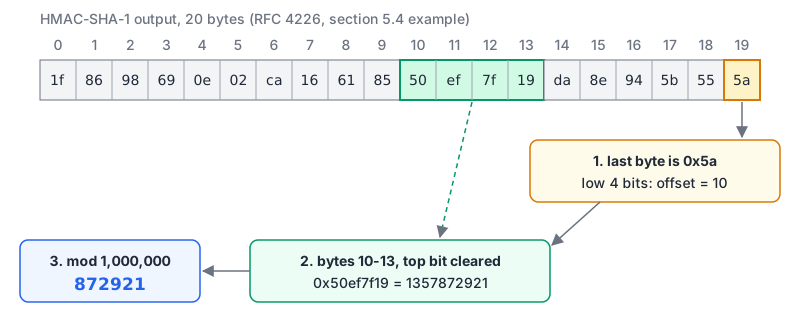
Clearing the top bit avoids signed versus unsigned disagreements between implementations. RFC 4226 requires at least 6 digits and says shared secrets MUST be at least 128 bits, with 160 bits recommended. The HMAC guide covers the HMAC part if you want the internals.
TOTP: replace the counter with the clock
RFC 6238 keeps everything above and swaps the counter for a time step:
T = floor((unix_time - T0) / X)      // T0 = 0, X = 30 seconds by default
TOTP = HOTP(K, T)
That's the whole algorithm. RFC 6238 also allows HMAC-SHA-256 and HMAC-SHA-512, and it notes that T must be able to exceed 32 bits so implementations keep working past 2038. Here it is in Node with no dependencies:
import { createHmac } from "node:crypto";

export function hotp(key, counter, digits = 6, algorithm = "sha1") {
  const msg = Buffer.alloc(8);
  msg.writeBigUInt64BE(BigInt(counter));
  const mac = createHmac(algorithm, key).update(msg).digest();
  const offset = mac[mac.length - 1] & 0x0f;
  const bin = mac.readUInt32BE(offset) & 0x7fffffff;
  return String(bin % 10 ** digits).padStart(digits, "0");
}

export function totp(key, unixSeconds, { step = 30, digits = 6, algorithm = "sha1" } = {}) {
  return hotp(key, Math.floor(unixSeconds / step), digits, algorithm);
}
Always check an implementation against the published test vectors before trusting it. The RFC 4226 vectors use the ASCII secret 12345678901234567890 with 6 digits; the RFC 6238 vectors use 8 digits, with that secret for SHA-1 and longer ASCII secrets (32 and 64 bytes) for SHA-256 and SHA-512:
| Source | Input | Expected |
|---|---|---|
| RFC 4226, Appendix D | counter 0 | 755224 |
| RFC 4226, Appendix D | counter 1 | 287082 |
| RFC 6238, Appendix B, SHA-1 | time 59 | 94287082 |
| RFC 6238, Appendix B, SHA-1 | time 1111111109 | 07081804 |
| RFC 6238, Appendix B, SHA-256 | time 1234567890 | 91819424 |
| RFC 6238, Appendix B, SHA-1 | time 20000000000 | 65353130 |
Put all ten HOTP vectors and all eighteen TOTP vectors in a unit test; the functions above reproduce every one. The last row is the one that catches 32-bit counters. Note the leading zero in 07081804: codes are strings, so never store or compare them as numbers.
Our TOTP generator runs the same algorithm in the browser with the common authenticator settings (SHA-1, 6 digits, 30 seconds). Paste in the Base32 secret GEZDGNBVGY3TQOJQGEZDGNBVGY3TQOJQ, which is the RFC test secret, or a throwaway secret, to compare against your server. Don't paste a production user's secret into any website, ours included.
Enrolment: the secret and the otpauth URI
To enrol, generate a random secret, show it as a QR code, and ask the user to type back a code to prove the app has it. The QR code almost always encodes an otpauth:// URI in the format Google documented on its Key Uri Format wiki:
otpauth://totp/Acme:alice%40example.com?secret=XK4A72IWW7JJFLTOSBMIEZBUOLGHDULK&issuer=Acme&algorithm=SHA1&digits=6&period=30The secret is Base32 (padding optional, and the wiki suggests leaving it out). issuer is "strongly recommended" and should match the label prefix. That page also says Google Authenticator ignores algorithm and period, and that digits is ignored on Android. Treat that as a reason to stick with SHA-1, 6 digits and 30 seconds unless you control the client app. The hash functions post covers how HMAC differs from a plain hash if SHA-1 here makes you nervous.
In practice I'd use a maintained library for the URI and verification. otpauth (9.6.0 on npm as of November 2026) does both:
import * as OTPAuth from "otpauth";

const secret = new OTPAuth.Secret({ size: 20 });   // 160 bits
const totp = new OTPAuth.TOTP({
  issuer: "Acme",
  label: "[email protected]",
  algorithm: "SHA1",
  digits: 6,
  period: 30,
  secret,
});

const uri = totp.toString();          // render as a QR code on the server
const delta = totp.validate({ token: userInput, window: 1 });
if (delta === null) { /* reject */ }
validate returns the step offset (which can be 0) or null, so check for null explicitly. The README also warns against secrets under 128 bits. If you're curious how the QR code itself encodes that URI, the QR codes post covers modes and error correction.
Verification: windows, replays and throttling
Phones drift and people type slowly, so servers accept codes from neighbouring steps:
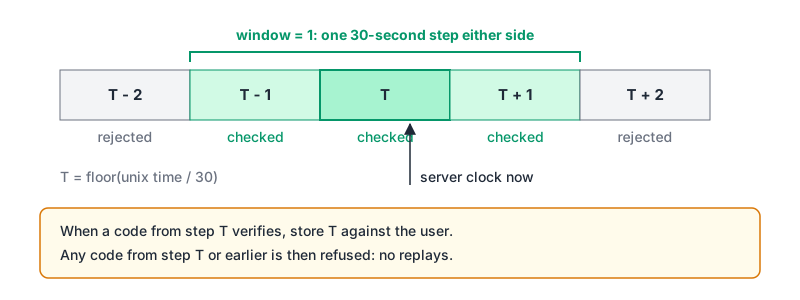
RFC 6238 recommends allowing at most one time step of network delay. It also describes resynchronisation: a verifier can record how far a particular device's clock is off and apply that offset to later checks. Keep the window small: every extra step is one more valid code an attacker's guess can hit, and the otpauth README says a window of 1 is enough in most cases.
Three rules that aren't optional:
- Accept each code once. RFC 6238 says a verifier must not accept the second attempt of the same OTP after a successful validation, and NIST SP 800-63B-4 says verifiers "SHALL accept a given OTP only once while it is valid". The cheap way: store the last accepted step per user and reject any step at or below it.
- Throttle. A 6-digit code has a million values. NIST requires rate limiting when the OTP output is under 64 bits (which a 6-digit code is) and caps consecutive failed attempts at no more than 100 before the authenticator is disabled (section 3.2.2). RFC 4226 adds that lockouts must work across sessions. Our rate limiting post has a Redis token bucket you can key by user ID.
- Compare in constant time. Use
crypto.timingSafeEqualon equal-length buffers, not===.
import { timingSafeEqual } from "node:crypto";

export function verifyTotp(key, code, lastUsedStep, now = Date.now() / 1000) {
  const current = Math.floor(now / 30);
  for (const step of [current - 1, current, current + 1]) {
    if (step <= lastUsedStep) continue;            // replay or older
    const expected = Buffer.from(hotp(key, step));
    const given = Buffer.from(String(code));
    if (given.length === expected.length && timingSafeEqual(given, expected)) {
      return { ok: true, step };                   // persist step as lastUsedStep
    }
  }
  return { ok: false };
}
Storing the secret
This is the part that surprises people coming from passwords. The server needs the raw secret to compute the expected code, so you can't hash it. NIST says verifier secrets "SHALL be strongly protected against unauthorized disclosure". In practice: encrypt the secret at rest with a key held outside the database (a KMS or an environment secret), decrypt only inside the verification path, and never log the otpauth URI. The Web Crypto post shows AES-GCM if you need the encryption step.
Recovery codes
Phones get lost, so enrolment should end with recovery codes. NIST SP 800-63B-4 section 4.2 is specific about saved recovery codes:
- each must include at least 64 bits from an approved random bit generator;
- they're stored hashed with an approved one-way function;
- after one is used, it's invalidated and the user is issued a new one;
- verification is throttled like any other authenticator, and issuing a replacement triggers an account recovery notification.
Because each code has at least 64 bits of entropy, a fast hash like SHA-256 is acceptable for storage, unlike passwords:
import { randomBytes, createHash } from "node:crypto";

const code = randomBytes(10).toString("hex");             // 80 bits, 20 hex chars
const display = code.match(/.{1,5}/g).join("-");          // e.g. 3f2a9-...
const stored = createHash("sha256").update(code).digest("hex");
Strip the hyphens before hashing on the way back in, and show the codes once.
Where TOTP stops
TOTP defeats attacks that only have the password, such as credential stuffing, but NIST is blunt that "OTP authentication is not phishing-resistant": a fake login page can ask for the code and relay it within the 30-second window. If phishing is your main threat, passkeys are the fix, and our password security post covers where they stand. TOTP remains a sensible second factor and a common fallback.
A short checklist for a TOTP implementation:
- 160-bit random secret, Base32 in an
otpauthURI withissuerset; QR rendered server-side. - SHA-1, 6 digits, 30 seconds unless you control the app.
- Window of 1, last-used step stored per user, constant-time comparison.
- Per-user throttling that survives new sessions; well under 100 consecutive failures.
- Secret encrypted at rest; never logged.
- Recovery codes with at least 64 bits each, hashed, single use, replaced after use.
- Unit tests that run the RFC 4226 and RFC 6238 vectors.
Written by AIDToolStack Editorial
Researched from official documentation, specifications and vendor pages, listed under Sources below. Last checked November 2026.
Sources
Related Posts
Explore on AIDToolStack
Discover tools and servers featured in our directory.
AI Tools
MCP Servers
Sponsor Our Newsletter
Reach thousands of developers who are actively evaluating AI tools, MCP servers, and dev infrastructure. Our weekly newsletter goes to engaged technical decision-makers.
All sponsored content is clearly labeled per our editorial policy.