
Getting Started with OpenAI Codex: Install, Sign-In, Sandbox Modes and AGENTS.md
"Codex" now means a terminal agent, an IDE extension, a desktop app and a cloud service that runs tasks against your GitHub repos. They share one engine and, mostly, one config file. If you're setting it up for the first time, the CLI is the piece to start with: it's open source (Apache-2.0), it shows you every permission decision, and everything you configure there carries over to the other surfaces.
Two housekeeping notes before the commands. OpenAI's Codex docs moved: links to developers.openai.com/codex/... now return a 308 redirect to learn.chatgpt.com, so older bookmarks still work but the paths changed. And the CLI moves fast; the releases page shows 0.167.0 as the latest stable on November 6, 2026, with 0.168 and 0.169 alphas already out. Anything version-specific below is as of November 2026.
1. Install
The README lists four routes:
# macOS and Linux (rerun the same command to update)
curl -fsSL https://chatgpt.com/codex/install.sh | sh

# npm
npm install -g @openai/codex

# Homebrew
brew install --cask codex
On Windows it's powershell -ExecutionPolicy ByPass -c "irm https://chatgpt.com/codex/install.ps1 | iex". Windows gets its own sandbox (more on that below), and WSL2 works too. WSL1 is unsupported from Codex 0.115, per the security docs.
2. Sign in, and choose how you pay
Run codex in a project, or codex login directly. The auth page describes the options:
codex login                                        # Sign in with ChatGPT (browser)
printenv OPENAI_API_KEY | codex login --with-api-key
codex login --device-auth                          # beta, for headless machines
codex login status
The choice is a billing decision as much as an auth one. With ChatGPT sign-in, usage comes out of your plan. The pricing page lists Plus at $20 a month with Codex in the web app, CLI, IDE extension and iOS; Pro starts at $100 (with $200 and $500 tiers); Business is $20 per user per month billed annually or $25 monthly. Plus has a five-hour window for local messages, and OpenAI's own example estimate is 15 to 160 GPT-6.1 Sol messages per window, which tells you how much it depends on the task. "Weekly limits may also apply."
With an API key, you pay standard API rates, and you lose the features that depend on ChatGPT: Codex cloud requires ChatGPT sign-in, and some curated plugins don't work. The auth docs recommend API keys for CI/CD.
One thing worth checking on day one: Codex caches credentials either in a plaintext file at ~/.codex/auth.json or in your OS credential store, and the cli_auth_credentials_store setting decides which. If your OS has a working keychain, pin it in ~/.codex/config.toml:
cli_auth_credentials_store = "keyring"The docs' own warning is that auth.json holds access tokens, so never commit it. Our environment variables and secrets guide covers the wider habit.
3. Pick a model
Codex uses "a recommended model" if you don't set one. The models page lists four for Codex as of November 2026:
| Model | What OpenAI says it's for |
|---|---|
gpt-6-astra | The most capable, for complex work |
gpt-6.1-sol | Near-Astra performance at lower cost |
gpt-6.1-terra | Fast and efficient; needs CLI 0.159.0 or later |
gpt-6-luna | The most efficient, for focused high-volume tasks |
Switch with /model inside a session, codex -m gpt-6.1-sol at launch, or model = "gpt-6.1-sol" in config.toml. gpt-5.5 was retired from Codex with ChatGPT sign-in on October 14, 2026, so if an old config pins it, update that line. Reasoning effort is a separate control (Low, Medium, High, Extra High in the CLI, plus Max and Ultra for some models). I'd leave both alone until you've used the defaults for a week.
4. Understand the sandbox before you let it run
This is the part people skip, and it's the reason I'd recommend Codex to a cautious team. Every session runs under two settings: a sandbox mode that the operating system enforces, and an approval policy that decides when Codex stops to ask.
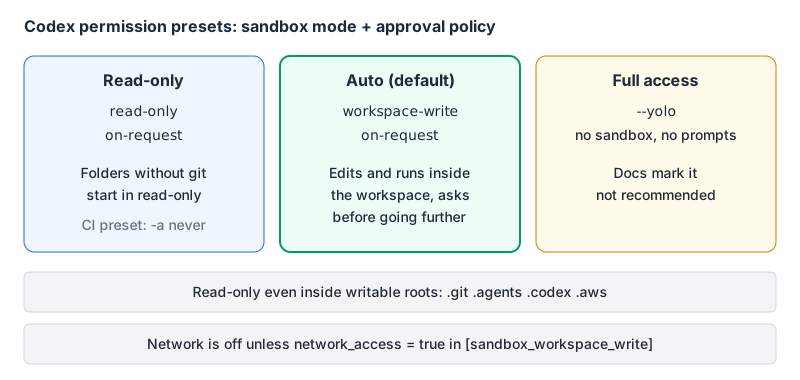
Per the approvals and security docs:
- Sandbox modes are
read-only,workspace-writeanddanger-full-access(--sandbox, orsandbox_modein config). - Approval policies are
on-request,never, or agranulartable (--ask-for-approval/-a, orapproval_policy). The olduntrustedvalue is no longer supported; the docs suggestread-onlypluson-requestinstead. - In a git repo you get the Auto preset:
workspace-writewithon-request. Codex edits files and runs commands in the workspace without asking, and asks before stepping outside it. - Even inside writable roots,
.git,.agents,.codexand.awsstay read-only. - Network access is off by default. Web search defaults to
"cached", not live.
The enforcement is real OS sandboxing: Seatbelt on macOS, bwrap plus seccomp on Linux, MXC on Windows. If your build needs to download packages, turn network on deliberately rather than reaching for --yolo:
[sandbox_workspace_write]
network_access = true
/permissions changes the mode mid-session. --dangerously-bypass-approvals-and-sandbox (alias --yolo) turns everything off, and the docs mark it not recommended. I'd only use it inside a throwaway container.
5. Write an AGENTS.md
Run /init and Codex drafts an AGENTS.md for the repo. Then edit it, because a generated file describes what's there, not what you want. Put in the commands that matter (how to run tests, lint, typecheck) and the rules a new teammate would get wrong.
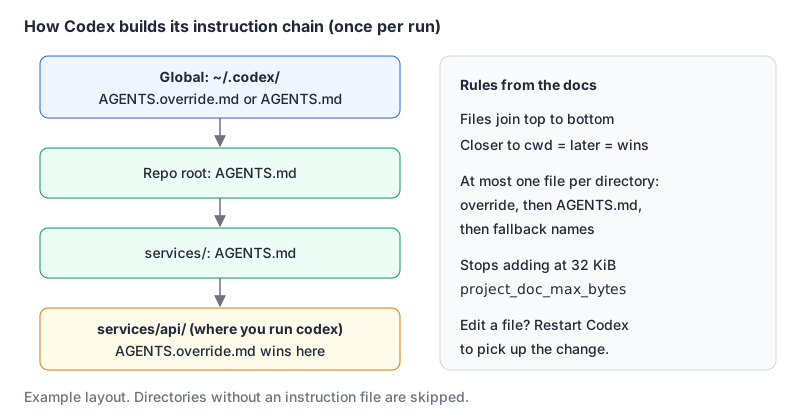
The AGENTS.md docs define the discovery rules. Codex reads one global file from ~/.codex (AGENTS.override.md if present, otherwise AGENTS.md), then walks from the repo root down to your current directory, taking at most one file per directory in the order AGENTS.override.md, AGENTS.md, then any names in project_doc_fallback_filenames. Files are concatenated root first, so the nearest one wins on conflicts. The combined size stops at project_doc_max_bytes, 32 KiB by default. The chain is built once per run, so restart after editing.
Because AGENTS.md is also read by other agents, including Claude Code when a repo has no CLAUDE.md, one file can serve a mixed team. If you're comparing the two tools, our Claude Code vs OpenAI Codex comparison goes through the differences.
6. Add MCP servers
Codex is an MCP client. Per the MCP docs, local servers go in by command and remote ones by URL:
codex mcp add context7 -- npx -y @upstash/context7-mcp
codex mcp add stripe --url https://mcp.stripe.com
codex mcp login stripe        # OAuth; add --no-browser on a remote box
codex mcp list
Each lands as a [mcp_servers.<name>] table in ~/.codex/config.toml, or in .codex/config.toml for a trusted project. For remote servers that take a token, use bearer_token_env_var = "NAME" so the secret stays in your environment. The CLI, IDE extension and ChatGPT desktop app share this configuration. Our pages for the Context7 and Stripe servers cover what each one exposes.
7. Use it in scripts, the IDE and the cloud
- Non-interactive:
codex exec "summarise the failing tests"runs once and exits. For CI the docs' read-only preset is--sandbox read-only --ask-for-approval never. - Review:
/reviewreviews uncommitted changes, a commit or your diff against a base branch. - IDE: the IDE extension runs in VS Code, Cursor and Windsurf; JetBrains and Xcode have their own integrations. The docs suggest Git checkpoints before and after each task.
- Cloud: Codex cloud runs tasks in an environment it sets up from your GitHub repo, then lets you commit or open a pull request. It needs ChatGPT sign-in.
Your first-hour checklist
- Install, run
codex login, and confirm withcodex login status. - Set
cli_auth_credentials_store = "keyring"if your OS supports it. - Leave the Auto preset on; enable
network_accessonly if your build needs it. - Run
/init, then rewriteAGENTS.mdwith real test and lint commands. - Add one MCP server you'll actually use, with secrets in environment variables.
- Try a contained task first, like writing tests for one module, and read the diff before you commit.
For a broader view of how Codex sits next to the other terminal agents, see our Codex tool page and the Gemini CLI vs OpenAI Codex comparison.
Written by AIDToolStack Editorial
Researched from official documentation, specifications and vendor pages, listed under Sources below. Last checked November 2026.
Sources
- github.com/openai/codex
- github.com/openai/codex/releases
- learn.chatgpt.com/docs/codex/cli
- learn.chatgpt.com/docs/auth.md
- learn.chatgpt.com/docs/pricing.md
- learn.chatgpt.com/docs/models.md
- learn.chatgpt.com/docs/agent-approvals-security.md
- learn.chatgpt.com/docs/agent-configuration/agents-md.md
- learn.chatgpt.com/docs/extend/mcp.md
- learn.chatgpt.com/docs/codex/ide.md
- learn.chatgpt.com/docs/cloud.md
- docs.stripe.com/mcp
Related Posts
Explore on AIDToolStack
Discover tools and servers featured in our directory.
AI Tools
MCP Servers
Sponsor Our Newsletter
Reach thousands of developers who are actively evaluating AI tools, MCP servers, and dev infrastructure. Our weekly newsletter goes to engaged technical decision-makers.
All sponsored content is clearly labeled per our editorial policy.