
Favicons and Web App Manifests: The Few Icon Files You Need and the Fields That Matter
Favicon checklists, including the size guide on this site, still list 57, 72, 114 and 152 pixel Apple icons, Windows tile images and a block of <link> tags longer than the rest of your <head>. Most of that targets devices and browsers from a decade ago. The set the current specs and vendor docs actually call for is small, and knowing why each file exists makes it easy to tell what you can drop.
This post goes through how browsers choose an icon, the handful of files worth shipping, the web app manifest field by field, and what each browser requires for installation, all from specs and vendor documentation as of November 2026.
How a browser picks an icon
The HTML standard describes it in a few sentences. If a page has several <link rel="icon"> elements, the browser must choose "the most appropriate icon according to the type, media, and sizes attributes." If several are equally appropriate, it uses the last one declared. If the chosen icon turns out to be unusable, say an unsupported format, it tries the next best. And if there's no icon link at all, browsers may request /favicon.ico from the site root.
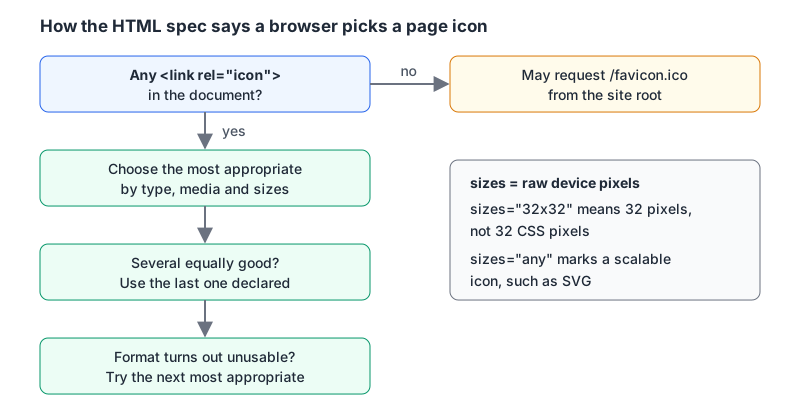
Two details from the same section matter in practice. sizes is measured in raw device pixels, not CSS pixels, so, in the spec's own example, an icon shown 50 CSS pixels wide on a 2x display needs 100 raw pixels. And sizes="any" marks a scalable icon, typically SVG. The spec also says the sizes values must not claim sizes the file doesn't contain.
MDN adds two warnings. The old rel="shortcut icon" form is non-conforming and "web authors must not use it anymore" (Google Search still accepts it for historical reasons). And Apple's iOS doesn't use rel="icon" or sizes for home screen icons. It reads its own apple-touch-icon instead.
The files worth shipping
<link rel="icon" href="/favicon.ico" sizes="32x32 48x48">
<link rel="icon" href="/icon.svg" type="image/svg+xml">
<link rel="apple-touch-icon" href="/apple-touch-icon.png">
<link rel="manifest" href="/manifest.webmanifest">
<meta name="theme-color" content="#2563eb">
Here's why each line is there.
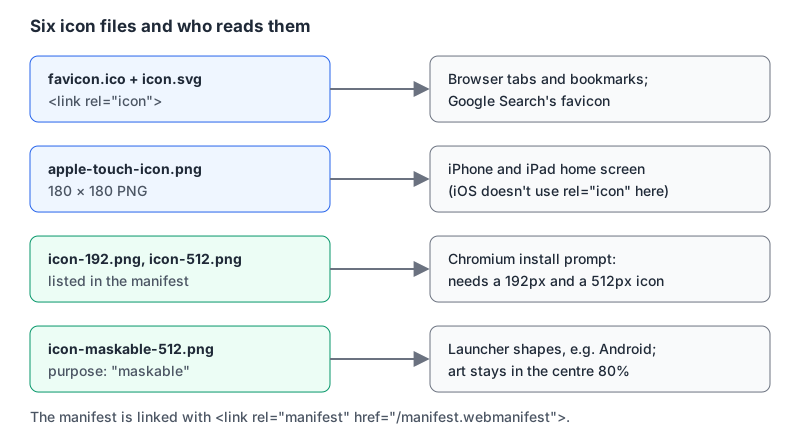
favicon.ico. It's the file browsers may fetch automatically when no icon link exists, which is reason enough to keep one at the root even if you also link it. An ICO can hold several bitmaps, and sizes should list exactly the ones inside: here a 32 and a 48 pixel image, the same pairing the HTML standard uses in its own example. The spec forbids claiming sizes the file doesn't contain.
icon.svg. One file that stays sharp at any size. Safari was the holdout here: WebKit announced that Safari 26 "now supports the SVG file format for icons everyplace there are icons in the interface, including favicons." Chromium has supported SVG favicons since version 80 and Firefox for far longer (caniuse data), and caniuse notes the file must be served as image/svg+xml. Because a supporting browser prefers the SVG and the rest fall back to the ICO, the two lines can coexist.
You can make the SVG switch for dark mode with a media query inside it:
<svg xmlns="http://www.w3.org/2000/svg" viewBox="0 0 32 32">
  <style>
    path { fill: #111827; }
    @media (prefers-color-scheme: dark) { path { fill: #f9fafb; } }
  </style>
  <path d="M4 4h24v24H4z"/>
</svg>
Don't rely on it everywhere yet. WebKit bug 309949, filed in March 2026 and still open as of November, reports that Safari's SVG favicons ignore prefers-color-scheme, so Safari always shows the light version. Pick colours that read on both light and dark tab bars and treat the media query as a bonus.
apple-touch-icon.png. Used when someone adds your site to an iPhone or iPad home screen. Apple's web app configuration guide shows a 180 × 180 icon for Retina iPhones, explains that the device picks the closest size and otherwise the smallest larger one, and says that without a link Safari searches the root for apple-touch-icon.png. That page is from Apple's documentation archive, last updated in 2016, but its root fallback and selection rules are why one 180 pixel file at the root covers it. The same document says iOS 7 and later don't add visual effects to touch icons, so the -precomposed variants are no longer needed. Give it the same art as your favicon with a little padding.
The manifest and its PNGs. These are for installation and app launchers, covered next.
theme-color. web.dev says it should match the manifest's theme_color, and Discord's link preview docs read it for the accent colour on embeds.
Google Search has its own favicon guidelines: the icon must be square, at least 8 × 8, ideally larger than 48 × 48, declared on the home page, and both the home page and the icon file must be crawlable by Googlebot and Googlebot-Image. It supports one favicon per hostname and asks that the URL not change often. Its list of supported formats (BMP, GIF, ICO, PNG, JPEG, PPM, TIFF) doesn't include SVG, so the ICO is what Google can use, which is the other reason for the 48 pixel image inside it.
The manifest, field by field
The Web App Manifest spec is still a W3C Working Draft; the latest one is dated 6 November 2026. It registers the application/manifest+json media type and the .webmanifest extension, though any JSON type works. A practical manifest:
{
  "id": "/",
  "name": "Example Notes",
  "short_name": "Notes",
  "description": "Fast, offline-friendly notes.",
  "start_url": "/app",
  "scope": "/",
  "display": "standalone",
  "theme_color": "#2563eb",
  "background_color": "#ffffff",
  "icons": [
    { "src": "/icon-192.png", "sizes": "192x192", "type": "image/png" },
    { "src": "/icon-512.png", "sizes": "512x512", "type": "image/png" },
    { "src": "/icon-maskable-512.png", "sizes": "512x512", "type": "image/png", "purpose": "maskable" }
  ]
}
What the less obvious fields do, per the spec and web.dev's manifest guide:
idis the app's identity. If you leave it out, it defaults to the processedstart_url, which means changingstart_urllater turns your app into a different app for anyone who installed it. Set it once.scopedefaults to thestart_urlwith its filename stripped. Navigations outside the scope leave the app window.start_urlmust be inside the scope.displaydefaults tobrowser. Usestandalonefor an app-like window.display_overridelets you list preferred modes checked beforedisplay.background_colorfills the splash screen on mobile, so match your page background.descriptionis truncated by Chrome at 300 characters, according to web.dev.icons[].purposecan beany(the default),maskableormonochrome.
On maskable icons: web.dev's maskable icon article defines the safe zone as a circle with a radius of 40% of the icon, so the important art must sit within the central 80%. It also advises against "purpose": "any maskable" on one file, because the extra padding a maskable icon needs makes it look small when used as a regular icon. Ship two files.
Link the manifest from every page with <link rel="manifest">. web.dev notes the request is made without credentials, so add crossorigin="use-credentials" if the manifest sits behind auth. If you're on Next.js, the install and service worker side is covered in Building a PWA with Next.js.
What each browser requires to install
From MDN's installability guide, as of November 2026:
| Browser | Requirement |
|---|---|
| Chrome, Edge, Samsung Internet | Manifest with name or short_name, a 192px and a 512px icon, start_url, display or display_override, and prefer_related_applications absent or false |
| All | Served over HTTPS, or from localhost / 127.0.0.1 during development |
| Safari on macOS | Add to Dock works for any site, with or without a manifest, from Safari 17 on macOS Sonoma |
| iOS and iPadOS | Installable from the Share menu in Safari, Chrome, Edge, Firefox and Orion since iOS 16.4 |
| Firefox desktop | Doesn't support installing from a manifest |
MDN is explicit that a service worker is not required for installability, though many PWAs use one for offline support. web.dev also notes that users can install a web app in Chrome even when it doesn't meet the installability criteria.
What you can delete
Based on the sources above, these are safe to drop from a new site:
rel="shortcut icon": non-conforming per MDN; plainrel="icon"is the standard form.- Apple icons at 57, 72, 114, 120, 152 and 167 pixels: one 180 pixel root file plus Apple's size-selection rule covers it.
apple-touch-icon-precomposed: unnecessary since iOS 7 stopped adding effects.msapplication-TileImage,msapplication-TileColorandbrowserconfig.xml: Windows 8-era pinned-site tiles. None of the current docs above mention them.- Separate 16 and 32 pixel PNG links, if your ICO holds those sizes and you ship an SVG.
Making the files
Start from a square SVG master. Our SVG to PNG Converter rasterises it at custom dimensions in the browser, so you can export 180, 192 and 512 pixel PNGs, then a 512 version with extra padding for the maskable icon. Check that padded version against the 80% safe zone; Chrome DevTools has a "Show only the minimum safe area for maskable icons" option in the Application panel's icons section, per web.dev.
The Favicon HTML Generator writes the <link> block for a path you give it, with toggles per icon type. It links the file you enter with the right type (SVG, PNG or ICO) and leaves the legacy "MS Tile" lines off by default; it doesn't write the manifest file itself, so add that by hand. The Favicon Size Guide lists the eight sizes that current browsers, Google Search, iOS and installable apps use, and leaves the legacy Apple and Windows sizes out.
Before you ship, run through this:
/favicon.icoreturns 200 at the root./icon.svgis served asimage/svg+xmland reads well on light and dark tabs./apple-touch-icon.pngexists at the root at 180 × 180.- The manifest has
id,name,start_url,displayand 192, 512 and maskable 512 icons. - Chrome DevTools' Application panel shows no manifest errors.
- robots.txt doesn't block the icon files or the home page from Googlebot.
Written by AIDToolStack Editorial
Researched from official documentation, specifications and vendor pages, listed under Sources below. Last checked November 2026.
Sources
- html.spec.whatwg.org/multipage/links.html
- developer.mozilla.org/en-US/docs/Web/HTML/Reference/Attributes/rel
- webkit.org/blog/16993/news-from-wwdc25-web-technology-coming-this-fall-in-safari-26-beta/
- caniuse.com/link-icon-svg
- github.com/Fyrd/caniuse/blob/main/features-json/link-icon-svg.json
- bugs.webkit.org/show_bug.cgi?id=309949
- developer.apple.com/library/archive/documentation/AppleApplications/Reference/SafariWebContent/ConfiguringWebApplications/ConfiguringWebApplications.html
- developers.google.com/search/docs/appearance/favicon-in-search
- www.w3.org/TR/appmanifest/
- web.dev/articles/add-manifest
- web.dev/articles/maskable-icon
- developer.mozilla.org/en-US/docs/Web/Progressive_web_apps/Guides/Making_PWAs_installable
- docs.discord.com/developers/link-previews/overview
Related Posts
Explore on AIDToolStack
Discover tools and servers featured in our directory.
AI Tools
MCP Servers
Sponsor Our Newsletter
Reach thousands of developers who are actively evaluating AI tools, MCP servers, and dev infrastructure. Our weekly newsletter goes to engaged technical decision-makers.
All sponsored content is clearly labeled per our editorial policy.