
Email Templates with React Email 6: Components, Rendering and Sending via Resend or Postmark
HTML email is stuck in roughly 2005: tables for layout, inline styles, and comments that only Outlook reads. React Email doesn't change any of that. What it changes is who writes it. You write components with props and types, and the library emits the table soup for you.
Here's the current setup as of November 2026, a real template rendered locally, and how to hand the output to Resend or Postmark without the usual surprises.
What changed in versions 5 and 6
If you set React Email up a year ago, your imports are probably out of date. From the changelog:
- 6.0 (16 April 2026) moved the components and render utilities into the single
react-emailpackage, saying@react-email/componentsand the per-component packages are "no longer needed." The preview server was renamed to@react-email/ui. On npm,@react-email/components1.0.12 is now marked "Package no longer supported." - 5.0 (7 November 2025) moved the Tailwind component to Tailwind v4 and added a dark mode switcher to the preview that simulates how clients invert colours.
The upgrade guide boils down to: remove @react-email/components and @react-email/preview-server, install react-email and @react-email/ui, and change imports to from "react-email". The latest release is react-email 6.11.8, published on 6 November 2026 (releases), and npm lists its engine requirement as Node 20.19.0 or later.
Setup, per the manual setup docs:
npm install react-email react react-dom -E
npm install @react-email/ui -D -E
Add "email:dev": "email dev" to your scripts, put templates in emails/, and the preview runs on localhost:3000.
A template that renders
This is a password reset email. It typechecks under TypeScript 7 in strict mode, and I rendered it with react-email 6.11.8 on Node.
// emails/password-reset.tsx
import { Body, Button, Container, Head, Heading, Html, Preview, Section, Text } from "react-email";

type Props = { name: string; resetUrl: string; expiresInMinutes: number };

export default function PasswordReset({ name, resetUrl, expiresInMinutes }: Props) {
  return (
    <Html lang="en">
      <Head />
      <Preview>{`Reset your password (link expires in ${expiresInMinutes} minutes)`}</Preview>
      <Body style={{ backgroundColor: "#f6f7f9", fontFamily: "Arial, sans-serif" }}>
        <Container style={{ maxWidth: 560, padding: 24, backgroundColor: "#ffffff" }}>
          <Heading as="h1" style={{ fontSize: 22 }}>Reset your password</Heading>
          <Text>Hi {name}, someone asked to reset the password for your account.</Text>
          <Section style={{ textAlign: "center", margin: "24px 0" }}>
            <Button href={resetUrl} style={{ backgroundColor: "#2563eb", color: "#fff", padding: "12px 20px", borderRadius: 6 }}>
              Choose a new password
            </Button>
          </Section>
          <Text>If you didn't ask for this, ignore this email. The link expires in {expiresInMinutes} minutes.</Text>
          <Text data-skip-in-text="true" style={{ color: "#6b7280", fontSize: 12 }}>Sent by Example Inc.</Text>
        </Container>
      </Body>
    </Html>
  );
}

PasswordReset.PreviewProps = {
  name: "Sam", resetUrl: "https://example.com/reset?t=abc", expiresInMinutes: 30,
} satisfies Props;
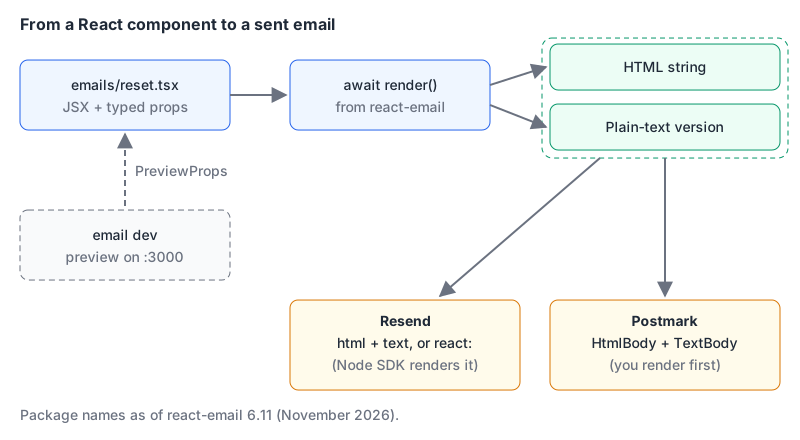
PreviewProps is how the preview server gets sample data; the docs' React Intl guide sets it the same way. I built the Preview text as one template string so it renders as a single text node.
What came out is worth looking at, because it explains why you don't want to write this by hand. The rendered HTML was 4,596 bytes for those few lines. Body became a full-width <table role="presentation"> with the font moved onto its <td>, Container became a centred table, and Preview became a hidden div padded with invisible characters so the inbox snippet doesn't pick up the email body. The Button came out as an <a> with Outlook-only padding hacks inside conditional comments:
<span><!--[if mso]><i style="mso-font-width:500%;mso-text-raise:18px" hidden>  </i><![endif]--></span>Remember that line. It matters in the gotchas below.
Rendering HTML and plain text
The render docs show three helpers, all imported from react-email:
import { render, pretty, toPlainText } from "react-email";

const html = await render(<PasswordReset name="Sam" resetUrl={url} expiresInMinutes={30} />);
const readable = await pretty(html); // indented, for debugging or snapshots
const text = toPlainText(html);
render is async, so forgetting the await hands your email provider a Promise. The plain-text output for my template was:
RESET YOUR PASSWORD

Hi Sam, someone asked to reset the password for your account.

Choose a new password https://example.com/reset?t=abc

If you didn't ask for this, ignore this email. The link expires in 30 minutes.
The footer marked data-skip-in-text="true" was left out of the text version and kept in the HTML, as documented. render(element, { plainText: true }) produced the same text.
Send both parts. Recipients who can't or won't view HTML get something readable, and our deliverability guide covers the authentication records that matter more for the inbox than the markup does.
Sending with Resend
Resend's Node SDK takes the component directly through the react parameter, which the send email API reference marks "Only available in the Node.js SDK." Its Node guide passes the component as a function call rather than JSX, which also works from a plain .ts file:
import { Resend } from "resend";
import PasswordReset from "./emails/password-reset";

const resend = new Resend(process.env.RESEND_API_KEY);

const { data, error } = await resend.emails.send(
  {
    from: "Example <[email protected]>",
    to: [user.email],
    subject: "Reset your password",
    react: PasswordReset({ name: user.name, resetUrl, expiresInMinutes: 30 }),
  },
  { idempotencyKey: `password-reset/${resetRequest.id}` },
);
if (error) throw new Error(`${error.name}: ${error.message}`);
A few details from Resend's docs and SDK:
- The SDK returns
{ data, error }rather than throwing, so checkerroryourself. - If you omit
text, Resend generates a plain-text version from the HTML. Pass an empty string to opt out. - Idempotency keys expire after 24 hours and can be up to 256 characters. A key like
password-reset/<id>stops a retried job from sending the same reset twice. toaccepts up to 50 addresses.- In SDK version 6.37.0 the
reactoption works by dynamically importing@react-email/renderand throws "Failed to render React component" if it can't.react-email6 depends on that package, so a normal install has it; if you hit the error in a pruned deployment, render tohtmlyourself instead. - If you use Resend's hosted templates (the
templatefield), you can't also sendhtml,textorreact.
Sending with Postmark
Postmark doesn't know about React, so render first and pass strings. The React Email Postmark guide does exactly that with the postmark package (5.1.0 on npm as of November 2026):
import { ServerClient } from "postmark";
import { render, toPlainText } from "react-email";

const client = new ServerClient(process.env.POSTMARK_SERVER_TOKEN!);
const html = await render(PasswordReset({ name: user.name, resetUrl, expiresInMinutes: 30 }));

await client.sendEmail({
  From: "[email protected]",
  To: user.email,
  Subject: "Reset your password",
  HtmlBody: html,
  TextBody: toPlainText(html),
  MessageStream: "outbound",
});
From the Postmark email API docs: the From address needs a confirmed sender signature, one of HtmlBody or TextBody is required (the page doesn't promise to generate text for you, so send both), MessageStream defaults to the transactional outbound stream, and a message can have at most 50 recipients across To, Cc and Bcc. The batch endpoint takes up to 500 messages and 50 MB per call, and returns a 200 even when some messages fail, so check each result's ErrorCode.
Both snippets are the shape I typechecked locally; I didn't send real mail.
Gotchas
- Comment-stripping breaks Outlook. A minifier or sanitiser that removes every HTML comment also removes the
<!--[if mso]>blocks React Email'sButtonrelies on. I ran a simple regex minifier over my rendered email and both conditional comments were gone. If something in your pipeline post-processes the HTML, check it keeps conditional comments, or skip it: the rendered output is already compact. - Porting old templates. Our HTML to JSX converter handles the mechanical part of turning an existing email into a component (class to className, inline style strings to objects, self-closing void tags). It converts HTML comments into JSX comments, though, which never render, so any Outlook conditional comments in the original are dropped (the tool warns you when it finds them). Rebuild those parts with React Email's components rather than copying them across.
email exportignores PreviewProps. The CLI's export command is documented as a secondary option torender(CLI docs). When I ranemail export --plainTexton the template above, the output read "Hi , someone asked..." and "expires in minutes": it rendered without any props. Give components safe defaults, or render in code with real data.- Sending from an assistant. Both providers have official MCP servers, Resend's and Postmark's, handy for sending test versions of a template while you build it. For Postmark, use the scoped
@activecampaign/postmark-mcppackage: in September 2025 an unrelated npm package namedpostmark-mcpadded a hidden BCC of every outgoing email to an attacker's address from version 1.0.16 onward, per Qualys's write-up. Our email MCP roundup compares the options.
A short checklist for each new template
- Imports come from
react-email, not@react-email/components. - Props are typed, and
PreviewPropsholds realistic sample data. Previewtext is set and reads well on its own.- You
await render()and send both HTML and a plain-text part. - Nothing strips comments from the output before it's sent.
- Retries use an idempotency key (Resend) or your own dedupe (Postmark).
- You've opened the preview's dark mode switcher and checked the email still reads in an inverted inbox.
Written by AIDToolStack Editorial
Researched from official documentation, specifications and vendor pages, listed under Sources below. Last checked November 2026.
Sources
- react.email/docs/changelog
- react.email/docs/getting-started/updating-react-email
- react.email/docs/getting-started/manual-setup
- react.email/docs/utilities/render
- react.email/docs/cli
- react.email/docs/guides/internationalization/react-intl
- react.email/docs/integrations/postmark
- github.com/resend/react-email/releases
- www.npmjs.com/package/react-email
- www.npmjs.com/package/@react-email/components
- resend.com/docs/send-with-nodejs
- resend.com/docs/api-reference/emails/send-email
- postmarkapp.com/developer/api/email-api
- github.com/ActiveCampaign/postmark.js
- threatprotect.qualys.com/2025/09/30/malicious-mcp-server-on-npm-postmark-mcp-exploited-in-attack/
Related Posts
Explore on AIDToolStack
Discover tools and servers featured in our directory.
AI Tools
MCP Servers
Sponsor Our Newsletter
Reach thousands of developers who are actively evaluating AI tools, MCP servers, and dev infrastructure. Our weekly newsletter goes to engaged technical decision-makers.
All sponsored content is clearly labeled per our editorial policy.