
DuckDB for Developers: SQL on CSV, JSON and Parquet Files Without a Server
Someone drops an 8 MB CSV export in Slack and asks which country brought in the most revenue last quarter. You could import it into Postgres, or open it in a spreadsheet and wait. Or you could run one SQL query against the file where it sits. That's what DuckDB is for: an analytical SQL engine that runs inside your process, with no server, and reads CSV, JSON and Parquet directly.
This post uses real output. I installed the Python package with pip install duckdb into a virtualenv, which gave me 2.0.0, generated a 200,000-row orders file, and ran everything below against it. I didn't run the S3, MotherDuck or client-server examples, and I say so where they appear.
DuckDB 2.0, and what it means for upgrades
As of November 2026 the current release is DuckDB 2.0.0, released 21 October 2026. It's a long-term support release, supported until at least October 2027. Version 1.4 is supported until 17 November 2026 and 1.5 was extended to March 2027.
The upgrade note that matters: database files written by 2.0 can't be opened by versions before 2.0. Existing files stay readable by older versions as long as they aren't converted. The announcement suggests testing on a shadow copy first, and waiting for the first patch release (promised for November) if the workload is critical. Other breaking changes include the new PEG parser becoming the default (the old one is available via SET enable_legacy_parser = true and the legacy_parser extension), single-arrow lambda syntax being disabled, and macOS on Intel being phased out.
If you only query CSV and Parquet files and never persist a .duckdb file, the format change doesn't touch you.
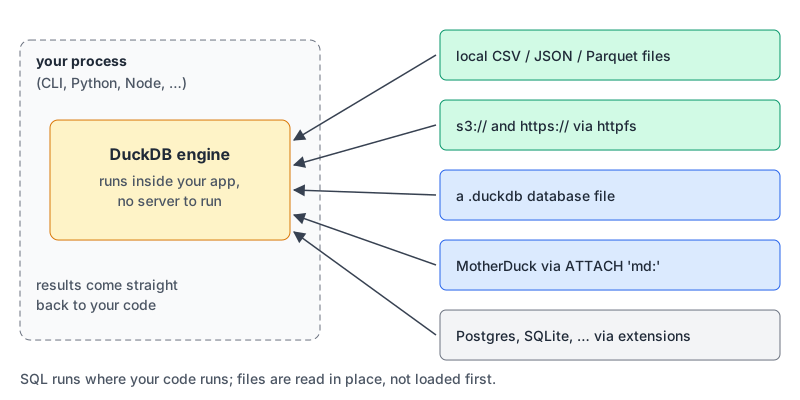
Querying files where they sit
A file path in FROM is enough. DuckDB's CSV sniffer detects the delimiter, quoting, header row and column types from a sample (20,480 rows by default):
D DESCRIBE SELECT * FROM 'orders.csv'
┌─────────────┬─────────────┬─────────┐
│ column_name │ column_type │  null   │
├─────────────┼─────────────┼─────────┤
│ order_id    │ BIGINT      │ YES     │
│ customer_id │ BIGINT      │ YES     │
│ ordered_at  │ TIMESTAMP   │ YES     │
│ total       │ DOUBLE      │ YES     │
│ channel     │ VARCHAR     │ YES     │
└─────────────┴─────────────┴─────────┘
(I trimmed three empty columns.) ordered_at came out as TIMESTAMP because the values had a 00:00:00 time part. When a guess is wrong, for example zip codes read as integers and losing leading zeros, override that one column with read_csv('orders.csv', types = {'zip': 'VARCHAR'}).
Joins across formats just work. Here the customers are a JSON-lines file:
SELECT c.country, count(*) AS orders, round(sum(o.total), 2) AS revenue
FROM 'orders.csv' o
JOIN 'customers.json' c ON c.id = o.customer_id
GROUP BY ALL
ORDER BY revenue DESC;
┌─────────┬────────┬────────────┐
│ country │ orders │ revenue │
├─────────┼────────┼────────────┤
│ US │ 52000 │ 5473644.58 │
│ IN │ 52000 │ 5461910.37 │
│ DE │ 48000 │ 5040747.5 │
│ BR │ 48000 │ 5036960.06 │
└─────────┴────────┴────────────┘GROUP BY ALL saved me listing the grouping column twice. If your analytical SQL is rusty, our window functions guide is a good companion. For JSON quirks before a file reaches DuckDB (big integers, JSON Lines), see our JSON tips.
Parquet: why it's worth converting
If you'll query a file more than a couple of times, convert it once:
COPY (FROM 'orders.csv') TO 'orders.parquet' (FORMAT parquet);On my synthetic data the CSV was 8,199,713 bytes and the Parquet file 1,558,529, about a fifth. Your ratio will differ; repetitive columns compress best. The Parquet docs say the default codec is Snappy, which parquet_metadata() confirmed:
D SELECT path_in_schema, compression, num_values
  FROM parquet_metadata('orders.parquet') WHERE row_group_id = 0;
┌────────────────┬─────────────┬────────────┐
│ path_in_schema │ compression │ num_values │
├────────────────┼─────────────┼────────────┤
│ order_id       │ SNAPPY      │     122880 │
│ customer_id    │ SNAPPY      │     122880 │
│ ordered_at     │ SNAPPY      │     122880 │
│ total          │ SNAPPY      │     122880 │
│ channel        │ SNAPPY      │     122880 │
└────────────────┴─────────────┴────────────┘
The bigger win is that DuckDB pushes column selection and filters into the Parquet reader. EXPLAIN shows both:
╭─ Parquet Scan ─────────────────────────────────╮
│ Function: PARQUET_SCAN                         │
│ Projections: channel, total                    │
│ Filters:                                       │
│ ordered_at >= '2026-10-01 00:00:00'::TIMESTAMP │
│ ~40,000 rows                                   │
╰────────────────────────────────────────────────╯
Only two of five columns are read. The filter can also skip whole row groups using their min/max statistics, but only if the data is laid out so the ranges don't overlap. My file had dates cycling through the year, so both row groups covered January to October and nothing could be skipped. Sorting before writing changed that:
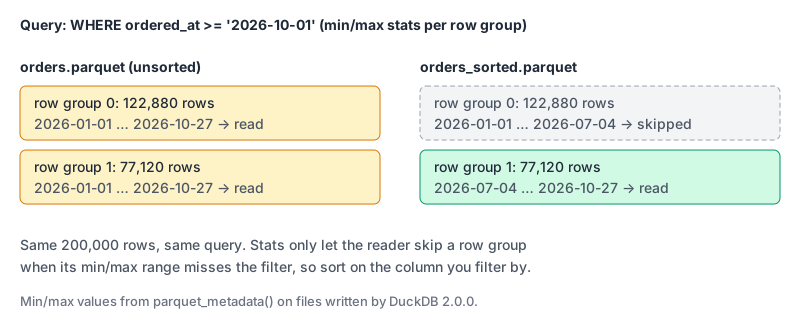
COPY (FROM 'orders.parquet' ORDER BY ordered_at)
  TO 'orders_sorted.parquet' (FORMAT parquet);
For data you'll filter by a low-cardinality column, partitioned writes give you Hive-style folders:
D COPY (FROM 'orders.parquet')
  TO 'orders_by_channel' (FORMAT parquet, PARTITION_BY (channel), OVERWRITE_OR_IGNORE);
orders_by_channel/channel=android/data_0.parquet
orders_by_channel/channel=ios/data_0.parquet
orders_by_channel/channel=web/data_0.parquet
Reading them back with read_parquet('orders_by_channel/*/*.parquet', hive_partitioning = true) restores channel as a column.
Files on S3 (not run here)
The httpfs extension reads s3:// and https:// paths. The S3 docs show a secret that uses the normal AWS credential chain:
CREATE OR REPLACE SECRET aws (TYPE s3, PROVIDER credential_chain);
SELECT channel, count(*) FROM read_parquet('s3://your-bucket/orders/*.parquet') GROUP BY channel;
Globs use ListObjectsV2, and COPY ... TO 's3://...' writes CSV or Parquet via multipart upload. DuckDB 2.0 added asynchronous I/O that keeps several reads in flight, which the announcement credits with "dramatically faster" queries on object storage. Everything above about pushdown applies doubly here, because skipped row groups are bytes you never download.
One writer, many readers (and what's new)
DuckDB's concurrency model is simple: one process can open a database file read-write, or many processes can open it with access_mode = 'READ_ONLY'. Not both. A web app with several worker processes all writing to one .duckdb file won't work; that's an OLTP job, and Postgres or SQLite are better at it (our SQLite in production post covers that end).
Version 2.0 polishes Quack, a native protocol first released in 1.5.3 that turns a DuckDB process into a server. From the announcement: CALL quack_serve(token = 'my_token'); on one side, ATTACH 'quack:localhost' AS qk (TOKEN 'my_token'); on the other. It listens on localhost only by default, and the docs recommend a TLS-terminating reverse proxy for remote clients. The other route to many writers is DuckLake with a Postgres catalog. I haven't run either, so treat them as options to evaluate.
Two smaller things in the box: duckdb -ui opens a local web UI on port 4213 (UI docs); queries run locally, but the UI's own files are fetched from ui.duckdb.org. And the 2.0 CLI detects when a coding agent is driving it and switches to compact Markdown output and JSON errors, which you can force with -agent or turn off with -no-agent.
Where MotherDuck fits
MotherDuck is a hosted DuckDB service. From the CLI you run ATTACH 'md:'; (or start with duckdb "md:"), sign in through the browser or set motherduck_token, and query cloud databases alongside local files.
One timing problem: as of November 2026 MotherDuck's version schedule lists support for DuckDB clients 1.4.x to 1.5.6, with no mention of 2.0. If you use MotherDuck, pin your client to 1.5.6 until that page lists 2.0.
For AI-assisted analysis, the MotherDuck MCP server works with plain local DuckDB too, read-only by default when pointed at a file; our data warehouse MCP roundup compares it with BigQuery, Snowflake and ClickHouse servers.
A short checklist
- Ad hoc questions about a file:
duckdb, thenFROM 'file.csv'. No import step. - Querying the same data repeatedly: convert to Parquet, sorted by the column you filter on.
- Many files: glob them, and partition by a column you filter by.
- Persisting a
.duckdbfile: decide on 1.5 or 2.0 deliberately, since 2.0 files don't open in 1.x. - Several processes writing: not a plain DuckDB file. Look at Quack or DuckLake, or use a database built for it.
- Using MotherDuck: stay on a client version its schedule lists.
Written by AIDToolStack Editorial
Researched from official documentation, specifications and vendor pages, listed under Sources below. Last checked November 2026.
Sources
- github.com/duckdb/duckdb/releases/tag/v2.0.0
- duckdb.org/2026/10/21/announcing-duckdb-200.html
- duckdb.org/docs/2.0/data/csv/auto_detection.html
- duckdb.org/docs/2.0/data/json/overview.html
- duckdb.org/docs/2.0/data/parquet/overview.html
- duckdb.org/docs/2.0/core_extensions/httpfs/s3api.html
- duckdb.org/docs/2.0/connect/concurrency.html
- duckdb.org/docs/2.0/core_extensions/ui.html
- duckdb.org/docs/2.0/core_extensions/overview.html
- motherduck.com/docs/getting-started/interfaces/connect-query-from-duckdb-cli/
- motherduck.com/docs/troubleshooting/version-lifecycle-schedules/
- github.com/motherduckdb/mcp-server-motherduck
Related Posts
Explore on AIDToolStack
Discover tools and servers featured in our directory.
AI Tools
MCP Servers
Sponsor Our Newsletter
Reach thousands of developers who are actively evaluating AI tools, MCP servers, and dev infrastructure. Our weekly newsletter goes to engaged technical decision-makers.
All sponsored content is clearly labeled per our editorial policy.