
Dependency Vulnerability Scanning: npm audit, Dependabot Alerts, OSV-Scanner and Snyk
Run npm audit on any app older than a year and you'll get a wall of red. Some of it is a critical bug in something you ship to production. A lot of it is a regex denial-of-service in a dev-only build tool's dependency's dependency. The scanners are good at finding matches; the work is deciding which ones matter, gating new ones, and not training your team to ignore the output.
This post covers the four tools most JavaScript teams end up choosing between (npm audit, GitHub's Dependabot alerts, OSV-Scanner and Snyk), what each one actually checks, and a setup that gates pull requests without blocking every deploy on old noise. Keeping dependencies current is a separate job, covered in our Dependabot and Renovate post. This one is about knowing when what you have is vulnerable.
What every scanner is doing
They all do the same thing underneath: read your lockfile, get the exact resolved version of every package (direct and transitive), and match those against a database of advisories. The differences are which database, where the scan runs, and what happens with the result.
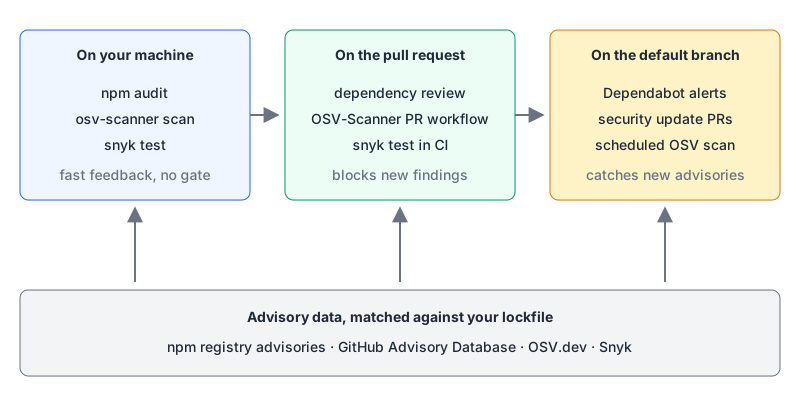
The lockfile is the input that matters. A scanner reading only package.json sees ranges, not what's installed. npm audit requires a package-lock.json by default for exactly this reason.
npm audit: free, built in, blunt
Per the npm audit docs, npm sends your package names and versions to the registry's bulk advisory endpoint and reports what comes back. The flags that make it usable in CI:
# fail only on high or critical
npm audit --audit-level=high

# ignore devDependencies (the default when NODE_ENV=production)
npm audit --omit=dev

# machine-readable output for your own filtering
npm audit --json
Note what --audit-level does: it sets the severity that causes a non-zero exit, but it "does not filter the report output." You'll still see everything.
npm audit fix applies fixes within your declared ranges by running a full install. npm audit fix --force will jump major versions, and the docs are blunt about it: if you don't have a clear idea of what you want to do, "it is strongly recommended that you do not use this option!" Treat --force as "open a branch and read the changelogs," never as a CI step.
There's also npm audit signatures, which checks registry signatures and provenance attestations on what you've installed. It's a different question (was this package tampered with?) and a cheap one to add.
The limitation is memory. The npm audit docs don't describe a way to record "we've assessed this one, ignore it until March," so teams either live with the noise or wrap it in their own scripts. That's the gap the other tools fill. If you're on pnpm or Yarn, our package manager comparison is a starting point for their equivalents.
Dependabot alerts: the baseline on GitHub
GitHub's docs say the dependency graph and Dependabot alerts are included in all plans. The alerts overview explains how they work: GitHub builds a dependency graph from your default branch and matches it against the GitHub Advisory Database. A new alert fires when either side changes, a new advisory or a push that changes your dependencies.
Limitations straight from that page: only advisories reviewed by GitHub trigger alerts, new vulnerabilities can take time to appear, archived repos aren't scanned, and for GitHub Actions only semantic versions are covered, not SHA pins. When you first enable it, notifications only cover vulnerabilities found from then on, so check the existing list by hand.
Turn on Dependabot security updates too. Per the security updates docs, when an alert fires Dependabot tries to raise a PR to the "minimum version that includes the patch", and reports an error on the alert if it can't. These are separate from version updates in dependabot.yml (our Dependabot config generator handles those).
Gating PRs with dependency review
Alerts tell you about the past. To stop a PR adding a new vulnerable package, use the dependency review action. GitHub's docs say the action is available for all public repositories; private ones need GitHub Code Security or Advanced Security (Code Security is $30 per active committer per month per the April 2025 changelog).
name: Dependency Review
on: [pull_request]

permissions:
  contents: read

jobs:
  dependency-review:
    runs-on: ubuntu-latest
    steps:
      - uses: actions/checkout@v6
      - uses: actions/dependency-review-action@v5
        with:
          fail-on-severity: high
fail-on-severity defaults to low and accepts low, moderate, high or critical. Because it only looks at what the PR changes, it never fails on old debt. Make it a required check and new vulnerable dependencies stop at review.
OSV-Scanner v2: open data, many ecosystems
OSV-Scanner is Google's open-source (Apache 2.0) scanner and describes itself as an "officially supported frontend to the OSV database" at osv.dev. It was at v2.7.0 as of its 12 October 2026 release. It's the one I'd pick for a polyglot repo, since one command reads npm, Cargo, Go and other lockfiles, plus SBOMs.
# scan every lockfile under the repo
osv-scanner scan source -r .

# specific lockfiles
osv-scanner scan source --lockfile=package-lock.json --lockfile=Cargo.lock

# a container image, or an exported archive
osv-scanner scan image my-app:latest
osv-scanner scan image --archive ./my-app.tar
Two features set it apart. Call analysis checks whether vulnerable code is actually reachable; per the source scanning docs it's on by default for Go (using govulncheck, which needs go on your PATH) and experimental for Rust. Note the warning: Rust call analysis builds your dependencies, which runs their build.rs scripts.
And ignores with expiry dates, in osv-scanner.toml per the configuration docs:
[[IgnoredVulns]]
id = "GHSA-xxxx-xxxx-xxxx"
ignoreUntil = 2027-02-01
reason = "Only reachable via the CLI build script, not shipped to users"
That's the feature that keeps a scanner credible. Every exception has a reason and an end date, and after that date the alert comes back on its own.
There's an experimental osv-scanner fix for guided remediation of npm and Maven projects, for example osv-scanner fix --strategy=in-place -L package-lock.json. The docs say to commit first, that it doesn't reinstall (run npm ci after), and that it's "risky when run on untrusted projects."
For CI, the GitHub Action docs provide reusable workflows, osv-scanner-reusable-pr.yml for pull requests and osv-scanner-reusable.yml for scheduled and push scans (both at @v2.7.0), which need actions: read, contents: read and security-events: write to upload SARIF results to the Security tab.
Snyk: a commercial layer on top
Snyk is the commercial option in this group, and it has a free tier. The plans page lists a free tier with 200 Open Source tests, 100 Code tests, 300 IaC tests and 100 Container tests, limited to 5 projects; Team starts at $25 a month for up to 10 developers. The CLI fits the same CI slot as the others (snyk test docs):
snyk test --all-projects --severity-threshold=high --fail-on=upgradable--fail-on=upgradable fails only when there's a fix available, which is a sensible rule for a blocking check: don't block a deploy on something nobody can fix yet. Exit codes are 0 for clean, 1 for vulnerabilities found, 2 for a failure and 3 for no supported project found, so treat 2 and 3 as broken pipelines, not passes. If you want an AI assistant to run scans during development, see our Snyk MCP server page.
What none of them catch
Vulnerability scanners match known, published advisories. A freshly compromised package has no advisory until someone writes one. CISA's September 2025 alert on the Shai-Hulud worm describes malware in over 500 npm packages that harvested GitHub tokens and cloud keys from machines that installed it. The protections that work earlier are release-age delays, lockfiles and pinned versions, which the dependency updates post covers, and the supply-chain items in our web security checklist.
A policy that people will follow
- Block new problems, not old ones. Required PR check with dependency review or the OSV PR workflow at
high. - Separate production from dev. Gate on
--omit=devresults; triage dev-only findings on a slower schedule. - Every ignore has a reason and an expiry.
osv-scanner.tomlignoreUntil, or your tool's equivalent. No permanent ignores. - Keep Dependabot alerts and security updates on, so a new advisory against
mainturns into a PR, not a dashboard nobody opens. - Never auto-run
npm audit fix --force. Majors get a branch and a human. - Run a scheduled scan of
main, because the code doesn't change but the advisory databases do.
Start with steps 1 and 4 this week; they're free on public repos and take ten minutes. Add the rest when the first noisy month tells you which findings your team actually cares about.
Written by AIDToolStack Editorial
Researched from official documentation, specifications and vendor pages, listed under Sources below. Last checked November 2026.
Sources
- docs.npmjs.com/cli/v11/commands/npm-audit
- docs.github.com/en/get-started/learning-about-github/about-github-advanced-security
- docs.github.com/en/code-security/dependabot/dependabot-alerts/about-dependabot-alerts
- docs.github.com/en/code-security/dependabot/dependabot-security-updates/about-dependabot-security-updates
- github.com/actions/dependency-review-action
- docs.github.com/en/code-security/supply-chain-security/understanding-your-software-supply-chain/about-dependency-review
- github.blog/changelog/2025-04-01-github-advanced-security-is-here-for-github-team-organizations
- google.github.io/osv-scanner/
- github.com/google/osv-scanner/releases
- google.github.io/osv-scanner/usage/scan-source
- google.github.io/osv-scanner/configuration/
- google.github.io/osv-scanner/experimental/guided-remediation/
- google.github.io/osv-scanner/github-action/
- snyk.io/plans/
- docs.snyk.io/developer-tools/snyk-cli/commands/test
- www.cisa.gov/news-events/alerts/2025/09/23/widespread-supply-chain-compromise-impacting-npm-ecosystem
Related Posts
Explore on AIDToolStack
Discover tools and servers featured in our directory.
AI Tools
MCP Servers
Sponsor Our Newsletter
Reach thousands of developers who are actively evaluating AI tools, MCP servers, and dev infrastructure. Our weekly newsletter goes to engaged technical decision-makers.
All sponsored content is clearly labeled per our editorial policy.