
Cookie Attributes Explained: SameSite, Secure, HttpOnly, Prefixes and Partitioned
Login works on localhost. In production the session cookie vanishes as soon as the app loads inside a partner's iframe, or a security scanner flags "cookie without HttpOnly", or Safari users get logged out and Chrome users don't. All three come down to the half-dozen attributes on one Set-Cookie line, and to the fact that browsers don't all treat a missing attribute the same way.
Here's what each attribute does according to the specs and MDN, what browsers default to as of November 2026, and where third-party cookies stand now that Google has changed its plans.
Which spec, by the way
The RFC is still RFC 6265, from April 2011. Its replacement, draft-ietf-httpbis-rfc6265bis, is at revision -22 (1 December 2025), has been submitted to the IESG and sits in the RFC Editor queue, but as of November 2026 it hasn't been published as an RFC. Browsers already implement most of it (SameSite and the cookie prefixes come from the bis work), so it's the more useful document to read.
One attribute, one job
Set-Cookie: __Host-sid=9f2c1e7a; Path=/; Max-Age=3600; Secure; HttpOnly; SameSite=Lax| Attribute | What it controls | If you leave it out |
|---|---|---|
Domain | Which hosts get the cookie. Setting it includes all subdomains | Host-only: sent back only to the exact host that set it |
Path | Which URL paths get it (/docs matches /docs/Web, not /docsets) | The path of the request URL that set it |
Expires / Max-Age | When it dies. Max-Age wins if both are set; zero or negative deletes | Session cookie |
Secure | Only sent over https: (localhost excepted) | Sent over plain HTTP too |
HttpOnly | Hidden from document.cookie | Readable and writable by any script on the page |
SameSite | Whether it rides on cross-site requests | Depends on the browser (see below) |
Partitioned | Stored per top-level site (CHIPS) | Unpartitioned |
All of that is from MDN's Set-Cookie reference. Two Domain details trip people up. Setting Domain=example.com widens the cookie to every subdomain, so the most restrictive choice is to omit it. And leading dots are ignored now, so .example.com and example.com mean the same thing.
Secure and HttpOnly
Secure means the cookie only goes over HTTPS. MDN adds that plain http: pages can't set Secure cookies at all, and that localhost is exempt, which is why things work on your machine over HTTP and you never notice a missing Secure until something else breaks.
HttpOnly stops JavaScript from reading the cookie through document.cookie. The bis draft also says script APIs can neither create nor overwrite a cookie that's flagged HttpOnly. What it doesn't do is stop the cookie being sent. MDN is explicit that an HttpOnly cookie "will still be sent with JavaScript-initiated requests". So HttpOnly stops an XSS bug from stealing your session token, but the injected script can still make authenticated requests while the page is open. It's worth having on every session cookie; it isn't an XSS fix. (If you're weighing cookies against tokens in localStorage, our JWT mistakes post covers that trade.)
SameSite, and what "site" means
SameSite is about sites, not origins. A site is scheme plus registrable domain (eTLD+1), so https://app.example.com and https://api.example.com are same-site even though they're different origins (web.dev). The scheme counts: http://example.com and https://example.com are cross-site. And entries on the Public Suffix List change the boundary: alice.github.io and bob.github.io are different sites.
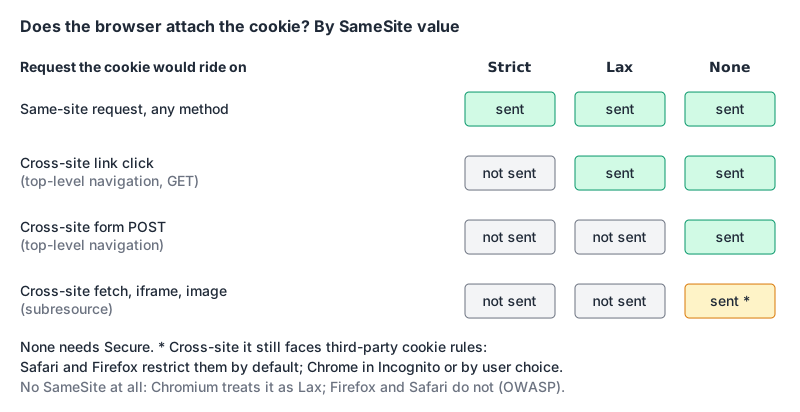
Strict: only same-site requests. A user who clicks a link to your app from their email arrives without the cookie on that first request, so they look logged out until the next navigation.Lax: same-site requests, plus cross-site top-level navigations with a safe method. Links work; cross-site form POSTs, iframes andfetch()don't carry it.None: always sent, but only together withSecure: MDN says it "must also be set" when using this value.
The default is where browsers split. Chrome started treating cookies with no SameSite attribute as Lax in Chrome 80, with enforcement reaching 100% of stable Chrome in August 2020 (Chromium). It also allows those defaulted cookies on top-level cross-site POSTs if they're at most two minutes old, which Chromium calls a temporary intervention. The OWASP CSRF cheat sheet notes that Firefox and Safari do not default to Lax. The fix is boring: always set SameSite explicitly.
For a normal first-party web app, I'd use Lax on the session cookie. Strict is fine for cookies that only guard dangerous actions, but the logged-out-on-arrival effect annoys people. None is for cookies that genuinely need to work inside someone else's page.
Don't treat SameSite as your CSRF defence. OWASP calls it "useful as a defense-in-depth control" that "does not replace a proper CSRF defense in most deployments", for two concrete reasons: any sibling subdomain is same-site (a takeover of old-promo.example.com can send requests your cookies accompany), and Lax still sends cookies on top-level GETs, so a state-changing GET endpoint is exposed. Keep the CSRF token. Our web security checklist has the rest.
Prefixes: rules the browser enforces for you
Cookie name prefixes make the browser reject a cookie that doesn't meet certain rules (MDN):
__Secure-: must be set withSecurefrom an HTTPS page.__Host-: also must have noDomainandPath=/. That pins it to one host, so a compromised subdomain can't overwrite it. OWASP recommends it for the same reason.__Http-and__Host-Http-: newer; they additionally requireHttpOnly, proving the cookie came from aSet-Cookieheader rather than script.
MDN's caveat applies: browsers that don't support prefixes just accept the cookie, so the prefix adds a guarantee where it's supported and costs nothing where it isn't. __Host- is my default for session cookies. Check MDN's compatibility table before depending on the two Http prefixes.
Lifetime and size limits
Max-Age takes seconds and beats Expires when both are present. The bis draft says user agents shouldn't keep a cookie more than 400 days (34,560,000 seconds) in the future and should cut longer values down to the limit, so "expires in 10 years" doesn't mean what it used to.
On size, RFC 6265 asks browsers to support at least 4096 bytes per cookie, 50 cookies per domain and 3000 in total. The bis draft is stricter about the failure: if name plus value exceed 4096 octets the whole cookie should be ignored, and an attribute value over 1024 octets is ignored. A session ID doesn't come close; a JWT stuffed with claims can.
Third-party cookies in November 2026
If you read in 2023 that Chrome was killing third-party cookies, that's no longer the plan. In April 2025 Google said it "will not be rolling out a new standalone prompt for third-party cookies" and would keep its existing settings (Privacy Sandbox blog). In October 2025 it said Chrome "will maintain our current approach to offering users third-party cookie choice" and retired most Privacy Sandbox APIs, including Topics, Protected Audience, Attribution Reporting, IP Protection and Related Website Sets. CHIPS and FedCM stay, having "seen broad adoption, including support from other browsers" (update).
Where that leaves the defaults, per MDN's third-party cookies guide:
| Browser | Third-party cookies by default |
|---|---|
| Chrome | Allowed; blocked in Incognito or if the user turns them off |
| Firefox | Total Cookie Protection: a separate jar per site, on by default |
| Safari | Tracking prevention restricts them by default |
| Edge | Blocks trackers from unvisited sites and known harmful trackers |
So "works in Chrome" proves very little for an embedded widget.
Partitioned cookies (CHIPS)
If your third-party cookie only needs to work per embedding site (a chat widget's session, an embedded map's preferences), add Partitioned. The cookie gets "double-keyed: by the origin that sets them and the origin of the top-level page" (MDN):
Set-Cookie: __Host-chat=a1b2; SameSite=None; Secure; Path=/; Partitioned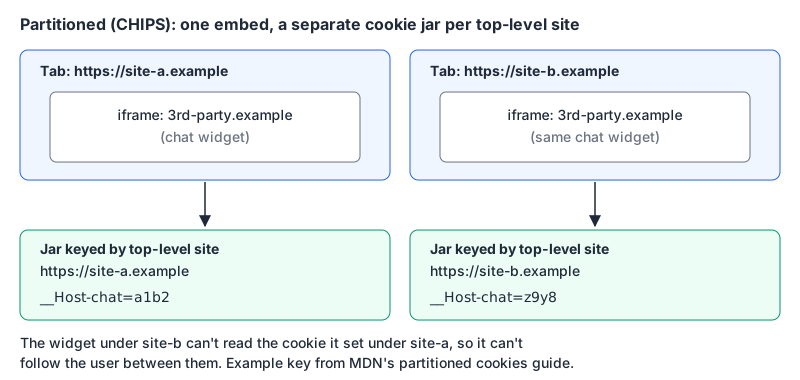
Partitioned requires Secure. MDN lists CHIPS as Baseline 2025, working across current browsers since December 2025. If you need the same cookie across a few related sites, partitioning won't help; the Storage Access API, which asks the user per frame, is the documented route.
Setting them in code
Express's res.cookie maps options to attributes. Note that its maxAge is in milliseconds even though the header's Max-Age is in seconds:
res.cookie("__Host-sid", sessionId, {
  httpOnly: true,
  secure: true,
  sameSite: "lax",
  path: "/",
  maxAge: 60 * 60 * 1000, // one hour, in ms
});

// a widget cookie that must work inside other sites
res.cookie("__Host-chat", chatId, {
  secure: true,
  sameSite: "none",
  partitioned: true,
  path: "/",
});
To check what a server actually sends, grab the header with curl -sS -i https://yourapp.example/login and paste the Set-Cookie value into our cookie parser. It splits out each attribute and warns about a missing HttpOnly, Secure or SameSite, SameSite=None without Secure, Partitioned without Secure, broken __Secure- and __Host- prefix rules, and cookies over 4096 bytes. For the response headers that sit alongside cookies (HSTS, CSP), see our security headers guide.
Checklist for a session cookie
__Host-prefix,Path=/, noDomain.SecureandHttpOnly, always.SameSite=Laxwritten out, not left to the browser.- A
Max-Ageunder 400 days, and a server-side session expiry that matches. - A CSRF token anyway.
- Embedded in other sites?
SameSite=None; Secure; Partitioned, and test in Safari and Firefox before Chrome.
Written by AIDToolStack Editorial
Researched from official documentation, specifications and vendor pages, listed under Sources below. Last checked November 2026.
Sources
- www.rfc-editor.org/rfc/rfc6265.html
- datatracker.ietf.org/doc/draft-ietf-httpbis-rfc6265bis/
- www.ietf.org/archive/id/draft-ietf-httpbis-rfc6265bis-22.html
- developer.mozilla.org/en-US/docs/Web/HTTP/Reference/Headers/Set-Cookie
- developer.mozilla.org/en-US/docs/Web/Privacy/Guides/Third-party_cookies
- developer.mozilla.org/en-US/docs/Web/Privacy/Guides/Privacy_sandbox/Partitioned_cookies
- web.dev/articles/same-site-same-origin
- www.chromium.org/updates/same-site/
- cheatsheetseries.owasp.org/cheatsheets/Cross-Site_Request_Forgery_Prevention_Cheat_Sheet.html
- privacysandbox.google.com/blog/privacy-sandbox-next-steps
- privacysandbox.google.com/blog/update-on-plans-for-privacy-sandbox-technologies
- privacysandbox.google.com/cookies
- expressjs.com/en/5x/api/response/
Related Posts
Explore on AIDToolStack
Discover tools and servers featured in our directory.
AI Tools
MCP Servers
Sponsor Our Newsletter
Reach thousands of developers who are actively evaluating AI tools, MCP servers, and dev infrastructure. Our weekly newsletter goes to engaged technical decision-makers.
All sponsored content is clearly labeled per our editorial policy.