
Choosing an Issue Tracker: Linear, Jira, GitHub Issues or GitLab
Most teams don't choose an issue tracker so much as inherit one. The company bought Jira years ago, or the repo had GitHub Issues switched on, or a founder liked Linear's keyboard shortcuts. That's fine until the tracker starts fighting the way you work: tickets live in one place, pull requests in another, and every planning meeting starts with ten minutes of reconciling the two.
This guide compares Linear, Jira, GitHub Issues with Projects, and GitLab's planning tools on what actually changes day to day: where the work sits relative to your code, what the free plans stop you doing, and what changed recently. Prices and limits are from each vendor's own pages as of November 2026.
The four options in one table
| Linear | Jira (Cloud) | GitHub Issues + Projects | GitLab | |
|---|---|---|---|---|
| Free plan | Unlimited members, 2 teams, 250 issues | Up to 10 users, 2 GB storage | Included in GitHub Free | 5 users per private top-level group on GitLab.com |
| First paid tier | Basic, $10/user/month, yearly | Standard (price varies by seat count) | Team, $4/user/month | Premium, $29/user/month, yearly |
| Lives next to code? | No, integrates with GitHub/GitLab | No, integrates via apps | Yes, same repo | Yes, same project |
| Hierarchy | Teams, projects, sub-teams on Business | Configurable issue types and hierarchy | Sub-issues, up to 8 levels | Epics (Premium), multi-level epics (Ultimate) |
| Best at | Speed and opinionated defaults | Custom workflows across many teams | Zero extra tooling for dev teams | One platform for code, CI and planning |
Sources: Linear pricing, Jira Cloud plans, GitHub pricing, GitLab pricing. I couldn't get a clean read of Atlassian's per-seat Standard price from its pricing page, and it's tiered by user count anyway, so use their calculator rather than a number from a blog.
Linear: fast, opinionated, and you pay per seat
Linear's Free plan allows unlimited members but only two teams and 250 issues, which is enough to evaluate it and not much more. Basic is $10 per user a month and lifts the issue cap and allows five teams; Business is $16 and adds private teams, guests, triage rules, issue SLAs and Linear Insights. Both are quoted on yearly billing, and the page shows no monthly rate. SAML, SCIM and audit logs are on Enterprise.
Linear is opinionated: you get far fewer knobs than in Jira, and that's the point. If your team wants to spend a quarter designing custom workflow schemes, it's the wrong tool.
Moving in is reasonable. Linear's import docs list importers for Jira, GitHub Issues, Asana and Shortcut, plus a CLI importer. Imports are one-time transfers, and re-running an import into the same team skips issues it has already brought over.
The price is the main argument against it. Ten developers on Business is $160 a month for something GitHub gives you for free alongside your code. Whether the speed is worth that is a team taste question, and the free tier is generous enough to test it properly.
Jira: maximum configurability, and a cloud-only future
Jira's Free plan covers up to 10 users with 2 GB of file storage, basic roadmaps and community support. Standard moves you to 250 GB, adds audit logs and advanced permissions, and lifts the user cap. Advanced roadmaps (planning across teams and projects) need Premium, which also adds unlimited storage and a 99.9% uptime SLA. Automation is metered too: the plans page lists 150 steps per subscription on Free and 400, 750 and 1,000 steps per user per month on Standard, Premium and Enterprise.
What Jira does better than anyone else here is let different teams run different processes in one system, with their own issue types, fields and workflows, all linking to each other. If non-engineering teams need to live in the same tracker, that's usually the deciding factor.
The big change to know about is self-hosting. Atlassian's Data Center end-of-life page sets the timeline:
- New customers could no longer buy Data Center subscriptions after 30 March 2026.
- Existing customers can't buy new subscriptions, expansions or upgrades after 30 March 2028.
- On 28 March 2029, Jira Software and Jira Service Management Data Center reach end of life and become read-only.
So if you're picking Jira now, you're picking Jira Cloud. If your organisation needs the tracker on its own servers, that's a reason to look at GitLab Self-Managed instead.
GitHub Issues and Projects: the tracker you already have
Issues and Projects are included on GitHub Free, and the paid plans (Team at $4 per user a month, Enterprise at $21) mostly add things unrelated to planning. For a team whose code is on GitHub, the case is simple: an issue, the branch and the pull request that closes it all live in one place, with no integration to maintain.
It's also much less basic than it used to be. According to GitHub's docs:
- A project can show items as a table, a board or a roadmap, with saved views, and can hold up to 50 fields including built-in ones. Custom fields can be dates, numbers, single-select, text or iterations.
- Built-in workflows can set fields when items change, auto-archive, and auto-add matching issues from a repository. Anything beyond that goes through the GraphQL API or GitHub Actions.
- Sub-issues allow up to 100 children per parent and up to eight levels of nesting.
- Organisations can define issue types, up to 25 of them, starting from task, bug and feature.
What it lacks is the cross-team machinery: there's no service desk, permissions follow repository access, and anyone outside engineering needs a GitHub account to participate. Automation beyond the built-ins means writing Actions, which some teams will see as a feature and others as a chore. Our GitHub Actions generator can scaffold the YAML if you go that way.
GitLab: planning in the same place as CI
GitLab's argument mirrors GitHub's: if your code, merge requests and pipelines are already in GitLab, the issues should be too. The difference is how much planning sits behind the paywall.
On GitLab.com, the Free tier is limited to five users per private top-level group, which rules it out for most companies. Premium is $29 per user a month on annual billing. Epics, the grouping above issues, are Premium and Ultimate only, and nested child epics are Ultimate only. Epics moved onto GitLab's unified work items framework, which went from beta in GitLab 17.2 to general availability in 18.1. Ultimate is priced by sales, and the pricing page lists an Enterprise Agile Planning add-on at $15 per user per month.
The upside is that GitLab still offers a Self-Managed edition, which makes it the natural landing spot for teams that must self-host and are leaving Jira Data Center. Our GitHub vs GitLab comparison covers the rest of the platform differences.
Gotchas when you switch
- Links break. Every commit message, PR description and doc that says
PROJ-123points at the old tracker. Keep it read-only for a while rather than deleting it. - Free caps are hard caps. Linear's 250 issues and GitLab's five users per group bite quickly.
- Workflows don't migrate cleanly. Importers move the issues. Custom Jira workflows, automation rules and permission schemes have no equivalent in Linear or GitHub, and that's often the reason to switch in the first place.
- AI agents want access too. If you plan to let coding assistants read tickets, check the integration story. There are MCP servers for Linear, Jira and GitHub, and our project management MCP roundup covers what each can do and how to scope its permissions.
The decision rule
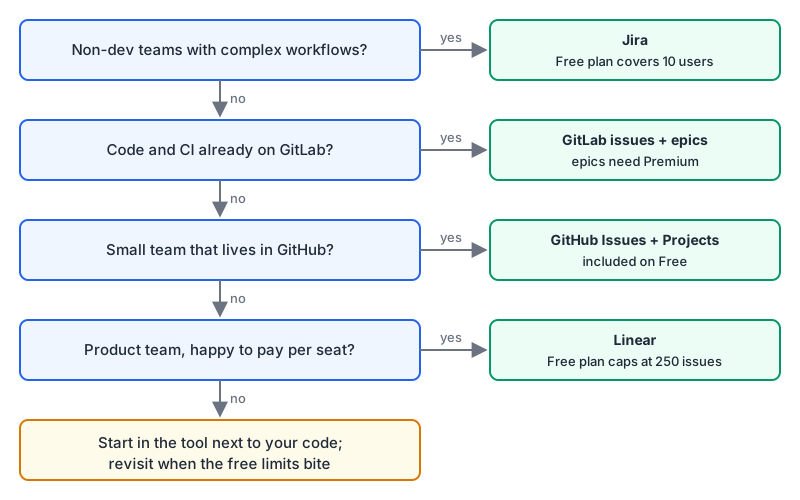
- If non-engineering teams must work in the same tracker with their own workflows, choose Jira Cloud, and budget for Premium if you need cross-project roadmaps.
- If your code and CI are on GitLab, or you have to self-host, use GitLab's issues, and plan on Premium for epics.
- If you're a small team on GitHub and don't need anything outside engineering, use GitHub Issues with Projects. It costs nothing extra, and sub-issues and issue types have closed most of the old gaps.
- If your product team wants an opinionated, fast tool and is happy to pay per seat, trial Linear on the free plan and see if the 250-issue cap feels too small within a month. If it does, you have your answer either way. The Linear vs Jira comparison has the detail on the two dedicated trackers.
Written by AIDToolStack Editorial
Researched from official documentation, specifications and vendor pages, listed under Sources below. Last checked November 2026.
Sources
- linear.app/pricing
- support.atlassian.com/jira-cloud-administration/docs/explore-jira-cloud-plans/
- github.com/pricing
- about.gitlab.com/pricing/
- linear.app/docs/import-issues
- www.atlassian.com/licensing/data-center-end-of-life
- docs.github.com/en/issues/planning-and-tracking-with-projects/learning-about-projects/about-projects
- docs.github.com/en/issues/tracking-your-work-with-issues/using-issues/adding-sub-issues
- docs.github.com/en/issues/tracking-your-work-with-issues/using-issues/managing-issue-types-in-an-organization
- docs.gitlab.com/user/group/epics/
Related Posts
Explore on AIDToolStack
Discover tools and servers featured in our directory.
AI Tools
MCP Servers
Sponsor Our Newsletter
Reach thousands of developers who are actively evaluating AI tools, MCP servers, and dev infrastructure. Our weekly newsletter goes to engaged technical decision-makers.
All sponsored content is clearly labeled per our editorial policy.