
Choosing a Container Runtime on Your Laptop: Docker Desktop, Podman, OrbStack or Colima
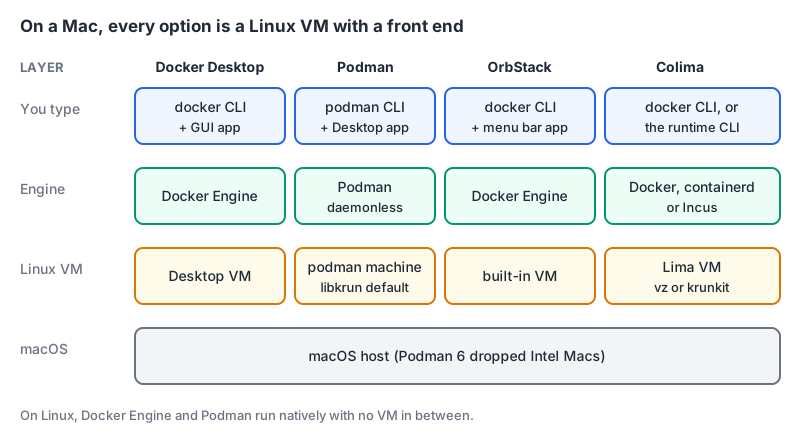
On Linux, running containers is a package install. On a Mac it's a decision, because containers need a Linux kernel and macOS doesn't have one. Every tool in this post is really a way of running a small Linux VM and wiring a container engine and CLI to it. They differ in licence, price, how much they hide, and which engine you end up talking to.
The four that come up most are Docker Desktop, Podman, OrbStack and Colima. Here's how they compare as of November 2026, using each project's own docs and pricing pages, plus the licence question that pushes most companies to look in the first place.
Start with the licence, because legal will
Docker Desktop is free only for some users. Docker's licence page lists free use for small businesses with "fewer than 250 employees AND less than $10 million in annual revenue", personal use, education and non-commercial open source projects. Professional use in larger organisations, and government use, needs a paid subscription. The same page says the licensing for open source projects such as Docker Engine isn't changing, so on a Linux server or in CI you can run the engine without a Desktop subscription.
As of November 2026 Docker's pricing page lists:
| Plan | Monthly billing | Annual billing (per month) |
|---|---|---|
| Personal | $0 | $0 |
| Pro | $11 | $9 |
| Team (up to 100 users) | $16 | $15 |
| Business | not offered | $24 |
Business is where the admin features live: SSO, SCIM, Image and Registry Access Management, and Enhanced Container Isolation.
OrbStack has a similar split. Its pricing page says the free tier is for personal, non-commercial use, and commercial use needs Pro at $8 per user per month, or $96 billed annually. Podman and Colima are open source with no paid tier: Colima is MIT licensed, and Podman is an open source project under the containers organisation on GitHub.
So the first question is just: does your company's size put you in the paid bracket for Docker Desktop or OrbStack? If it does, compare the subscription cost against the time cost of supporting a free alternative across your team.
Docker Desktop: the reference, with a subscription
Docker Desktop is what most tutorials assume. You get the Docker Engine inside a managed VM, the docker CLI, Compose, a GUI, and the extras in the subscription tiers. Release cadence is fast: version 4.98.0 shipped on 3 November 2026 according to the release notes, which also say versions older than six months from the latest release aren't available to download. Plan on keeping it updated.
The case for staying on it is compatibility. Compose files, devcontainers and testing tools that talk to the Docker socket just work, and nobody needs to debug why a volume mount behaves differently. If you're already paying, or you're under the threshold, there's little reason to switch. Our Docker for developers guide and Docker Compose for local development both assume Docker semantics, and everything there applies.
Podman: daemonless, rootless by default, and newly Apple Silicon only
Podman runs containers without a long-running daemon, and on macOS and Windows it manages its VM through podman machine. The podman-machine docs list the providers per platform:
| Host | Providers | Default |
|---|---|---|
| macOS | libkrun, applehv | libkrun |
| Windows | wsl, hyperv | wsl |
| Linux | qemu | qemu |
Machines run rootless by default; podman machine init --rootful switches that.
podman machine init               # creates the VM with the default provider
podman machine start
podman run --rm -p 8080:80 docker.io/library/nginx
The big news is Podman 6. The 6.0.0 release on 24 June 2026 dropped support for Intel Macs, Windows 10 and cgroups v1 hosts. It removed CNI networking (use Netavark), slirp4netns (use Pasta) and the BoltDB database, which Podman tries to migrate to SQLite automatically on startup. It made libkrun the default Mac provider and changed podman volume prune to remove only unused anonymous volumes, matching Docker; --all gives the old behaviour. As of November 2026 the latest stable release is 6.1.4, with 6.2.0 at release candidate.
If your team has Intel Macs, that's now a blocker for current Podman. Otherwise the main friction is the daemonless model: tools that expect a Docker daemon and its socket may need extra setup, so test your Compose files and IDE integrations before you commit. Our Docker vs Podman comparison covers those differences in more detail.
OrbStack: the polished Mac app
OrbStack is a native Mac app that runs Docker containers, Kubernetes and full Linux machines from one menu bar icon. Its docs list automatic domain names for containers, file access to images and volumes, and built-in migration from Docker Desktop or Colima. The homepage says it's optimised for Apple Silicon, and it makes speed and battery claims of its own. I haven't seen independent benchmarks I'd cite, so treat those as marketing until you've tried it on your machine.
Because it runs a Docker Engine, the docker CLI and Compose work unchanged. That's the attraction: a Docker-compatible setup that feels like part of macOS, at a lower per-seat price than Docker's Team plan. The trade-off is that it's a single-vendor, Mac-only product, and its free tier doesn't cover work use.
Colima: free, scriptable, minimal
Colima ("Containers on Lima") is a command-line tool that boots a Lima VM and runs a container runtime in it. Per its README, it supports Docker, containerd and Incus as runtimes, can enable Kubernetes, and offers the vz VM type with optional Rosetta 2 emulation for x86 images, plus a krunkit VM type for GPU-accelerated AI workloads.
colima start                 # Docker runtime by default
colima start --kubernetes    # with a local Kubernetes cluster
With the Docker runtime you keep using the normal docker CLI against Colima's engine. There's no GUI and no subscription. It suits developers who are comfortable in a terminal and want something free that behaves like Docker. The latest release listed is v0.10.3, a hotfix for a Kubernetes regression, so check the release page for anything newer before you standardise on a version.
Gotchas before you switch a team
- Socket paths can differ. Each tool exposes its engine at its own socket. Tools that assume
/var/run/docker.sockmay needDOCKER_HOSTpointed at the right one. Test your IDE's devcontainer support and any Testcontainers suites first. - File sharing is where the performance claims live. Every option has to share files between macOS and the VM, and that's where vendors pitch their speed. Measure your own project's install and build, not a vendor's benchmark.
- Images are per VM. Switching tools means re-pulling or re-building images, since each has its own VM disk. OrbStack offers migration from Docker Desktop and Colima; for the others, plan for a cold cache.
- Agents and sandboxes. If you run AI coding agents inside containers, the runtime's isolation matters. Our post on running AI coding agents safely covers containers as a sandbox, and the Docker MCP server lets assistants manage containers directly, which is worth scoping carefully.
If you're converting old docker run commands into Compose files during the move, our docker run to Compose converter saves some typing.
The decision rule
- If your company is under Docker's free threshold, or already pays for a Docker subscription, stay on Docker Desktop. Compatibility is worth more than anything you'd gain.
- If you need a paid licence anyway and everyone is on Apple Silicon Macs, try OrbStack Pro: Docker-compatible, cheaper per seat than Docker Team at list price.
- If you want free and open source and like the Docker CLI, use Colima.
- If you want rootless, daemonless containers, run Linux servers with Podman already, or need a free option on Windows too, use Podman 6, as long as nobody is still on an Intel Mac.
Written by AIDToolStack Editorial
Researched from official documentation, specifications and vendor pages, listed under Sources below. Last checked November 2026.
Sources
- docs.docker.com/subscription/desktop-license/
- www.docker.com/pricing/
- orbstack.dev/pricing
- github.com/abiosoft/colima
- github.com/containers/podman
- docs.docker.com/desktop/release-notes/
- docs.podman.io/en/latest/markdown/podman-machine.1.html
- github.com/containers/podman/releases/tag/v6.0.0
- github.com/containers/podman/releases
- docs.orbstack.dev/
- orbstack.dev/
Related Posts
Explore on AIDToolStack
Discover tools and servers featured in our directory.
AI Tools
MCP Servers
Sponsor Our Newsletter
Reach thousands of developers who are actively evaluating AI tools, MCP servers, and dev infrastructure. Our weekly newsletter goes to engaged technical decision-makers.
All sponsored content is clearly labeled per our editorial policy.