
Web Application Firewall Basics: What a WAF Catches, What It Misses, and Tuning OWASP CRS
At 5:00 PM GMT on 2 December 2025, Cloudflare deployed new block-by-default WAF rules for a React Server Components remote code execution bug. Per Cloudflare's write-up, CVE-2025-55182 was rated CVSS 10.0 and affected React 19.0 through 19.2 and Next.js 15 through 16, and every customer whose traffic was proxied through the WAF, free plans included, was covered. AWS added a ReactJSRCE_BODY rule to its Known bad inputs managed group for the same CVE.
The same post also says Cloudflare "strongly recommend[s]" updating React anyway. That pairing is the best summary of what a web application firewall is for. It buys you time and filters noise. It doesn't make vulnerable code safe.
What a WAF actually sees
A WAF is a layer-7 filter in front of your app: a CDN feature (Cloudflare), a cloud service attached to a load balancer or API gateway (AWS WAF), or a module in your own proxy (ModSecurity, Coraza). Each request is decrypted, inspected against rules, and then allowed, blocked, challenged or just counted and logged.
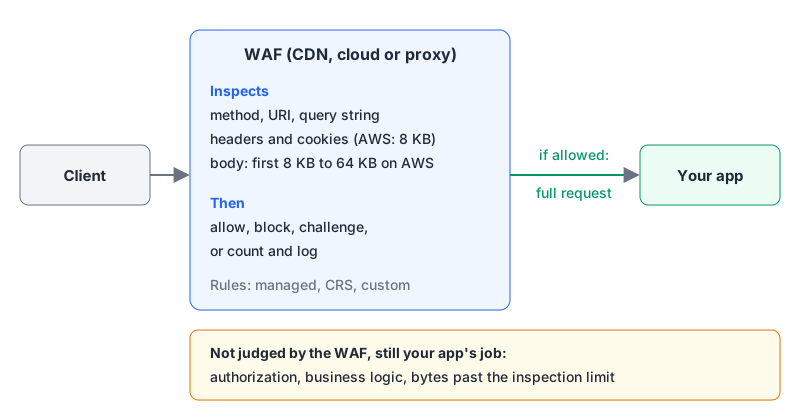
The important word in that diagram is "first". Inspection has limits. On AWS, the body inspection limit is the first 8 KB for Application Load Balancer and AppSync, and 16 KB by default (raisable to 64 KB) for CloudFront, API Gateway, Cognito, App Runner and Verified Access. Headers and cookies are capped at 8 KB and 200 entries each. What happens to the rest depends on each rule's oversize handling, and outside the console the default is Continue: inspect what fits, ignore what doesn't. AWS states plainly that when a request is allowed, "the entire web request is sent", including the parts it never looked at.
So an attacker who pads a JSON body past 8 KB and puts the payload at the end can walk past body rules on an ALB, unless something else blocks oversize bodies first. That's the job of the Core rule set's SizeRestrictions_BODY rule, covered below. AWS's own guidance is to add a rule that blocks oversize bodies, set to Match, ahead of everything else, and to explicitly allow only the endpoints that really need large bodies.
What it won't save you from
| Problem | Does a WAF help? | Why |
|---|---|---|
| Known CVE in a framework you haven't patched yet | Yes, often | Vendors ship targeted rules, as Cloudflare and AWS did for CVE-2025-55182 and AWS has for Log4j |
| Generic SQL injection or XSS probes | Partly | Signatures catch common payloads; anything past the inspection limit or unlike known patterns gets through |
| Scanners and junk traffic | Yes | Bad user agents, exploit paths like web-inf, missing User-Agent |
| Broken access control (IDOR, missing authz) | No | The malicious request is a perfectly valid request |
| Business logic abuse | No | The WAF can't know a coupon shouldn't apply twice |
| Credential stuffing | Only with bot and rate features | Signatures don't help; you need rate limiting and bot scoring |
| A compromised dependency in your build | No | It runs inside your app, behind the WAF |
The access-control row is the one to remember. Broken access control is A01 in the OWASP Top 10, and our web security checklist maps it to code-level fixes, because a WAF can't tell user 41 reading user 42's invoice from a normal request.
Managed rules: what you get by default
Cloudflare. The managed rules page lists what each plan gets:
| Ruleset | Free | Pro | Business | Enterprise |
|---|---|---|---|---|
| Cloudflare Free Managed Ruleset | yes | yes | yes | yes |
| Cloudflare Managed Ruleset | no | yes | yes | yes |
| Cloudflare OWASP Core Ruleset | no | yes | yes | yes |
| Sensitive Data Detection | no | no | no | yes |
Cloudflare's OWASP ruleset is described as its implementation of OWASP CRS 3.3.0. It scores requests and acts when the score passes a threshold: Low (60 and higher), Medium (40, the default) or High (25), at paranoia level PL1 by default, per the concepts page. Cloudflare itself warns that on top of its Managed Ruleset and attack score, the OWASP ruleset is "prone to false positives and offers only marginal benefits." I'd turn on the Managed Ruleset first and only add the OWASP one if logs show it catching something the others miss.
AWS WAF. The baseline Core rule set (AWSManagedRulesCommonRuleSet) costs 700 WCU and blocks, among other things, query strings over 2,048 bytes, cookie headers over 10,240 bytes and request bodies over 8 KB. That last rule, SizeRestrictions_BODY, is the classic first false positive: file uploads and big JSON posts start returning 403. Override that one rule to Count instead of disabling the whole group, using the shape from AWS's override docs:
"ManagedRuleGroupStatement": {
  "VendorName": "AWS",
  "Name": "AWSManagedRulesCommonRuleSet",
  "RuleActionOverrides": [
    { "Name": "SizeRestrictions_BODY", "ActionToUse": { "Count": {} } }
  ]
}
Then add your own rule that allows large bodies only on the upload route, and keep the oversize block everywhere else. The Known bad inputs group (200 WCU) is the cheap win: it targets specific exploit patterns, including the Log4j and React RCE signatures, rather than broad categories.
Running your own: OWASP CRS, ModSecurity and Coraza
If your traffic doesn't go through a CDN or cloud load balancer, you can run the rules yourself. The status changed in the last two years, so check what you're installing.
- OWASP CRS is at v4.30.0 (October 2026). Its security policy supports the two latest releases plus a 4.25.x LTS line until Q3 2027. The 3.3.x line reached end of life in Q3 2026.
- ModSecurity, the engine CRS was written for, moved from Trustwave to OWASP in 2024: the OWASP project page says the transfer began in February 2024. It's actively maintained there, with libmodsecurity v3.0.17 and the Apache-module v2.9.15 both released in September 2026. If you read "ModSecurity is end-of-life" somewhere, that was Trustwave's support ending on 1 July 2024 (which also led F5 to retire its NGINX ModSecurity WAF module), not the project.
- Coraza is an OWASP WAF engine written in Go that runs SecLang rules and is compatible with CRS v4 (not older CRS). It's the natural pick for Go proxies and Envoy or Caddy setups.
CRS uses anomaly scoring. Each matching rule adds points (critical is 5, error 4, warning 3, notice 2) and the request is blocked only when the total reaches the threshold, 5 inbound and 4 outbound by default, according to the anomaly scoring docs. Paranoia levels 1 to 4 add stricter rules; PL1 "hardly ever" false-alarms, while PL3 and PL4 expect you to write exclusions. Both live in crs-setup.conf:
SecAction "id:900000,phase:1,pass,t:none,nolog,\
  setvar:tx.blocking_paranoia_level=1"

# First weeks in production: very high threshold, then lower it
SecAction "id:900110,phase:1,pass,t:none,nolog,\
  setvar:tx.inbound_anomaly_score_threshold=10000,\
  setvar:tx.outbound_anomaly_score_threshold=10000"
Starting at a huge threshold and lowering it gradually is the approach the CRS docs recommend for new deployments. False positives then show up in logs instead of in your support queue. Exclusions should be narrow, removing one rule for one path rather than turning a rule off globally:
SecRule REQUEST_URI "@beginsWith /api/markdown-preview" \
  "id:1001,phase:1,pass,nolog,ctl:ruleRemoveById=941100"
Rule 941100 is CRS's libinjection-based XSS check, which an endpoint that accepts user-written HTML or Markdown is likely to trip. The exclusion runs in phase 1 so it takes effect before the phase 2 rule evaluates the body.
A rollout that doesn't break checkout
- Start in count or detection mode. Cloudflare and AWS both let you log instead of block; ModSecurity has
SecRuleEngine DetectionOnly. - Send logs somewhere you'll read them and sort by rule ID and path. A handful of rules usually produce most of the noise.
- Write exclusions per route, especially for endpoints that legitimately accept HTML, Markdown, SQL-looking text or large uploads.
- Switch to block, keep alerting on block rates, and repeat when you add endpoints.
- Patch anyway. Treat every emergency WAF rule as a deadline for the real fix.
When it's worth it
If you're already behind Cloudflare or AWS, turn on the managed rules: the virtual-patching value alone justifies the hour of tuning. If you run a small app on a VPS behind your own proxy, CRS at PL1 with a sensible threshold is a reasonable extra layer, but your time is better spent on the basics first: patched dependencies, real authorization checks, the response headers from our HTTP security headers guide, and a Cloudflare vs CloudFront decision if you need a CDN in front anyway. A WAF is a seatbelt. It's still worth knowing how to drive.
Written by AIDToolStack Editorial
Researched from official documentation, specifications and vendor pages, listed under Sources below. Last checked November 2026.
Sources
- blog.cloudflare.com/waf-rules-react-vulnerability/
- docs.aws.amazon.com/waf/latest/developerguide/aws-managed-rule-groups-baseline.html
- docs.aws.amazon.com/waf/latest/developerguide/web-request-body-inspection.html
- developers.cloudflare.com/waf/managed-rules/
- developers.cloudflare.com/waf/managed-rules/reference/owasp-core-ruleset/
- developers.cloudflare.com/waf/managed-rules/reference/owasp-core-ruleset/concepts/
- docs.aws.amazon.com/waf/latest/developerguide/web-acl-rule-group-override-options.html
- github.com/coreruleset/coreruleset/releases
- github.com/coreruleset/coreruleset/blob/main/SECURITY.md
- owasp.org/www-project-modsecurity/
- github.com/owasp-modsecurity/ModSecurity/releases
- www.f5.com/company/blog/nginx/f5-nginx-modsecurity-waf-transitioning-to-eol
- github.com/corazawaf/coraza
- coreruleset.org/docs/2-how-crs-works/2-1-anomaly_scoring/
- coreruleset.org/docs/2-how-crs-works/2-2-paranoia_levels/
- developers.cloudflare.com/changelog/post/2025-12-03-emergency-waf-release/
- github.com/coreruleset/coreruleset/blob/v4.30.0/crs-setup.conf.example
- github.com/coreruleset/coreruleset/blob/v4.30.0/rules/REQUEST-941-APPLICATION-ATTACK-XSS.conf
Related Posts
Explore on AIDToolStack
Discover tools and servers featured in our directory.
AI Tools
MCP Servers
Sponsor Our Newsletter
Reach thousands of developers who are actively evaluating AI tools, MCP servers, and dev infrastructure. Our weekly newsletter goes to engaged technical decision-makers.
All sponsored content is clearly labeled per our editorial policy.