
Kafka vs RabbitMQ: Log or Broker, and How to Choose
"We need a message queue" usually means one of two different things. Sometimes it means hand this job to a worker, make sure it runs once-ish, then forget it. Sometimes it means record that this happened, and let any number of systems read it, now or next week. RabbitMQ was built for the first, Kafka for the second, and most bad experiences with either come from using it for the other job.
Both have moved toward each other recently, which makes the choice less binary than it was. Here's how each one actually moves a message, what changed by November 2026, and a rule for picking.
Where they are as of November 2026
- Apache Kafka 4.4.0 was released on 22 October 2026, with 4.3.2 a day later as a bugfix release (downloads page). Since Kafka 4.0 it runs entirely without ZooKeeper (KRaft only), and that release raised the broker requirement to Java 17.
- RabbitMQ 4.4.0 came out in October 2026 (GitHub release), and the 4.4 and 4.3 series are the ones with community support (release information). Classic queue mirroring was removed in 4.0; replicated queues now mean quorum queues or streams.
Kafka: a log you read at your own pace
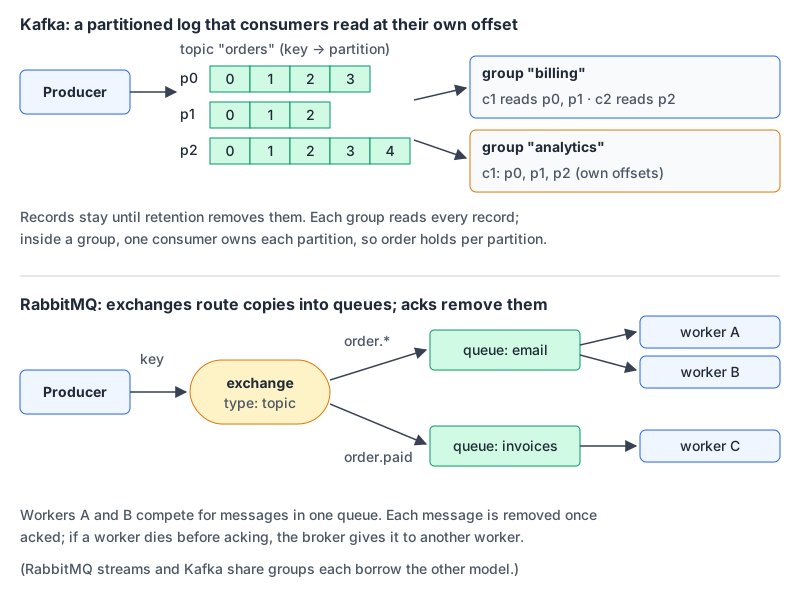
Kafka's introduction puts the key difference plainly: events are not deleted after consumption. A topic keeps records for a per-topic retention period, and consumers just track a position. Topics are split into partitions; records with the same key go to the same partition; and a consumer reads a partition's records in exactly the order they were written.
I ran the apache/kafka:4.4.0 image and pushed eight keyed records into a three-partition topic, then read them with a consumer group:
$ kafka-console-consumer.sh --topic payments --group billing --from-beginning \
    --formatter-property print.key=true --formatter-property print.partition=true \
    --formatter-property print.offset=true
Partition:0	Offset:0	cust-4	pay-4
Partition:0	Offset:1	cust-5	pay-5
Partition:0	Offset:2	cust-6	pay-6
Partition:1	Offset:0	cust-1	pay-1
Partition:1	Offset:1	cust-2	pay-2
Partition:1	Offset:2	cust-3	pay-3
Partition:1	Offset:3	cust-1	pay-7
Partition:1	Offset:4	cust-2	pay-8

$ kafka-consumer-groups.sh --describe --group billing
GROUP    TOPIC     PARTITION  CURRENT-OFFSET  LOG-END-OFFSET  LAG
billing  payments  0          3               3               0
billing  payments  1          5               5               0
billing  payments  2          0               0               0
(Columns trimmed.) Both cust-1 records landed in partition 1, so their order is preserved. Partition 2 got nothing: with a handful of keys, hashing is lumpy. A second group, analytics, reading an earlier test topic from the beginning got every record again, because each group keeps its own offsets.
The consequences:
- Parallelism is capped by partitions. The design docs say each partition is consumed by exactly one consumer in a group at a time. Three partitions, three busy consumers at most; a fourth sits idle.
- One slow record blocks its partition. Records behind it wait, because the consumer moves an offset, not individual messages.
- Delivery is at-least-once by default. Exactly-once is available through Kafka Streams or the transactional producer with read-committed consumers.
- Replay is free. Reset a group's offset and reprocess last Tuesday. That's the feature people actually buy Kafka for.
RabbitMQ: a broker that routes and forgets
RabbitMQ's AMQP model works differently. Producers publish to an exchange, which copies messages into queues according to bindings. Consumers take messages from a queue and acknowledge them; only then does the broker remove the message. If a consumer dies without acking, the broker redelivers to another consumer.
On the rabbitmq:4.4-management image I declared a topic exchange with two quorum queues, bound email to order.* and invoices to order.paid, and published an order.created and an order.paid message:
$ rabbitmqctl list_queues name type messages
name      type    messages
invoices  quorum  0
email     quorum  2
email matched both routing keys, invoices matched one, and the 0 is because I had already fetched and acked that one message, which removed it. No offsets, no replay. Routing is the broker's job; your consumers just drain queues.
The consequences run the other way:
- Competing consumers scale per queue. Add workers and they share the queue's messages. No partition count to plan.
- Per-message handling. A slow or failing message doesn't block the ones behind it for other consumers. You can reject, requeue or dead-letter individual messages.
- Poison messages are bounded. Since 4.0, quorum queues have a delivery limit that defaults to 20; after that the message is dropped, or dead-lettered if you have configured a dead-letter exchange.
- Ordering is FIFO with caveats. The queues guide says the broker dequeues in order, but redeliveries and multiple consumers can reorder delivery.
- Not a long-term store. The quorum queue docs list very long backlogs (5M+ messages) among the cases they aren't designed for.
RabbitMQ 4.4 also added delayed delivery to quorum queues: set an x-opt-delivery-time on the message and it's enqueued now but delivered later (4.4.0 release notes).
The convergence: share groups and streams
Kafka share groups (KIP-932, "Queues for Kafka") add queue-style consumption on normal topics. Consumers in a share group get individual records, each with an acquisition lock (30 seconds by default) and a delivery count (5 attempts by default before a record is archived), and the number of consumers can exceed the number of partitions. It was early access in 4.0 and declared production-ready in 4.2. Kafka 4.4 added dead-letter queues for share groups (KIP-1191), which Confluent says may still change in a minor release. Ordering across batches isn't guaranteed in share groups, so you trade Kafka's per-partition ordering for queue semantics.
RabbitMQ streams go the other way: an append-only log that consumers read non-destructively from any offset, built for large fan-outs, replay and big backlogs. Super streams partition a stream for scale.
So "Kafka can't do queues" and "RabbitMQ can't replay" are both out of date. The defaults and the tooling around each still point in their original directions, though.
Side by side
| Kafka 4.4 | RabbitMQ 4.4 | |
|---|---|---|
| Core abstraction | Partitioned, replicated log | Exchanges routing to queues |
| After a consumer reads | Record stays until retention | Message removed on ack (classic/quorum queues) |
| Scaling consumers | Up to the partition count per group (share groups lift this) | Add consumers to a queue |
| Ordering | Per partition | Per queue, weakened by redelivery |
| Routing | By key to partition | Direct, fanout, topic and headers exchanges |
| Replay | Reset offsets | Streams only |
| Failed message handling | Your code (DLQ for share groups in 4.4) | Reject, delivery limit, dead-lettering |
| Replication | Partition replicas across brokers | Raft-based quorum queues; replicated streams |
Failure handling is your code either way
Both give you at-least-once delivery in the common setup. A consumer that crashes after doing the work but before committing an offset or acking will see the message again. Make handlers idempotent: record a message ID or business key and skip duplicates. Our post on HTTP idempotency covers the same pattern for APIs. If your events are JSON, validating them against a schema at the consumer boundary catches producer bugs early; the JSON Schema validator is handy for checking a payload against a draft schema while you write it.
To try either locally, both run as single containers; our Docker Compose guide covers health checks so your app waits for the broker.
How I'd choose
- Background jobs, RPC-ish work, routing by type, per-message retries: RabbitMQ with quorum queues. Less to plan, and the broker does the routing.
- Event streams that several services consume independently, or that you'll want to replay: Kafka. Pick partition counts from your target consumer parallelism and choose keys that spread load.
- Mostly Kafka already, plus a work queue: try share groups before adding a second broker.
- Mostly RabbitMQ, plus some fan-out or replay: RabbitMQ streams before adding Kafka.
- Small app, a few job types: you may not need either. A Redis stream or a Postgres-backed job table carries a lot of load before a broker pays for itself. That's also a reasonable reading of our monolith versus microservices advice.
If you run either and want an AI assistant to look at it, we have pages on Confluent's Kafka MCP server, which has tools like delete-topics you should block, and the RabbitMQ MCP server from the Amazon MQ team, which keeps mutating tools off unless you pass --allow-mutative-tools.
Written by AIDToolStack Editorial
Researched from official documentation, specifications and vendor pages, listed under Sources below. Last checked November 2026.
Sources
- kafka.apache.org/community/downloads/
- kafka.apache.org/blog/2025/03/18/apache-kafka-4.0.0-release-announcement/
- kafka.apache.org/blog/2026/02/17/apache-kafka-4.2.0-release-announcement/
- www.confluent.io/blog/introducing-apache-kafka-4-4-0/
- kafka.apache.org/44/getting-started/introduction/
- kafka.apache.org/44/design/design/
- cwiki.apache.org/confluence/display/KAFKA/KIP-932%3A+Queues+for+Kafka
- github.com/rabbitmq/rabbitmq-server/releases/tag/v4.4.0
- www.rabbitmq.com/release-information
- www.rabbitmq.com/tutorials/amqp-concepts
- www.rabbitmq.com/docs/quorum-queues
- www.rabbitmq.com/docs/queues
- www.rabbitmq.com/docs/streams
Related Posts
Explore on AIDToolStack
Discover tools and servers featured in our directory.
AI Tools
MCP Servers
Sponsor Our Newsletter
Reach thousands of developers who are actively evaluating AI tools, MCP servers, and dev infrastructure. Our weekly newsletter goes to engaged technical decision-makers.
All sponsored content is clearly labeled per our editorial policy.