
Cursor vs Offset Pagination: Keyset Queries, Duplicates and API Shapes
GET /orders?page=2 is the first pagination API most of us write, and it works fine until two things happen: the table gets big, and rows get inserted while someone is paging. Then you get slow deep pages and an item that appears twice, and a support ticket that says "the export has duplicates".
Both problems come from the same place. LIMIT 20 OFFSET 40 describes a page by how many rows came before it. A cursor (a keyset, to be precise) describes it by the last row you saw. Everything else in this post follows from that difference.
Why OFFSET gets slow
The Postgres docs say it plainly in the LIMIT and OFFSET chapter: "The rows skipped by an OFFSET clause still have to be computed inside the server; therefore a large OFFSET might be inefficient." The database can't jump to row 900,000. It walks the index (or sorts) and throws away everything before it.
I checked that with SQLite 3.51 on a laptop: a million rows, an index on (created_at DESC, id DESC), and a query that also reads a non-indexed column.
CREATE TABLE orders (id INTEGER PRIMARY KEY, created_at TEXT NOT NULL, total INTEGER NOT NULL);
-- 1,000,000 rows, three per second of created_at
CREATE INDEX orders_created_id ON orders (created_at DESC, id DESC);

-- offset: page starting at row 900,001
SELECT id, created_at, total FROM orders
ORDER BY created_at DESC, id DESC LIMIT 3 OFFSET 900000;

-- keyset: same page, starting after the last row of the previous page
SELECT id, created_at, total FROM orders
WHERE (created_at, id) < ('2026-01-01 09:15:33', 100001)
ORDER BY created_at DESC, id DESC LIMIT 3;
Both return the same rows (ids 100000, 99999, 99998). With .timer on, the offset query took 22 to 23 ms across two runs; the keyset query reported 0.000 s, under the timer's resolution. OFFSET 10 was also instant. The cost grows with the offset. These are local numbers from one machine and I didn't repeat the test on Postgres, so treat them as a demonstration of the trend rather than a benchmark; the Postgres docs quoted above are the reason to expect the same shape there.
EXPLAIN QUERY PLAN shows why: the keyset query is a SEARCH ... USING COVERING INDEX orders_created_id (created_at<?) and the offset query is a SCAN of the same index. If you're on Postgres, paste EXPLAIN ANALYZE output into our EXPLAIN visualizer and look for the rows the Limit node had to pull through before it started returning anything.
Why OFFSET skips and repeats rows
Speed is the problem people notice first. Correctness is the one that bites. Here's a six-row table, paged three at a time, with one insert between page 1 and page 2 (real output from sqlite3):
-- page 1 (offset 0)
6|09:20
5|09:15
4|09:10
-- page 2 with OFFSET 3, after a new post arrived
4|09:10
3|09:05
2|09:05
-- page 2 with keyset, cursor = last row of page 1 (09:10, 4)
3|09:05
2|09:05
1|09:00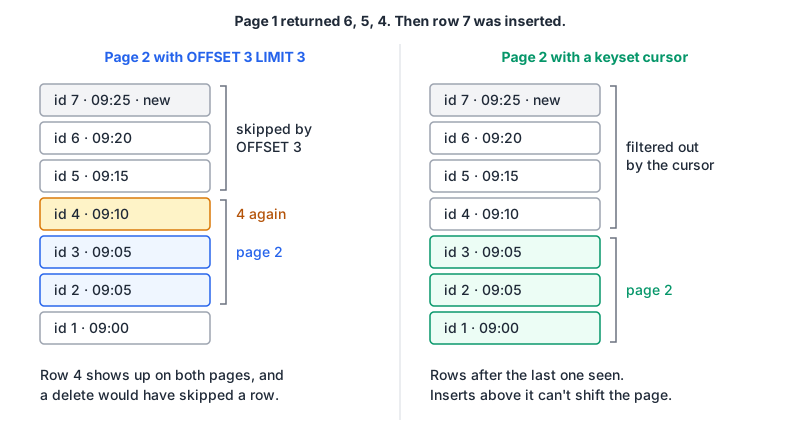
The new row pushed everything down one place, so row 4 showed up again. A delete does the opposite and a row silently disappears from the export. Markus Winand's no-offset page puts it bluntly: using the number of rows already seen to skip them later "is simply wrong". The keyset version doesn't care what happened above the cursor.
Writing keyset queries properly
Make the order unique. Postgres warns that without an ORDER BY that "constrains the result rows into a unique order", you get "an unpredictable subset" of rows per page. created_at alone isn't unique; two rows from the same millisecond can land on either side of a page boundary. Add the primary key as a tiebreaker in both the ORDER BY and the index.
Compare as a row. WHERE (created_at, id) < ($1, $2) is the clean form. The Postgres docs on row constructor comparison define it: elements are compared left to right, "stopping as soon as an unequal or null pair of elements is found". That's exactly "earlier timestamp, or same timestamp and lower id". The long-hand version is equivalent but easier to get wrong:
WHERE created_at < $1 OR (created_at = $1 AND id < $2)Check that your database uses the index for it. Winand's seek method chapter lists PostgreSQL (since 8.4) as using row values for index access, and says MySQL evaluates them correctly but couldn't use them as an index access predicate when he wrote it. Run EXPLAIN on your version rather than trusting either of us. If it scans, the long-hand OR form plus a leading created_at <= $1 range condition is the usual workaround.
Watch for NULLs. The Postgres row comparison docs note that a null in a compared pair makes the row comparison null, so a nullable sort column will quietly drop rows from pages. Sort on NOT NULL columns, or coalesce in both the index and the query.
Backwards is the mirror image. For a "previous page" link, flip the comparison and the sort (> and ASC), take the limit, then reverse the rows in your code before returning them.
What it costs you
Keyset pagination isn't free. You give up things that page numbers make easy:
| Offset / page number | Keyset cursor | |
|---|---|---|
| Jump to page 37 | Yes | No, only next and previous |
| Show "page 3 of 120" | Yes (needs a COUNT) | Not without a separate count |
| Deep page cost | Grows with the offset | Roughly constant with a matching index |
| Rows inserted or deleted while paging | Duplicates or gaps | Stable |
| Change sort order per request | Easy | Each sort needs its own cursor shape and index |
| Implementation effort | Trivial | Moderate |
Winand's answer to the first row is that page-number navigation is a poor interface anyway, and for infinite scroll, feeds, sync jobs and exports I agree. For an admin table where someone genuinely wants page 37 of a few thousand rows, offset is fine. Don't over-engineer a list that will never pass a few hundred pages.
Shaping the API
Look at what the big public APIs do, because they've already hit the edge cases.
Stripe (v1) uses object IDs as cursors. Per the pagination reference, lists accept limit (1 to 100, default 10), starting_after and ending_before, the two are mutually exclusive, results come in reverse chronological order, and the response has has_more. Stripe's newer v2 namespace switches to a page token with next_page_url and previous_page_url, and per the v2 overview you "can't change list filters after the first request".
Slack returns response_metadata.next_cursor and takes it back as cursor. Its pagination docs say an empty or missing next_cursor means you're done, that you can get fewer results than limit even when more exist, that cursors expire ("do not persist cursors for hours or days"), and they recommend 100 to 200 results per call.
GitHub uses a mix. Its REST pagination guide says endpoints use page, before/after or since, that per_page tops out at 100 for most endpoints (ask for more and you silently get fewer), and that in all cases you can follow the URLs in the link response header. That header is RFC 8288 Web Linking, with entries like <https://api.github.com/repositories/1300192/issues?page=4>; rel="next".
Put together, my defaults for a new API:
- Opaque cursor. Encode the sort key values, plus a version number, and base64url it. Clients must not parse it, and you keep the freedom to change it.
- Return a next link or cursor, and a boolean.
has_more(Stripe) or an empty cursor (Slack). Never make clients infer the end from a short page. - Cap
limitand document the cap and the default. - Bind filters to the cursor. Either embed them or reject a cursor used with different filters, like Stripe v2.
- Reject bad cursors with a 400 and a clear error code. Slack uses
invalid_cursor.
A minimal encoder and decoder in Node (run with Node 24):
const encodeCursor = (row) =>
  Buffer.from(JSON.stringify({ v: 1, c: row.created_at, i: row.id })).toString('base64url');

function decodeCursor(s) {
  try {
    const { v, c, i } = JSON.parse(Buffer.from(s, 'base64url').toString('utf8'));
    if (v !== 1 || typeof c !== 'string' || !Number.isSafeInteger(i)) throw new Error();
    return { created_at: c, id: i };
  } catch { return null; }   // respond 400 invalid_cursor
}
eyJ2IjoxLCJjIjoiMjAyNi0xMS0wN1QwOToxMDowMFoiLCJpIjo0fQ
{ created_at: '2026-11-07T09:10:00Z', id: 4 }
nullOpaque isn't secret. Anyone can decode that with a Base64 decoder in URL-safe mode (the Base64 post explains the alphabet). That's fine for timestamps and IDs. If the cursor would reveal something sensitive, or you can't tolerate clients forging one, sign it with an HMAC or store the state server-side and hand out a random token.
The cursor also doesn't replace authorisation. Decode it, then run the query with the caller's tenant filter as usual, so a crafted cursor can't reach another tenant's rows.
Indexes and the rest of the query
A keyset query is only fast if an index matches the filter and sort exactly: equality filters first, then the sort columns in order, for example (tenant_id, created_at DESC, id DESC). The indexing post covers composite index order in more detail, and Postgres tuning covers reading the plans.
If you're on GraphQL, the same rules apply under a different shape: connection-style first/after arguments are cursor pagination with a standard envelope, and a keyset is a good thing to put behind the cursor. The GraphQL vs REST post covers the rest of that trade-off.
A rule of thumb
Use offset when people click page numbers, the result set is small, and a duplicate row is cosmetic. Use a keyset cursor when anything iterates the whole list (sync, export, infinite scroll, event replay), when the table grows without bound, or when rows arrive while people read. If you're unsure, start with a cursor: switching a public API from offsets to cursors later is a breaking change, and going the other way never comes up.
Written by AIDToolStack Editorial
Researched from official documentation, specifications and vendor pages, listed under Sources below. Last checked November 2026.
Sources
- www.postgresql.org/docs/current/queries-limit.html
- www.postgresql.org/docs/current/functions-comparisons.html
- use-the-index-luke.com/no-offset
- use-the-index-luke.com/sql/partial-results/fetch-next-page
- docs.stripe.com/api/pagination
- docs.stripe.com/api-v2-overview
- docs.slack.dev/apis/web-api/pagination
- docs.github.com/en/rest/using-the-rest-api/using-pagination-in-the-rest-api
- www.rfc-editor.org/rfc/rfc8288.html
Related Posts
Explore on AIDToolStack
Discover tools and servers featured in our directory.
AI Tools
MCP Servers
Sponsor Our Newsletter
Reach thousands of developers who are actively evaluating AI tools, MCP servers, and dev infrastructure. Our weekly newsletter goes to engaged technical decision-makers.
All sponsored content is clearly labeled per our editorial policy.