
Container Image Scanning with Trivy, Grype and Docker Scout: CI Gates and Base Images
Run a scanner against a freshly built image on a full Debian base and much of the list comes from OS packages that arrived with the base image, not from your code. It's tempting to respond in one of two ways: fail the build on everything, which is how checks end up disabled, or collect reports nobody reads. Neither does much.
The useful version of image scanning comes down to three decisions: which findings break the build, which base image you start from, and how you keep the scanner itself trustworthy. That last one stopped being theoretical in March 2026.
What a scanner actually does
All three tools here work the same way underneath. They unpack the image, build an inventory of what's installed (OS packages from the dpkg or apk database, plus language packages such as node_modules and Python site-packages), then match that inventory against vulnerability advisories. Filters decide what you see, and an exit code decides whether CI goes red.
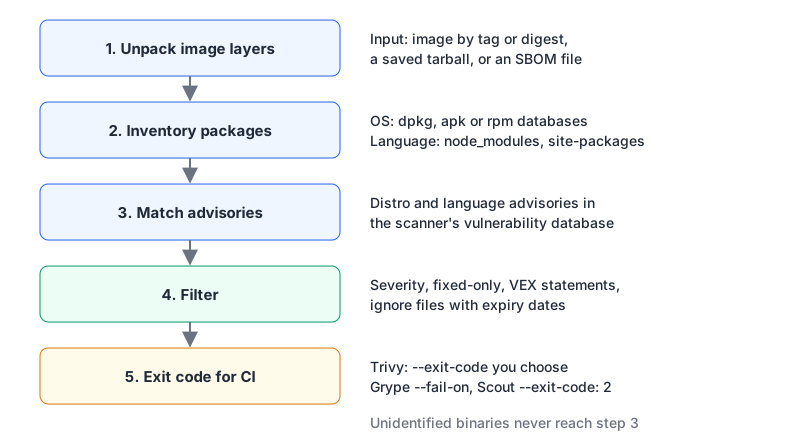
The inventory step is the same job as generating an SBOM, which is why Grype and Docker Scout can scan an SBOM file directly instead of the image. It also explains the most common surprise: a scanner can only report what it can identify. A binary you curl into /usr/local/bin with no package metadata may simply not appear.
Trivy, Grype and Docker Scout side by side
Versions are as of early November 2026.
| Trivy | Grype | Docker Scout CLI | |
|---|---|---|---|
| Latest release | v0.76.2 | v0.121.2 | v1.29.0 |
| Scans besides CVEs | secrets (on by default), misconfig, license | none; pairs with Syft for SBOMs | SBOM output (docker scout sbom) |
| Fail the build | --exit-code 1 (any value you pick) | --fail-on high (exit 2) | --exit-code (exit 2) |
| Only fixable issues | --ignore-unfixed | --only-fixed | --only-fixed |
| Suppress with reasons | .trivyignore (with expiry dates), VEX | ignore rules in config, OpenVEX | --only-* and --ignore-base filters |
| Prioritisation extras | --exit-on-eol for end-of-life OS | EPSS, KEV, risk score | --epss, --ignore-base |
Flags come from each tool's reference: trivy image, Grype's options and docker scout cves.
Honest take: the vulnerability results overlap heavily, so pick on workflow. Trivy is the one-binary option if you also want secret and Dockerfile misconfiguration checks. Grype's EPSS and KEV data helps when you need to argue about which of 40 "high" findings to fix first. Scout's --ignore-base is the quickest way to split "our dependencies" from "the base image's problem", which is often the first conversation a team needs to have.
A CI gate that people won't disable
Gate on what you can act on: high and critical findings that have a fix available. Report the rest.
# Trivy: fail on fixable HIGH/CRITICAL only
trivy image --severity HIGH,CRITICAL --ignore-unfixed --exit-code 1 myapp:1.4.2

# Grype: same idea
grype myapp:1.4.2 --fail-on high --only-fixed

# Docker Scout: same idea, plus SARIF for code scanning UIs
docker scout cves --only-severity critical,high --only-fixed --exit-code myapp:1.4.2
docker scout cves --format sarif --output scout.sarif.json myapp:1.4.2
When you accept a finding, record why and when it expires. Trivy's ignore file supports exactly that, per its filtering docs:
# .trivyignore
# Not reachable: we never call the affected function. Re-check by 2027-01-31.
CVE-2019-14697 exp:2027-01-31
Two more habits matter more than the exact thresholds. Rescan images that are already deployed on a schedule, because advisories keep arriving and last month's clean image may not be clean today. And scan the image you ship, by digest, not a rebuilt lookalike.
Pin the scanner, too
On 19 March 2026 the scanner became the attack. Aqua's advisory GHSA-69fq-xp46-6x23 describes how an attacker with compromised credentials published a malicious Trivy v0.69.4, force-pushed 76 of 77 version tags of aquasecurity/trivy-action to credential-stealing code, and replaced all 7 tags of setup-trivy. Malicious v0.69.5 and v0.69.6 Docker Hub images followed on 22 March. The root cause, per the advisory, was a credential rotation after an earlier incident that "was not atomic", leaving the attacker a window. It's tracked as CVE-2026-33634.
The list of who was not affected is the useful part:
- anyone using Trivy images referenced by digest;
- anyone on v0.69.3, protected by GitHub's immutable releases, or v0.69.2, verifiable through Sigstore signatures;
- Homebrew users on the official formula, which builds from source;
- anyone who pinned
trivy-actionto a known-good commit SHA from after 9 April 2025, or used the0.35.0tag, which immutable releases also protected.
So: reference scanner images by digest, pin actions to full commit SHAs rather than tags, and verify signatures where the project publishes them. A security scanner runs inside your pipeline with your registry and cloud credentials, which makes it a high-value target. Our GitHub Actions CI/CD patterns post covers SHA pinning and least-privilege tokens in more detail.
The base image decides most of the result
You can tune filters forever, but the cheapest way to cut findings is to ship fewer packages. Four common starting points:
| Base | What you get | Cost and catches |
|---|---|---|
Official node:24-slim etc. | Debian with a shell and apt | Free; most packages, most findings |
| Distroless | Debian 13 runtime only, no shell or package manager; nodejs22, nodejs24, nodejs26 images | Free; :nonroot and :debug tags; images signed with cosign |
| Docker Hardened Images | Minimal Alpine or Debian based images, non-root by default, with SBOMs, SLSA Build Level 3 provenance and VEX | Community tier free under Apache 2.0; paid tiers add CVE-fix SLAs and FIPS variants |
| Chainguard Containers | Images built on Chainguard OS with SBOMs and Sigstore signatures | Free images limited to latest and latest-dev tags; specific versions need paid production images |
Switching a Node service to distroless is usually a small change to the last stage of a multi-stage build:
FROM node:24-slim AS build
WORKDIR /app
COPY package.json package-lock.json ./
RUN npm ci --omit=dev
COPY . .

FROM gcr.io/distroless/nodejs24-debian13:nonroot
WORKDIR /app
COPY --from=build /app /app
CMD ["server.js"]
The distroless README warns that there's no shell, so ENTRYPOINT and CMD must use the exec (JSON array) form. Debugging changes too: use the :debug tag, which adds a busybox shell, when you need to poke around, and never ship it. Pin the -debian13 suffix rather than relying on the unversioned name, which the project says may change.
Docker Hardened Images pull from their own registry after a docker login dhi.io, for example docker pull dhi.io/python:3.13 from the getting-started guide. Because they ship VEX statements, scanners that read VEX can drop findings the image maintainer has marked not exploitable. Read VEX as the publisher's claim, not proof.
Whichever base you choose, run trivy image --exit-on-eol 1 occasionally. An end-of-life OS stops getting fixes, so its CVE count only grows.
Gotchas
- An empty report can mean "nothing identified". Static binaries and files copied in without package metadata are invisible to the matcher. Check the scanner's package inventory, not just the findings.
- Unfixed findings still matter for exposure.
--ignore-unfixedis right for a build gate, but look at the unfixed list when deciding whether to switch base images. - Secret scanning in images is a second net, not the first. If Trivy finds a key in a layer, it's already in your registry. Fix the build with a .dockerignore and build secrets, then rotate the key.
- Scanner databases are downloads too. Air-gapped or rate-limited CI needs a cached or mirrored database; Trivy's
--skip-db-updateis for runs that use one you fetched earlier.
Where to start this week
- Add one scanner to CI with the fixable-high/critical gate above, pinned by digest or SHA.
- Generate and store an SBOM per image so you can rescan without rebuilding.
- Try your service on distroless or a hardened image and compare the scanner output.
- Schedule a nightly rescan of what's actually running.
If you're starting from a fresh Dockerfile, the Dockerfile generator gives you a multi-stage skeleton, and our containerizing Next.js walkthrough shows a production image end to end.
Written by AIDToolStack Editorial
Researched from official documentation, specifications and vendor pages, listed under Sources below. Last checked November 2026.
Sources
- github.com/aquasecurity/trivy/releases
- github.com/anchore/grype/releases
- github.com/docker/scout-cli/releases
- github.com/aquasecurity/trivy/blob/v0.76.2/docs/guide/references/configuration/cli/trivy_image.md
- github.com/anchore/grype/blob/main/cmd/grype/cli/options/grype.go
- docs.docker.com/reference/cli/docker/scout/cves/
- github.com/aquasecurity/trivy/blob/v0.76.2/docs/guide/configuration/filtering.md
- github.com/aquasecurity/trivy/security/advisories/GHSA-69fq-xp46-6x23
- nvd.nist.gov/vuln/detail/CVE-2026-33634
- github.com/GoogleContainerTools/distroless
- docs.docker.com/dhi/
- www.chainguard.dev/docs/chainguard/containers/overview
- docs.docker.com/dhi/get-started/
- github.com/aquasecurity/trivy-action/releases
Related Posts
Explore on AIDToolStack
Discover tools and servers featured in our directory.
AI Tools
MCP Servers
Sponsor Our Newsletter
Reach thousands of developers who are actively evaluating AI tools, MCP servers, and dev infrastructure. Our weekly newsletter goes to engaged technical decision-makers.
All sponsored content is clearly labeled per our editorial policy.