
Choosing a Search Engine: Who Runs It, What the Licence Allows and How the Bill Grows
The search box works, sort of. It's a LIKE query, or a Postgres tsvector column someone added last year, and now product wants typo tolerance, facets and "AI search" by next quarter. The technical comparison of relevance and typo rules is the easy part; we covered that in Adding Search to a Web App. This post is about the decision that's harder to undo: who runs the engine, what licence you're accepting, and how the bill grows when traffic does.
Prices and versions below are as of November 2026, taken from each vendor's own pages.
Start with who runs it
Every option sits somewhere between "a SaaS endpoint you call" and "a cluster you're paged for". That position decides more about your next two years than the ranking algorithm does.
| How you get it | Licence | Latest release (Nov 2026) | |
|---|---|---|---|
| Postgres full-text search | Already in your database | Same as your Postgres | Postgres 18 docs, 18.6 |
| Algolia | Hosted only | Commercial service | n/a |
| Meilisearch | Self-host, or Meilisearch Cloud | MIT (Community), commercial or BUSL 1.1 (Enterprise) | v1.56.1 |
| Typesense | Self-host, or Typesense Cloud | GPL-3.0 server, Apache client libraries | v30.2 |
| Elasticsearch | Self-host, or Elastic Cloud | ELv2 by default; source also under SSPL or AGPLv3 | 9.5.6 |
| OpenSearch | Self-host, or managed (e.g. AWS) | Apache 2.0 | 3.9.0 |
Release numbers come from each project's GitHub releases (Meilisearch, Typesense, Elasticsearch, OpenSearch). The Postgres row is the version of the text search docs at the time of writing.
Postgres: the option you already pay for
Before adding a service, be honest about what you're missing. The Postgres docs list exactly why LIKE and regex fall short: no linguistic support, so satisfies doesn't match satisfy; no ranking; and no index support, so they "must process all documents for every search." Full-text search fixes all three with tsvector, GIN indexes and ts_rank.
What it doesn't give you out of the box is typo tolerance across fields, facet counts on every query, or instant prefix search tuned for keystrokes. You can bolt on pieces (trigram similarity for "did you mean", for one), and semantic search is closer than people assume: the pgvector README (v0.8.7, Postgres 13+) says to "use together with Postgres full-text search for hybrid search," merging the two result lists with Reciprocal Rank Fusion or a cross-encoder.
The win is operational. One database, one backup, transactional consistency, and permissions that are just a WHERE clause. If search is a feature rather than the product, I'd want a concrete user complaint before leaving it.
Licences: read them before you bet on one
Search engines have had an eventful few years of licence changes, and that matters if you ship software to customers or might offer search as part of a hosted product.
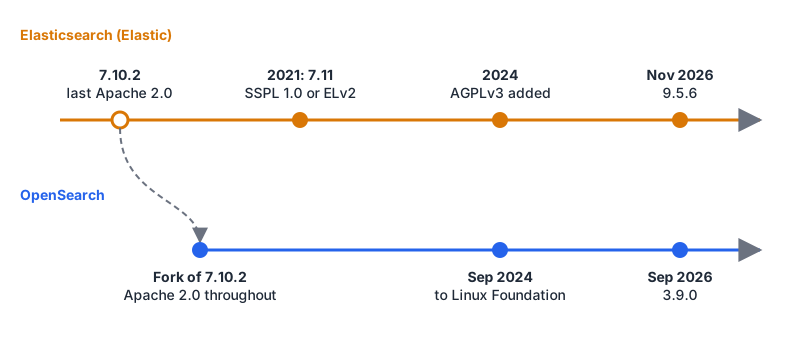
The short version, from the sources:
- Elasticsearch. Elastic's licensing FAQ says that with 7.11 in 2021, the Apache 2.0 code became dual-licensed under SSPL 1.0 and the Elastic License 2.0. In 2024 AGPLv3 was added as a third option for the free parts of the source; the FAQ's changelog dates that to 29 August 2024. Default distributions ship under ELv2. Client libraries, Beats and Logstash stay Apache 2.0.
- OpenSearch. The OpenSearch FAQ says it derives from Elasticsearch 7.10.2, the last Apache release, and that all of its software is Apache 2.0. On 16 September 2024 the Linux Foundation announced the OpenSearch Software Foundation to host the project, which until then was run by AWS.
- Meilisearch. The README splits it in two. The Community Edition is MIT. The Enterprise Edition, which adds sharding among other things, is under a commercial licence or BUSL 1.1 and is "not allowed in production without a commercial agreement." If you expect to need sharding, price that in now.
- Typesense. The repo lists the server as GPL-3.0 and the client libraries as Apache-licensed.
None of these stop you running the engine as a backend behind your own app. The differences bite when you modify the engine, redistribute it, or offer it as a service to others. Elastic's FAQ is explicit that SSPL's obligations kick in "if you provide the product as a service to others." That's a question for your lawyer, not a blog post, but it's a five-minute question to ask before you pick, not after.
How the bill grows
The pricing models are different enough that the same traffic can be cheap on one and painful on another.
Algolia charges per request and per record. On the pricing page, the Grow plan starts at $0 a month with 10K search requests and 100K records included, then $0.50 per extra 1K searches and $0.40 per extra 1K records. Grow Plus adds AI synonyms and AI ranking at $1.75 per extra 1K searches. NeuralSearch, Algolia's hybrid of semantic and keyword search, is listed only on the custom-priced enterprise tier. (There's also a separate Free plan with 10K searches and 50K records a month; the two record figures are easy to mix up.)
Here's the arithmetic for one million searches a month on Grow at those list prices: 990 billable thousands × $0.50 = $495 a month, before records. Search-as-you-type is the trap here. If your UI sends a request on every keystroke, a ten-letter query can be several requests, so debounce before you model costs.
Meilisearch Cloud starts "at $20/month" per its pricing page, with a usage-based option and a resource-based one. The page's estimator shows $30 a month for 100K documents and 50K searches on the usage-based plan. Self-hosting the Community Edition is free with no usage limits.
Typesense Cloud prices the cluster, not the traffic. The pricing page has you pick RAM (from 0.5 GB up to 1,024 GB), vCPUs, node count and extras, and says you get "a dedicated cluster, with no limits on records or operations." It doesn't print rates on the page; you get a number from its calculator. Because Typesense keeps the index in memory, RAM is the number that scales with your data.
Self-hosted anything costs servers plus the person who upgrades, monitors and restores them. That person is the real line item, and it's the one people forget.
The rough shape: per-request pricing is great when traffic is low and painful when it's high; per-cluster pricing is the reverse. If you can estimate monthly searches and document count, you can price all three hosted options in an afternoon.
Vector and hybrid search changed the shortlist
Semantic search no longer has to mean a separate vector database. As of November 2026 most of these options handle it themselves:
- Meilisearch describes itself as "AI-powered hybrid search", combining semantic and full-text results, and its README mentions conversational search and an experimental built-in MCP server at
/mcp. - Typesense can index embeddings from your own models or "automatically generate embeddings from within Typesense," per its README.
- Algolia puts NeuralSearch on its top plan only.
- Postgres gets there with pgvector plus full-text search, as above.
If you're building retrieval for an LLM feature, our RAG for developer documentation post covers why hybrid (keyword plus vector) usually beats either alone. The practical point for choosing an engine: you may not need a second datastore for embeddings.
Keys in the browser
Hosted search engines are often queried straight from the browser, which means a key ships in your JavaScript. Algolia's API key docs are clear about the tiers. The admin key is "your most sensitive key." The search-only key is "safe to use in your production frontend code," but the same page warns it can be used to scrape your indices or run up your search count.
For per-user or per-tenant restrictions, Algolia offers secured API keys: virtual keys derived from a base key with generateSecuredApiKey, which can only add restrictions, never remove them, and can expire via validUntil. Revoking the base key revokes everything derived from it. Generate them on your server. Whatever engine you choose, find its equivalent before you put multi-tenant data in one index.
If an AI assistant will be poking at your index during development, we have pages for the Meilisearch MCP server and the Elasticsearch MCP server. Point them at a dev index with a read-only key, not production.
Gotchas worth knowing up front
- Migrating engines means rewriting queries. Filter syntax, ranking config and highlighting all differ. Keep search behind one module in your code so a switch touches one file.
- The managed OpenSearch and Elasticsearch offerings are different products. They share ancestry up to 7.10.2 and have been separate projects since, so use the client library for the one you picked and test before assuming compatibility.
- Free tiers end abruptly. Model the month you hit 10× today's traffic, not today.
- Enterprise editions hide the features you'll want later. Sharding in Meilisearch, NeuralSearch in Algolia. Read the plan matrix with your growth in mind.
A decision rule
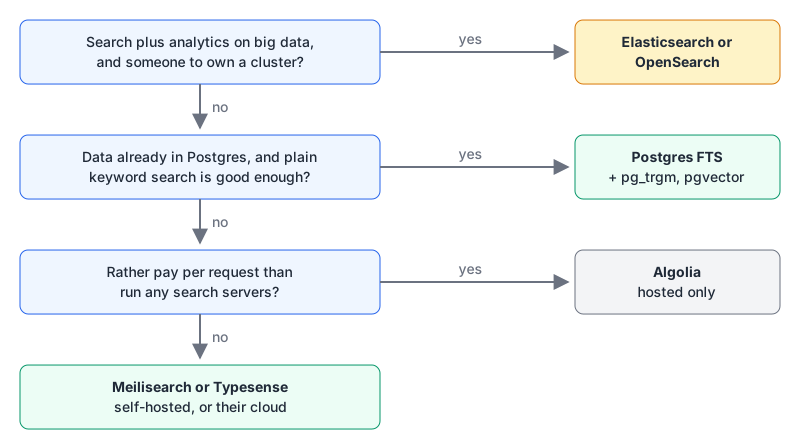
Stay on Postgres until a user-facing complaint (typos, facets, speed on every keystroke) proves you need more. If search plus analytics over a lot of data is central to the product and you have someone to own a cluster, choose OpenSearch if you want Apache 2.0 with foundation governance, Elasticsearch if you want Elastic's features and can live with ELv2 or AGPL. If you'd rather never run a search server and your traffic is modest or highly profitable per query, Algolia. For everything in between, which is most apps, Meilisearch (MIT, best defaults) or Typesense (explicit schema, priced by cluster size), self-hosted at first with the vendor cloud as the escape hatch. Whichever you choose, keep the database as the source of truth and build the full re-index script on day one.
Written by AIDToolStack Editorial
Researched from official documentation, specifications and vendor pages, listed under Sources below. Last checked November 2026.
Sources
- github.com/meilisearch/meilisearch/releases
- github.com/typesense/typesense/releases
- github.com/elastic/elasticsearch/releases
- github.com/opensearch-project/OpenSearch/releases
- www.postgresql.org/docs/current/textsearch-intro.html
- github.com/pgvector/pgvector
- www.elastic.co/pricing/faq/licensing
- opensearch.org/faq/
- linuxfoundation.org/press/linux-foundation-announces-opensearch-software-foundation-to-foster-open-collaboration-in-search-and-analytics
- github.com/meilisearch/meilisearch
- github.com/typesense/typesense
- www.algolia.com/pricing
- www.meilisearch.com/pricing
- cloud.typesense.org/pricing
- www.algolia.com/doc/guides/security/api-keys/
Related Posts
Explore on AIDToolStack
Discover tools and servers featured in our directory.
AI Tools
MCP Servers
Sponsor Our Newsletter
Reach thousands of developers who are actively evaluating AI tools, MCP servers, and dev infrastructure. Our weekly newsletter goes to engaged technical decision-makers.
All sponsored content is clearly labeled per our editorial policy.