
Choosing a Package Manager: npm, pnpm, Yarn or Bun
The package manager used to be the least interesting decision in a JavaScript project. Use whatever came with Node, or whatever the last team used, and move on. Two things changed that in 2026. First, every major manager now blocks dependency install scripts by default or close to it, and pnpm and Yarn now refuse brand-new releases for a day by default, a change pnpm's notes describe as protection against supply chain attacks. Second, two of the four are being rewritten in Rust: pnpm 12 already shipped as one, and Yarn 6 is in release candidates. Throw in Node dropping Corepack, and your old setup instructions are probably wrong.
Versions as of November 2026
| Latest | Notes | |
|---|---|---|
| npm | 12.2.2 (4 Nov 2026) | Node 26.13.0 LTS still bundles npm 11.20.0; Node 27 alpha bundles npm 12 (dist index) |
| pnpm | 12.18.0 (5 Nov 2026) | pnpm 11 still gets releases (11.28.11 the same day) |
| Yarn | 4.18.1 (24 Sep 2026) | Yarn 6, a Rust rewrite, is at 6.0.0-rc.23 |
| Bun | 1.4.4 (22 Oct 2026) | package manager and runtime in one binary |
One trap before anything else. Node's docs say Corepack "will no longer be distributed starting with Node.js v25" (Corepack docs for v24). On Node 26, corepack enable isn't there. Install pnpm or Yarn explicitly in CI, or use pnpm 12's standalone installer, which doesn't need Node.js at all.
The security defaults are now the main difference
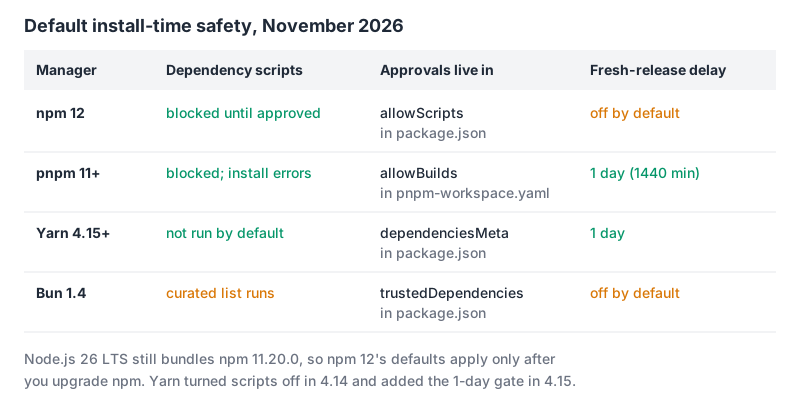
npm 12 flipped the biggest default. Its 12.0.0 release notes say "Dependency lifecycle scripts are now blocked by default unless allowed by the root package's allowScripts policy." You review and approve with the new npm install-scripts command:
npm install-scripts ls                    # what's waiting for review
npm install-scripts approve sharp esbuild # pinned to the installed versions
npm install-scripts deny telemetry-pkg    # stays blocked, even after approve --all
npm rebuild                               # run the newly approved scripts
Approvals are pinned to the version you reviewed by default, so an upgrade puts the package back in the queue. The same release made allow-git and allow-remote default to none (no git or tarball-URL dependencies unless you opt in), removed npm shrinkwrap, and made unknown CLI flags an error. npm also has a min-release-age setting, in days, but its default is null, so it's off until you set it.
pnpm got there earlier. pnpm 11 (April 2026) made strictDepBuilds the default, replaced the old onlyBuiltDependencies family with a single allowBuilds map, and set minimumReleaseAge to 1440 minutes, so "newly published packages will not be resolved until they are at least 1 day old." An unreviewed build fails the install with ERR_PNPM_IGNORED_BUILDS rather than quietly skipping, which is noisier but harder to ignore. It also stopped reading most settings from .npmrc: only auth and registry settings stay there, everything else moves to pnpm-workspace.yaml.
Yarn 4 changed defaults inside a minor line. 4.14.0 "Makes enableScripts: false the default," and 4.15.0 made npmMinimalAgeGate: 1d the default. If you're on an older 4.x, upgrading changes behaviour without a major bump, so read the notes.
Bun doesn't run dependency lifecycle scripts unless the package is trusted, but "a curated list of popular npm packages with lifecycle scripts is allowed by default," per its lifecycle docs. Adding your own trustedDependencies array replaces that default list, so copy across any you still need. Bun's minimumReleaseAge is in seconds and defaults to null (disabled).
A release-age delay isn't free. When it blocks a fresh security fix, npm's docs say npm audit fix keeps the vulnerable version, warns and exits non-zero; every tool has an exclude list (minimumReleaseAgeExclude in pnpm, min-release-age-exclude in npm, npmPreapprovedPackages in Yarn, minimumReleaseAgeExcludes in Bun) for exactly this case.
How each one lays out node_modules
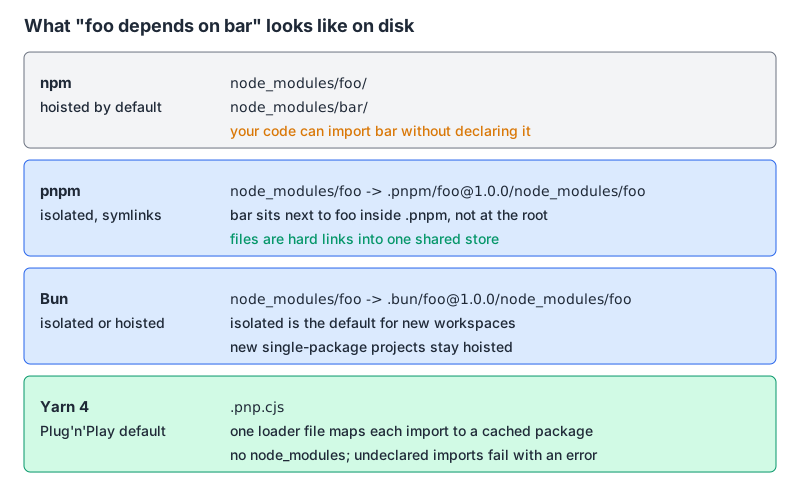
This is the difference you'll feel day to day. npm's default hoisted layout lets your code import a package you never declared, because it happens to sit at the top level; that works until a dependency drops it. pnpm's layout only symlinks your declared dependencies into the root and hard-links files from one content-addressable store, so phantom imports fail immediately and disk use stays low across projects. Bun's isolated linker is deliberately close to pnpm's, and per the install docs it's the default for new workspaces while new single-package projects stay hoisted. Yarn's Plug'n'Play skips node_modules entirely and resolves imports from a .pnp.cjs file, which is the strictest of the lot and the one most likely to need editor setup; set nodeLinker: node-modules when a tool can't cope.
Monorepos: workspaces and catalogs
All four support workspaces. The newer feature is the catalog: one place to declare a dependency's version range, referenced from each package with catalog:. pnpm defines catalogs in pnpm-workspace.yaml, Yarn added them in 4.10.0 as .yarnrc.yml settings, and Bun keeps catalogs inside the workspaces field of package.json. npm has workspaces but no catalogs.
A pnpm 12 workspace with catalogs and the security settings in one file:
# pnpm-workspace.yaml
packages:
  - "apps/*"
  - "packages/*"

catalog:
  react: ^19.0.0

allowBuilds:
  esbuild: true
  core-js: false

minimumReleaseAge: 1440
Then in any package, "react": "catalog:". pnpm 12 also stopped tolerating typos here: a setting it doesn't recognise is reported, and it fails the command when the project pins a pnpm version the running pnpm satisfies, per the 12.0.0 notes. The same notes say lockfiles are now "a pure function of the dependency graph," so reordering workspaces no longer churns pnpm-lock.yaml.
For the rest of the monorepo setup (task runners, caching, internal packages), see our pnpm and Turborepo walkthrough and Turborepo vs Nx.
Lockfiles and switching
| Lockfile | CI install | |
|---|---|---|
| npm | package-lock.json (shrinkwrap removed in 12) | npm ci |
| pnpm | pnpm-lock.yaml | pnpm install --frozen-lockfile |
| Yarn | yarn.lock | yarn install --immutable |
| Bun | text bun.lock since Bun 1.2 | bun ci |
Bun's old binary bun.lockb can be converted with bun install --save-text-lockfile --frozen-lockfile --lockfile-only. In pnpm 12, --frozen-lockfile false no longer works; use --no-frozen-lockfile. Switching managers is mostly deleting one lockfile and generating another, but treat it like a dependency upgrade: the new resolution can pick different versions within your ranges. Our semver calculator is handy for checking what a ^ or ~ range will actually allow.
Rust rewrites: should you care?
pnpm's 12.0 announcement says simply that "pnpm 12 is stable. It is a rewrite of pnpm in Rust," and that upgrading shouldn't feel like a migration. Yarn's Yarn 6 page says the same for Yarn: a ground-up Rust rewrite, still in preview, with a JavaScript-based Yarn 5 as a stepping stone and about 30 months of critical fixes for 5.x after 6 goes stable. That page still gives Q3 2026 as the target for a stable release, and that quarter has passed. Both projects publish speed claims; they're their own measurements, so time an install of your own repository before you believe any of them.
The decision rule
- Small project, or you want zero setup: npm. With npm 12 the script policy is finally safe by default; upgrade from the npm bundled with Node 26 to get it, and set
min-release-ageyourself. - Monorepo, many projects on one machine, or you want the strictest defaults with the least config: pnpm. Strict layout, a shared store, catalogs, a 1-day delay and blocked builds out of the box. It's what I'd pick for most teams.
- Already on Yarn Berry and happy with Plug'n'Play: stay, upgrade to the latest 4.x and read the 4.14 and 4.15 default changes. Don't move to Yarn 6 until it's stable.
- Already using Bun as the runtime:
bun installis the obvious choice. Choose between the curated trust list and your owntrustedDependencies, and setminimumReleaseAge.
Whichever you pick, pin the manager and its version in the packageManager field (our package.json generator scaffolds the rest of the file), commit the lockfile, and run the frozen install in CI. For head-to-head detail, see pnpm vs npm vs Yarn and pnpm vs Bun.
Written by AIDToolStack Editorial
Researched from official documentation, specifications and vendor pages, listed under Sources below. Last checked November 2026.
Sources
- github.com/npm/cli/releases
- nodejs.org/dist/index.json
- github.com/pnpm/pnpm/releases
- github.com/yarnpkg/berry/releases
- github.com/yarnpkg/zpm/releases
- github.com/oven-sh/bun/releases
- nodejs.org/docs/latest-v24.x/api/corepack.html
- pnpm.io/installation
- github.com/npm/cli/releases/tag/v12.0.0
- docs.npmjs.com/cli/v12/commands/npm-install-scripts
- docs.npmjs.com/cli/v12/using-npm/config
- github.com/pnpm/pnpm/releases/tag/v11.0.0
- bun.com/docs/pm/lifecycle
- bun.com/docs/runtime/bunfig
- pnpm.io/symlinked-node-modules-structure
- bun.com/docs/pm/isolated-installs
- bun.com/docs/pm/cli/install
- yarnpkg.com/features/pnp
- pnpm.io/catalogs
- github.com/pnpm/pnpm/releases/tag/v12.0.0
- pnpm.io/blog/releases/12.0
- v6.yarnpkg.com/concepts/yarn-6
Related Posts
Explore on AIDToolStack
Discover tools and servers featured in our directory.
AI Tools
MCP Servers
Sponsor Our Newsletter
Reach thousands of developers who are actively evaluating AI tools, MCP servers, and dev infrastructure. Our weekly newsletter goes to engaged technical decision-makers.
All sponsored content is clearly labeled per our editorial policy.