
Choosing a Frontend Hosting Platform: Vercel, Netlify, Cloudflare, Render or Fly.io
Most frontend hosts look identical on day one. You connect a Git repo, push, get a preview URL, and the free tier covers it. The differences show up later: the day the site starts earning money, the month a post goes viral, or the moment you need a process that stays alive longer than one request. Those three moments are where Vercel, Netlify, Cloudflare, Render and Fly.io actually part ways, so that's how I'd compare them.
Every price and limit below comes from the vendor's own pricing page or docs, as of November 2026. These pages change a few times a year, so check the date before you quote anything to your manager.
Start with what runs at request time
The cheapest question to answer first: when a visitor hits your site, does any of your code run?
- Nothing runs. A Vite build, an Astro site with no server output, a docs site. You're shipping files to a CDN, and almost any host will do it well.
- A function runs. Server rendering, an API route, image optimisation. Now you pay for compute, and each host meters it differently.
- A process stays up. WebSockets, a queue worker, a long-lived Node server, anything that keeps state in memory. That's a container or VM job, and the serverless-first hosts are the wrong shape for it.
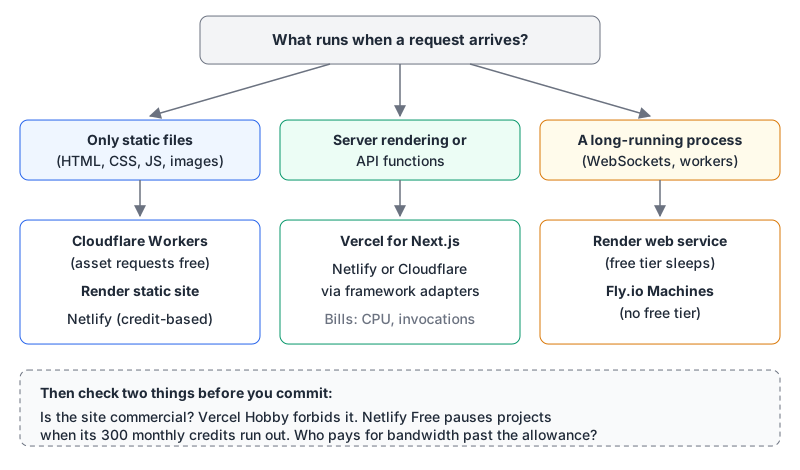
If you're unsure which bucket a framework puts you in, our serverless vs containers guide covers the cold-start and execution-limit side, and the edge functions post covers what belongs at the edge and what doesn't.
The free tiers, and the small print that matters
| Host | Free tier, as of November 2026 | What happens at the limit |
|---|---|---|
| Vercel Hobby | 100 GB Fast Data Transfer, 1M function invocations, 4 hours of Active CPU a month | Capped; you can't buy more on Hobby |
| Netlify Free | 300 credits a month | Projects are paused until the next cycle |
| Cloudflare Workers Free | 100,000 requests a day, 10 ms CPU per invocation; static asset requests free and unlimited | Worker requests fail past the daily limit |
| Render | Static sites free; free web services get 750 instance hours a month | Free services suspended when hours run out |
| Fly.io | No free tier; new accounts get a $1 trial credit for 7 days | You pay from the first second |
A few rows need more than a table cell.
Vercel Hobby is non-commercial. The fair use guidelines define commercial use broadly: any deployment that brings financial gain to anyone involved in producing it, including a paid employee or consultant writing the code. Taking payments, advertising a product, running ads (Google AdSense is named), or a site whose main purpose is affiliate links all count. Donations don't. So a freelancer's client site, a startup's marketing page and an ad-supported blog all need Pro, even if the traffic would fit in Hobby. The pricing page also confirms you can't buy extra usage on Hobby.
Netlify Free stops serving. Netlify moved to credits. Free gets 300 a month with a hard limit, and the credits documentation is blunt about what happens next: once the balance is used up, all your projects are paused and visitors get a "Site not available" page. Bandwidth costs 20 credits per GB, so 300 credits is roughly 15 GB of transfer if nothing else draws on the pool. Production deploys cost 15 credits each, while deploy previews and branch deploys are free.
Render free web services sleep. Per Render's free tier docs, a free web service spins down after 15 minutes without inbound traffic and takes about a minute to come back. Render says plainly not to use free instances for production. Static sites are a different product and are free to deploy, though they still count against the workspace's bandwidth allowance.
Cloudflare splits assets from code. On Workers pricing, requests to static assets are free and unlimited on both plans, and egress isn't billed. Only requests that run your Worker script count toward the 100,000-a-day free limit. The static assets limits are worth knowing: 20,000 files per Worker version on Free and 100,000 on Paid, 25 MiB per file (platform limits). One more thing: the Pages docs now tell you to start new projects with Workers, which Cloudflare calls its primary platform for building applications. Pages still works, but I wouldn't start there in late 2026.
How each host bills once you pay
The paid plans differ more in shape than in headline price.
Vercel Pro is a $20 monthly platform fee that includes one deploying seat and $20 of usage credit; extra deploying seats are $20 each and viewer seats are free (Pro plan docs). Bandwidth changed in September: Flat Rate CDN went GA for Pro teams on 8 September 2026. Pro includes the lowest tier with 1 TB of data transfer a month, and paid tiers start at $20 a month for 10M requests and 50 TB. Traffic above your tier is still served and, per the changelog, isn't billed, subject to fair use. Functions stay usage-based: $0.60 per million invocations and Active CPU from $0.128 an hour. New teams get spend notifications at $200 by default, which you should lower on day one.
Netlify sells credit pools: Personal at $9 a month with 1,000 credits, Pro at $20 a month with 3,000 credits and unlimited members (pricing). Deploys, compute (10 credits per GB-hour), bandwidth (20 per GB) and web requests (2 per 10,000) all draw on the same balance. On Pro, extra packs are 1,500 credits for $10. The upside is one number to watch. The downside is that deploys compete with traffic: ten production deploys a working day is about 200 a month, or 3,000 credits, which is all of Pro before a single visitor shows up.
Cloudflare Workers Paid is a $5 monthly minimum with 10 million requests and 30 million CPU milliseconds included, then $0.30 per extra million requests and $0.02 per extra million CPU ms. Static asset requests remain free. For a mostly static site with a few dynamic routes, this is very hard to beat on price.
Render replaced its per-seat plans this year. The April 2026 changelog moved Professional ($19 per member) to Pro at $25 a month flat, and Organization to Scale at $499 a month; remaining legacy workspaces moved automatically on 1 August 2026. The catch is bandwidth: outbound bandwidth docs list 5 GB included on Hobby, 25 GB on Pro and 1 TB on Scale, then $0.15 per GB. Compute is billed per instance on top.
Fly.io is pay-as-you-go with no plan fee. The smallest Machine (shared-cpu-1x, 256 MB) is $2.19 a month if it runs all month, stopped Machines cost $0.15 per GB of root filesystem per month, and outbound transfer is $0.02 per GB in North America and Europe (pricing docs).
A worked number: 500 GB a month
Plans are easier to compare with one concrete load. Here's a commercial site serving 500 GB of transfer a month, counting bandwidth only.
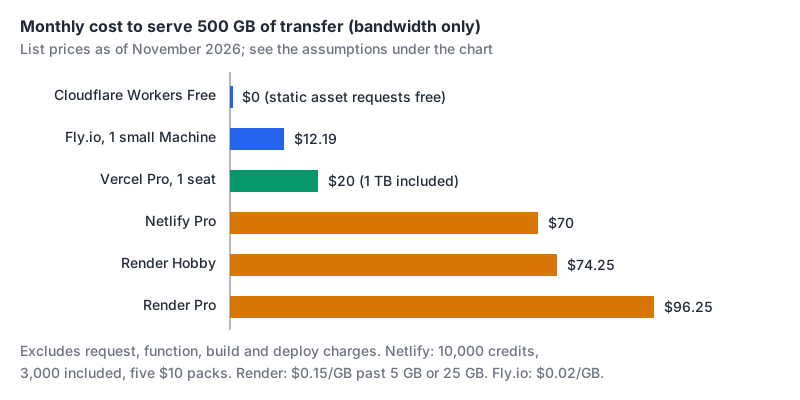
The arithmetic, so you can redo it with your own numbers:
- Cloudflare: static asset requests and egress aren't billed, so $0 until your Worker code itself needs the paid plan ($5).
- Fly.io: 500 × $0.02 = $10, plus $2.19 for one small always-on Machine.
- Vercel Pro: $20, since 500 GB fits inside the included 1 TB. Hobby isn't an option because the site is commercial.
- Netlify Pro: 500 GB × 20 credits = 10,000 credits. Pro includes 3,000, so you need 7,000 more, which is five $10 packs: $20 + $50 = $70.
- Render: Hobby pays for 495 GB at $0.15 = $74.25. Pro pays $25 plus 475 GB at $0.15 = $96.25.
This deliberately leaves out request charges, function compute and build minutes, and those can flip the order. A server-rendered app with heavy function use looks very different. Still, it shows why "both have a $20 plan" tells you very little. Our Vercel vs Netlify comparison goes deeper on those two.
Framework fit and who owns what
Next.js deploys to Vercel with zero configuration, which is no surprise since Vercel builds it. That gap is narrowing: Next.js 16.2 shipped a stable Adapter API with a public test suite so other hosts can run Next.js more consistently. If you want to run it yourself, our posts on containerizing Next.js and deploying to a Hetzner server cover the Docker route that also fits Render and Fly.io.
Ownership is worth a glance too. NuxtLabs joined Vercel in July 2025, and the Astro team joined Cloudflare in January 2026. Both projects stayed MIT-licensed, and both announcements commit to supporting other hosts. I'd take that at face value while watching which adapters get new features first. The Astro vs Next.js comparison has more on how those two frameworks differ.
If you drive deploys from an AI agent, we list MCP servers for Netlify, Cloudflare, Render and Fly.io.
Gotchas before you migrate
- Lower your spend alerts first. Vercel's default notification sits at $200 per cycle. Set something you'd actually notice.
- Netlify's free pause is site-wide. One busy project can take every project on the team offline until the cycle resets.
- Free Postgres on Render expires. The free database expires 30 days after creation and is deleted after a further 14-day grace period (free tier docs).
run_worker_firstcosts requests. On Cloudflare's free tier, paths you force through the Worker count against the daily limit and get a 429 once it's spent.- Fly.io bills stopped Machines for their root filesystem. Destroy what you don't need rather than just stopping it.
The decision rule
- Mostly static and commercial? Start on Cloudflare Workers with static assets. Free asset serving and unbilled egress are hard to argue with.
- Next.js with server rendering and a small team? Vercel Pro. You're paying for the tightest framework integration, and 1 TB of transfer is included.
- Lots of collaborators, modest traffic, and you'd like one balance to watch? Netlify Pro, keeping an eye on deploy frequency.
- Need a real server, WebSockets or a worker next to the frontend? Render if you want a managed dashboard, Fly.io if you want cheap per-second Machines and lower egress.
- Personal, non-commercial project? Any free tier works. Vercel Hobby is generous, just read its commercial-use definition before you add that first ad.
Written by AIDToolStack Editorial
Researched from official documentation, specifications and vendor pages, listed under Sources below. Last checked November 2026.
Sources
- vercel.com/docs/limits/fair-use-guidelines
- vercel.com/pricing
- docs.netlify.com/manage/accounts-and-billing/billing/billing-for-credit-based-plans/how-credits-work/
- render.com/docs/free
- developers.cloudflare.com/workers/platform/pricing/
- developers.cloudflare.com/workers/static-assets/billing-and-limitations/
- developers.cloudflare.com/workers/platform/limits/
- developers.cloudflare.com/pages/
- vercel.com/docs/plans/pro-plan
- vercel.com/changelog/flat-rate-cdn-is-now-ga-for-pro-teams
- www.netlify.com/pricing/
- render.com/changelog/updated-plans-for-render-workspaces
- render.com/docs/outbound-bandwidth
- docs.fly.io/about/pricing
- nextjs.org/blog/nextjs-across-platforms
- vercel.com/blog/nuxtlabs-joins-vercel
- astro.build/blog/joining-cloudflare/
- render.com/docs/static-sites
- developers.cloudflare.com/workers/static-assets/
Related Posts
Explore on AIDToolStack
Discover tools and servers featured in our directory.
AI Tools
MCP Servers
Sponsor Our Newsletter
Reach thousands of developers who are actively evaluating AI tools, MCP servers, and dev infrastructure. Our weekly newsletter goes to engaged technical decision-makers.
All sponsored content is clearly labeled per our editorial policy.