
Choosing a Frontend Framework: React, Vue, Svelte, Astro, Next.js or Nuxt
"Which frontend framework should we use?" is usually two questions wearing one coat. The first is the UI library: React, Vue or Svelte, the thing that turns state into DOM. The second is the meta-framework on top: Next.js, Nuxt, SvelteKit or Astro, which owns routing, data loading, server rendering and the build. Teams that argue past each other are often answering different halves.
So pick in that order. The UI library decides who you can hire and which component libraries you get. The meta-framework decides how pages are rendered, how you upgrade, and how tied you are to one host.
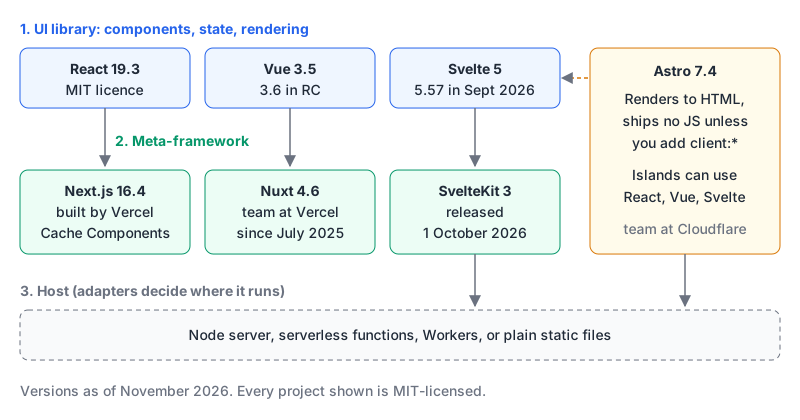
Where each one stands in November 2026
| Current release | Recent change worth knowing | |
|---|---|---|
| React | 19.3, 9 September 2026 | View Transitions and Fragment Refs are now stable |
| Next.js | 16.4, 6 October 2026 | Cache Components recommended for every app, on by default in create-next-app |
| Vue | 3.5.45 stable; 3.6 in release candidates | Nuxt can opt into Vue 3.6's Vapor Mode |
| Nuxt | 4.6, October 2026 | Nuxt 3 reached end of life on 31 July 2026 |
| Svelte / SvelteKit | Svelte 5; SvelteKit 3 on 1 October 2026 | Config moves to vite.config.ts, $lib becomes #lib |
| Astro | 7.4, 15 October 2026 | 7.0 brought a Rust compiler and Vite 8 |
Sources for the rows: the React versions page and React 19.3 post; the Next.js 16.4 post; vuejs/core releases; the Nuxt blog and Nuxt 4.6 post; SvelteKit 3 is here; the Astro blog and Astro 7 post.
I'm not going to quote popularity numbers here. They're easy to find and hard to source well, and they matter less than the shape of your project.
First split: is this a content site or an app?
This one question eliminates half the options.
A content site (marketing pages, docs, a blog, a store catalogue) is mostly HTML that changes when someone publishes. Astro's islands docs describe the model: every component renders to HTML and CSS, client-side JavaScript is stripped automatically, and a component only becomes interactive when you add a client:* directive. You can write those islands in React, Preact, Svelte, Vue or SolidJS, even mixing them on one page.
---
import Pricing from '../components/Pricing.tsx';
import Newsletter from '../components/Newsletter.svelte';
---
<Pricing />                    <!-- static HTML, no JS shipped -->
<Newsletter client:visible />  <!-- hydrates when scrolled into view -->
That default is the right one for content. You opt in to JavaScript instead of fighting to remove it.
An app (dashboards, editors, anything behind a login with lots of client state) is the opposite. Most of the page is interactive, navigation should feel instant, and data changes per user. That's where Next.js, Nuxt and SvelteKit earn their complexity. Our Astro vs Next.js comparison walks through the boundary cases, like a marketing site with a logged-in area.
Second split: React, Vue or Svelte
If the team already knows one, that's usually the answer. Rewriting skills costs more than any framework difference. When it's genuinely open:
React gives you the library and leaves the rest to you. The latest release, 19.3, made <ViewTransition> stable, which animates elements entering, leaving or moving using the browser's View Transition API, plus Fragment Refs for attaching behaviour to a group of siblings without a wrapper <div> (React 19.3 post). The price is that you'll pick a meta-framework and a state approach yourself; our React state management post covers the second part.
Vue suits teams who like template, script and styles together in one single-file component, with fewer choices left open. The thing to watch is Vapor Mode in 3.6. Nuxt 4.6 already supports it in interop mode: you set vue.vapor: true and mark individual components with a vapor attribute, but it needs Vue ^3.6.0-rc.2 or newer and the Nuxt post lists known limitations (Nuxt 4.6). Treat it as something to try in a side project, not to bet a launch on. React vs Vue has the side-by-side.
Svelte is the one I'd try if your team wants to write less framework code. SvelteKit 3 is brand new, though, and the announcement is upfront that remote functions aren't ready yet because they depend on Async Svelte, which still needs an experimental flag. If you start a SvelteKit project this month, start on 3 and use the migration tooling for anything older:
npx sv create my-app                              # new project
npx sv migrate sveltekit-3 --tasks all --confirm  # existing 2.x project
Third split: which meta-framework, and who funds it
Next.js is built by Vercel and is the default React choice. 16.4 is a big moment for its caching model: the team now recommends Cache Components ('use cache' with cacheLife) for every app, new create-next-app projects have it switched on, and it becomes the default in Next.js 17 (Next.js 16.4). If you're on an older App Router project, expect a migration. Our posts on upgrading to Next.js 16 and caching in the App Router cover both models.
Nuxt is the Vue equivalent. NuxtLabs joined Vercel in July 2025, with Nuxt and Nitro staying MIT-licensed, a public roadmap, and Nitro committed to serving all vendors without lock-in. 4.6 pushed further in that direction by defining Nuxt's own server types so handlers run unchanged across Nitro v2, Nitro v3 or an experimental Vite-based server. If you're still on Nuxt 3, note that it reached end of life on 31 July 2026. See Next.js vs Nuxt for how the two compare.
Astro is now staffed by Cloudflare: the Astro Technology Company joined Cloudflare on 16 January 2026. The team's post says Astro stays MIT-licensed and platform-agnostic, with support for a wide set of deployment targets. Astro 7.0 in June swapped in a Rust compiler and moved to Vite 8, which comes with real breaking changes (Astro 7):
- Markup is no longer silently corrected, so sloppy HTML that used to work now renders as written.
- Unclosed tags and unterminated attributes are errors.
- Newlines between inline elements no longer render as a space; you need
{' '}.
None of these is hard to fix, but they're the kind of thing that surfaces in old content files you haven't opened in a year.
Funding isn't a reason to avoid any of these. Every project here is MIT-licensed, so a fork is always possible. It's a reason to read adapter release notes for your host as carefully as the framework's own.
Upgrade cost is part of the price
The framework you pick will ship at least one breaking major in the next couple of years, so look at how each one handles it:
- Next.js publishes codemods and, as of 16.4, a
next upgrade --agentcommand that hands a coding agent version-specific guidance. - SvelteKit has
sv migrate, which applies what it can and writes a TODO list for the rest. - Astro has
npx @astrojs/upgradeto bump Astro and its integrations together. - Nuxt shipped Nuxt 5 groundwork in 4.5 and 4.6, so the next major is already partly visible.
Build tooling also shifts under you. Astro 7 moved to Vite 8, and Next.js 16 made Turbopack stable; our bundlers post explains what changed there. If you're leaving Create React App, the CRA migration guide is the place to start.
The decision rule
- Content first, interactivity in patches? Astro. Bring whichever UI library your team knows for the islands.
- An app, and the team knows React? Next.js, and start new projects with Cache Components on, since that's where the framework is heading.
- An app, and the team prefers Vue? Nuxt 4. Don't start anything new on Nuxt 3.
- An app, a small team, and you value less framework code? SvelteKit 3, accepting that remote functions aren't ready yet.
- Can't decide between two? Build the same awkward page in both, the one with a form, a slow API call and a logged-in state, and pick the one whose code you'd rather maintain in two years.
Written by AIDToolStack Editorial
Researched from official documentation, specifications and vendor pages, listed under Sources below. Last checked November 2026.
Sources
- react.dev/versions
- react.dev/blog/2026/09/09/react-19-3
- nextjs.org/blog/next-16-4.md
- github.com/vuejs/core/releases
- nuxt.com/blog
- nuxt.com/blog/v4-6
- svelte.dev/blog/sveltekit-3-is-here
- astro.build/blog/
- astro.build/blog/astro-7/
- docs.astro.build/en/concepts/islands/
- vercel.com/blog/nuxtlabs-joins-vercel
- astro.build/blog/joining-cloudflare/
- www.cloudflare.com/press/press-releases/2026/cloudflare-acquires-astro-to-accelerate-the-future-of-high-performance-web-development/
- nextjs.org/blog
- github.com/facebook/react
- github.com/sveltejs/kit
- svelte.dev/blog
Related Posts
Explore on AIDToolStack
Discover tools and servers featured in our directory.
AI Tools
MCP Servers
Sponsor Our Newsletter
Reach thousands of developers who are actively evaluating AI tools, MCP servers, and dev infrastructure. Our weekly newsletter goes to engaged technical decision-makers.
All sponsored content is clearly labeled per our editorial policy.